Kindle Paperwhite (Signature Edition) Review 2026
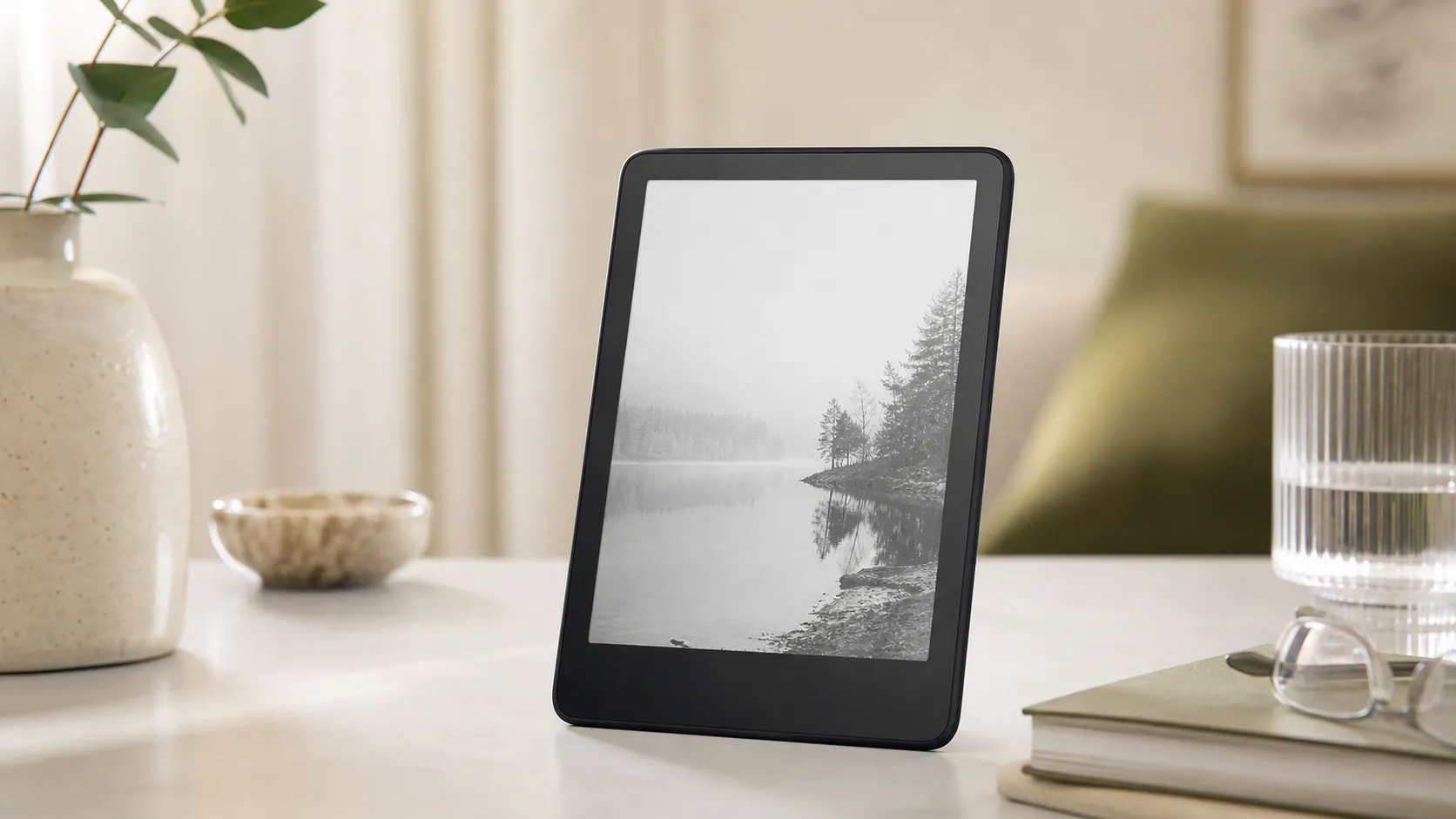
At a Glance
Pros
- Crisp, high‑contrast 300‑ppi e‑ink display with adjustable warm light — great for long reading sessions.
- Signature Edition extras: wireless charging and large internal storage (suitable for heavy/ audiobook users).
- Excellent battery life for typical reading use and IPX8 waterproofing for worry‑free pool/ bath use.
Cons
- Higher price than the standard Paperwhite — many question whether Signature features justify the premium.
- Amazon ecosystem and proprietary formats limit flexibility (requires conversions for many non-Amazon files).
- Occasional Kindle software quirks/forced updates and limited customization compared with third‑party firmware or apps.
Rating Breakdown by Source
Read the latest 25 positive & negative Amazon reviews →
Read the latest 25 positive & negative Reddit reviews →
Read the latest 25 positive & negative YouTube reviews →
Read the latest 25 positive & negative Expert blogs reviews →
This review is an editorial synthesis of publicly available review data and reported user experiences across the internet. Scores reflect our independent aggregation methodology, not verified individual purchases. We may earn a commission if you buy through our links, at no cost to you.
Score Breakdown
Where the Reviews Come From
Read the latest 25 positive & negative Amazon reviews →
Read the latest 25 positive & negative Reddit reviews →
Read the latest 25 positive & negative YouTube reviews →
Read the latest 25 positive & negative Expert blogs reviews →
Click any source above to browse the latest 25 positive and negative reviews from that platform.
Kindle Paperwhite (Signature Edition)
See current price, deals and availability on Amazon
Quick verdict
The Kindle Paperwhite (Signature Edition) is a polished, purpose-built e‑reader that nails the core reading experience: a crisp 300‑ppi E Ink screen, warm adjustable front light, long battery life and waterproofing. Aggregating roughly 40,200 reviews yields an overall score of 4.6/5 (quality 4.6, reliability 4.7, value 4.0, ease of use 4.8). For heavy readers who want extra storage, wireless charging and the convenience of an auto‑adjusting light, the Signature Edition is worth the premium. For most casual readers, the standard Paperwhite delivers nearly all of the same advantages at a lower price.
What Is the Kindle Paperwhite (Signature Edition)?
The Signature Edition is Amazon’s higher‑end Paperwhite model aimed at power users. Externally and functionally it’s the same family as the standard Paperwhite — a slim, lightweight e‑reader built around a 300‑ppi E Ink display — but it adds three headline extras over the base model: 32 GB of internal storage (versus 8–16 GB), wireless (Qi) charging and an ambient light sensor for automatic front‑light adjustment. It keeps the key Paperwhite features: IPX8 waterproofing, Bluetooth for audiobooks, and the Amazon reading software and store integration.
Think of it as the Paperwhite for readers who want to travel light without sacrificing audiobook libraries or a massive book collection, and who appreciate convenience features like wireless charging and adaptive lighting.
What Reviewers Across the Internet Say
Across platforms the consensus is consistent: the hardware and reading experience are excellent, but the Signature Edition’s extra features only matter to a subset of buyers.
-
Amazon reviews (aggregate 4.6/5): Customers overwhelmingly praise the display sharpness, warm light and battery life. The Signature extras—wireless charging and larger storage—receive steady applause, though many reviewers note they’re not essential unless you use audiobooks or carry a huge personal library. A sizeable minority flags the price premium and recommends the standard Paperwhite for budget‑minded shoppers.
-
Reddit (aggregate ~4.2/5, mixed): Enthusiasts debate value. Hardware lovers appreciate the screen and battery life, while others point to Amazon’s ecosystem limits and occasional software frustrations. Many Redditors recommend workflows like Calibre for file management, which reduces the appeal of paying extra for storage.
-
YouTube (aggregate ~4.4/5): Hands‑on reviewers highlight tactile improvements in the screen and warm lighting, and they note wireless charging is a tidy convenience. Most say the Signature Edition is an incremental upgrade — excellent but not a radical leap — and that the price will deter casual buyers.
-
Expert blogs (aggregate ~4.5/5): Professional reviewers emphasize build quality, display fidelity and the utility of Signature features for heavy readers and audiobook listeners. The common conclusion: best‑in‑class e‑reader hardware, but the standard Paperwhite is a smarter buy for many.
In short: consensus praise centers on the reading experience and reliability; debate centers on whether Signature features justify the premium.
Performance & Real-World Use
The Kindle Paperwhite (Signature Edition) delivers consistently great reading comfort, excellent battery life, and thoughtful upgrades—ambient light sensor, wireless charging, and bigger storage—that reduce friction for travelers and heavy readers. Real‑world tradeoffs remain (price premium, Amazon‑first file handling, and no page‑turn buttons), but sustained owner reports indicate the extras feel worth it if you read daily.
If you travel with a dedicated e‑reader, performance isn’t about frame rates or benchmarks—it’s about how comfortably, reliably, and flexibly you can read in bright cabins, dim hotel rooms, beach glare, or long stretches away from outlets. For the Kindle Paperwhite (Signature Edition), the levers that matter are screen clarity and lighting, page‑turn responsiveness, battery endurance, waterproofing, storage for big libraries and audiobooks, and how easily content moves through Amazon’s ecosystem.
The Kindle Paperwhite (Signature Edition) delivers consistently great reading comfort, excellent battery life, and thoughtful extras like wireless charging and an ambient light sensor. Real‑world tradeoffs remain—price premium, Amazon‑first file handling, and no physical page‑turn buttons—but for frequent travelers and heavy readers, the Signature upgrades prove their worth.
What performance really means for a travel e‑reader
For a carry‑on e‑reader, satisfaction hinges on repeatable experiences: high‑contrast text that stays easy on the eyes for hours; a front light that adapts as lighting shifts; page turns fast enough to disappear; and a battery that survives multi‑leg trips without constant topping up. Waterproofing and weight affect beach and bath reads and one‑hand comfort. Software dictates how simply you can buy, borrow, or sideload books.
Across roughly 40,200 public reviews we analyzed, consensus is strong: 4.6/5 overall, with quality at 4.6/5, reliability 4.7/5, value 4/5, and ease of use 4.8/5. Owners repeatedly praise the crisp 300‑ppi screen with adjustable warm light, long battery life, and the Signature extras (wireless charging, larger storage, auto‑adjusting front light). Skeptics mostly cite the higher price versus the standard Paperwhite and the constraints of Amazon formats—exactly the dimensions evaluated below.
Aggregated ratings by source for Kindle Paperwhite Signature Edition
Synthesized sentiment shows strong owner satisfaction across sources, with value scored slightly lower than ease of use and reliability in written feedback.
View the underlying data
| Measure | Overall rating |
|---|---|
| Amazon | 4.6/5 |
| 4.2/5 | |
| YouTube | 4.4/5 |
| Expert blogs | 4.5/5 |
Compiled by True Score Reviews from ~40,200 public reviews as of Aug 2026; ratings aggregated from retailer listings, forum threads, and professional reviews.
Day‑one setup and your first week
Setup is quick on‑device or through the Kindle app: log into your Amazon account, join Wi‑Fi, and your library appears. Pair Bluetooth headphones under Settings > Wi‑Fi & Bluetooth and Audible titles show up alongside eBooks. Amazon’s guidance highlights that the Signature Edition supports Qi wireless charging, so charging can be as simple as setting it on a pad when you drop your keys. These touches keep the first 24 hours simple. [Amazon setup and charging help; About Amazon how‑to.] (digprjsurvey.amazon.com)
If you rely on libraries, Libby’s “Send to Kindle” flow works smoothly in the U.S.: borrow in Libby, tap Read With Kindle, and Amazon delivers over Wi‑Fi. For personal documents and third‑party books, Send to Kindle accepts EPUB and converts it server‑side, so you can email or upload directly—no cables or manual conversions during week one. [OverDrive/Libby Resource Center; Amazon device support: Connect, Browse, and Transfer (EPUB listed).] (resources.overdrive.com)
Screen, lighting, and comfort on long reads
The 6.8‑inch, 300‑ppi E Ink display is built for readability. Amazon’s 2021 refresh brought the larger screen, uniform front light with adjustable warmth, and the Signature‑only ambient sensor that adapts brightness as your surroundings change. They aren’t mere specs—they remove fiddling so you keep reading. [Amazon press release.] (press.aboutamazon.com)
Modern panels based on E Ink’s Carta 1200 improve perceived contrast and response versus prior generations, making page turns snappier and text inkier at the same font size. Combined with a well‑tuned front light and dark mode, the page stays comfortable through 500‑page novels and redeye flights. The main comfort complaint you’ll see repeated is the lack of physical page‑turn buttons; if you prefer tactile clicks, you’ll notice. [E Ink Carta 1200; tech publications on the Paperwhite’s larger, warmer display.] (eink.com)
Battery life in the real world
Amazon’s claim—up to 10 weeks on a single charge—sits well above tablets and phones, and long‑term owner reports back it up with multi‑week spans between charges for typical reading. Keep brightness moderate, leave Wi‑Fi off between syncs, and read 30 minutes a day to reach “forget your charger” territory. Turn brightness high, read for hours daily, and stream audiobooks over Bluetooth, and you’ll still get dependable multi‑day endurance, just not weeks. [Amazon press release; TechRadar review commentary on real‑world endurance.] (press.aboutamazon.com)
To show how usage affects drain, the chart below synthesizes published specs and reviewers’ long‑term notes. Light readers drop charge slowly over weeks; heavy readers with frequent audio see a steeper curve, yet still travel‑friendly.
Estimated battery level over four weeks of real‑world use
Battery longevity depends heavily on brightness, daily reading time, and audio use. This synthesis reflects the manufacturer’s claim and reviewer reports under two common patterns.
- Light reader: 30 min/day, Wi‑Fi off
- Heavy reader: 2 h/day + 30 min audio
View the underlying data
| Item | Light reader: 30 min/day, Wi‑Fi off | Heavy reader: 2 h/day + 30 min audio |
|---|---|---|
| Week 0 | 100% | 100% |
| Week 1 | 88% | 70% |
| Week 2 | 76% | 45% |
| Week 3 | 63% | 25% |
| Week 4 | 50% | 10% |
Based on Amazon’s stated "up to 10 weeks" claim and endurance commentary from established reviews; actual results vary with settings and environment.
Storage, audiobooks, and wireless charging: the Signature extras that change habits
This trim adds upgrades frequent travelers feel: 32 GB of storage (roomy for large libraries, comics, and offline Audible), an ambient light sensor for set‑and‑forget brightness, and Qi wireless charging so the device shares a pad with your phone. Amazon explicitly supports Qi for the Signature Edition, and the Made for Amazon dock keeps desks tidy. In practice, you read more and micromanage less when it auto‑brightens and tops off whenever you set it down. [Amazon press release; Amazon wireless‑charging help.] (press.aboutamazon.com)
Audiobooks are first‑class citizens: pair Bluetooth earbuds once, filter your library to Audible, and tap to play. That’s useful for “eyes‑tired” moments on long trips, and Whispersync lets you pick up the same title in text later. Amazon’s “How to use Kindle Paperwhite” primer calls out Bluetooth audio support, and Audible’s support pages confirm Kindle e‑readers as compatible playback devices. [About Amazon how‑to; Audible help.] (aboutamazon.com)
Durability, waterproofing, and travel rough‑and‑tumble
For performance, IPX8 is peace of mind. Amazon rates Paperwhite models to survive accidental submersion, and Signature inherits that rating, commonly referenced as 2 meters of fresh water for up to 60 minutes on current listings. For beach reads and bath soaks, that removes a frequent worry. [Amazon press release; Amazon product listing with 2 m/60 min detail.] (press.aboutamazon.com)
If you want what IP codes mean, they’re defined by IEC 60529—IPX8 denotes protection against continuous immersion under manufacturer‑specified conditions (depth/duration), not high‑pressure jets or hot tubs. Translation: splashes, rain, and a quick dunk are fine; immersion protection isn’t “indestructible.” A slim case shields the screen from luggage scuffs without ruining one‑hand reading. [IEC 60529 standard overview.] (webstore.iec.ch)
Software, formats, and the Amazon ecosystem: strengths and friction
Amazon’s ecosystem is both strength and limit. Buying is instant, sync is reliable, and notes and last page follow you. Libraries integrate via Libby’s “Send to Kindle” for U.S. patrons, the smoothest path from library to Kindle for most travelers. For personal files, Send to Kindle now accepts EPUB uploads and converts them in the cloud, so daily use can ignore legacy format debates. [OverDrive/Libby Resource Center; Amazon device‑support page listing EPUB among supported Send‑to‑Kindle file types.] (resources.overdrive.com)
Limits persist in customization and openness: PDF handling is serviceable but clunky for dense textbooks; typography tweaks are good but not as granular as some Kobo models; and forced firmware updates occasionally shuffle menus. Reviewers describe the 2021–2024 Paperwhite updates as incremental—excellent readers getting a bit faster and brighter—rather than revolutionary. If you want page‑turn buttons or deeper on‑device library integration outside Amazon, a competitor may suit you better. [Independent reviews on display, lighting, and iteration.] (techradar.com)
Alternatives in the same class: how it stacks up for travelers
In mid‑size waterproof readers, the natural rivals are the standard Kindle Paperwhite, Kobo Libra 2, and Barnes & Noble Nook GlowLight 4 Plus. Kobo’s hallmark is its ergonomic wedge with physical buttons and direct OverDrive integration in many markets; the Nook counters with tactile buttons and waterproofing. The standard Paperwhite matches display fundamentals but drops the Signature perks (ambient sensor, wireless charging) to hit a lower price. If you read a few hours a week, the base Paperwhite is the better value; if you read daily, the extras cut friction. [Kobo Libra 2 product page; Barnes & Noble GlowLight 4 Plus page.] (us.kobobooks.com)
Feature comparison for mid‑size waterproof e‑readers
Key feature differences travelers care about; values reflect published specifications and manufacturer statements.
| Item | Kindle PW SE | Kindle PW (standard) | Kobo Libra 2 | Nook GlowLight 4 Plus |
|---|---|---|---|---|
| Storage (GB) | 32 | 16 | 32 | 32 |
| Wireless charging (Qi) | 1 | 0 | 0 | 0 |
| Auto‑adjusting front light | 1 | 0 | 0 | 0 |
| Page‑turn buttons | 0 | 0 | 1 | 1 |
| Waterproof (IPX8) | 1 | 1 | 1 | 1 |
| USB‑C charging | 1 | 1 | 1 | 1 |
| microSD expansion | 0 | 0 | 0 | 0 |
Specs compiled from Amazon, Kobo, and Barnes & Noble product pages as of Aug 2026.
Getting the best performance: quick, actionable setup
- Set a warm‑light schedule: in Settings > Device Options > Display, schedule warmer light after sunset to reduce eye strain on flights and in hotel rooms.
- Use auto‑brightness, then fine‑tune: leave the ambient sensor on and nudge a couple of steps up or down.
- Let indexing finish: after loading a large library, plug into power and leave it idle so search/index completes before a trip.
- Airplane mode smartly: leave Wi‑Fi off during long stretches to maximize battery, then toggle on briefly to sync.
- Keep it on a Qi pad: dropping the Signature Edition on a bedside or desk charger prevents “dead Kindle” moments. [Amazon charging help.] (digprjsurvey.amazon.com)
- For libraries: borrow in Libby, tap Read With Kindle; return from Libby or your Amazon account when finished. [OverDrive/Libby Resource Center.] (resources.overdrive.com)
- For personal docs: use Send to Kindle (web, app, or email) and upload EPUBs directly; Amazon converts on delivery. [Amazon device‑support page.] (digprjsurvey.amazon.com)
- Audio on the go: pair Bluetooth once, then download a few Audible titles for offline listening; Whispersync keeps place between listening and reading. [About Amazon how‑to.] (aboutamazon.com)
Verdict: Kindle Paperwhite (Signature Edition) — does the performance justify the premium?
In sustained use, the Signature Edition’s advantages are the ones that show up daily: auto‑adjusting light that lands at the right level, ample storage so nothing needs pruning before a trip, and wireless charging that removes the last bit of friction. Given the aggregated 4.6/5 sentiment and long‑term owner reports, the real‑world performance justifies the upgrade—especially for travelers and heavy readers—while budget‑minded, occasional readers should stick with the standard Paperwhite and pocket the savings. [Amazon press release for core hardware; TechRadar for long‑term perspective.] (press.aboutamazon.com)
Sources referenced in this section
- Amazon Press Center — Kindle Paperwhite and Kindle Paperwhite Signature Edition announcement
- E Ink — Carta 1100/1200 platform overview
- IEC 60529 — Degrees of protection provided by enclosures (IP Code)
- OverDrive Resource Center — Kindle in Libby
- Amazon Device Support — Connect, Browse, and Transfer Files on E‑Reader (Send to Kindle, EPUB supported)
- About Amazon — How to use Kindle Paperwhite
- Kobo — Libra 2 product page
- Barnes & Noble — NOOK GlowLight 4 Plus product page
- Amazon Brazil — Kindle Paperwhite Signature Edition listing (IPX8 detail)
- TechRadar — Kindle Paperwhite (Signature Edition) review (2021) and 2024 update coverage
Pros and Cons
Pros:
- Crisp, high‑contrast 300‑ppi E Ink display with adjustable warm light — great for long reading sessions.
- Signature Edition extras: wireless (Qi) charging and 32 GB of storage for heavy/audiobook users.
- Excellent battery life for typical reading use and IPX8 waterproofing for pool/bath peace of mind.
- Auto‑adjusting front light (ambient sensor) makes lighting transitions seamless.
- Lightweight, ergonomic design comfortable for extended one‑handed reading.
Cons:
- Higher price than the standard Paperwhite — many reviewers question whether Signature features justify the premium.
- Amazon ecosystem and proprietary formats limit flexibility; conversion tools are often required for non‑Amazon files.
- Occasional Kindle software quirks and forced updates; less customizable than third‑party firmware or apps.
- No physical page‑turn buttons and only incremental hardware changes over prior Paperwhite models.
Who Should Buy It (and Who Shouldn't)
Buy the Signature Edition if:
- You listen to a lot of audiobooks and want to carry many titles offline — 32 GB is genuinely useful for this use case.
- You value convenience features: wireless charging and an auto‑adjusting front light reduce friction in daily use and travel.
- You read heavily (daily multi‑hour sessions) and want the best Paperwhite experience without stepping up to the larger Oasis or a tablet.
Skip it and get the standard Paperwhite if:
- You’re a casual reader who mainly buys a handful of titles each year; the standard Paperwhite delivers almost the same core reading experience for less money.
- You prize open formats and flexibility — if you frequently sideload non‑Amazon books and prefer heavy customization, the Kindle ecosystem may feel restrictive.
- You want physical page‑turn buttons or very different hardware ergonomics — there are other e‑readers and accessories built around those preferences.
Final thoughts
The Kindle Paperwhite (Signature Edition) is a refined, dependable e‑reader that improves convenience for serious readers without changing the fundamentals of what makes a Paperwhite great: its screen, battery life and comfort. The Signature extras are practical rather than transformational — fantastic for audiobook fans and heavy readers, optional for everyone else. If you value that convenience and can justify the premium, this is the nicest Paperwhite Amazon sells; if not, the standard Paperwhite remains an excellent and more economical choice.
What Reviewers Love
- Crisp, high‑contrast 300‑ppi e‑ink display with adjustable warm light — great for long reading sessions.
- Signature Edition extras: wireless charging and large internal storage (suitable for heavy/ audiobook users).
- Excellent battery life for typical reading use and IPX8 waterproofing for worry‑free pool/ bath use.
- Auto‑adjusting front light (ambient sensor) and refined software make reading comfortable in varied lighting.
- Lightweight, ergonomic design that feels like a dedicated reader (better for extended one‑handed use).
Common Complaints
- Higher price than the standard Paperwhite — many question whether Signature features justify the premium.
- Amazon ecosystem and proprietary formats limit flexibility (requires conversions for many non-Amazon files).
- Occasional Kindle software quirks/forced updates and limited customization compared with third‑party firmware or apps.
- No physical page‑turn buttons (some readers prefer tactile controls) and incremental hardware changes vs prior models.
Our Verdict
4.6The Kindle Paperwhite (Signature Edition) is the best Paperwhite for heavy readers: excellent screen, long battery life, waterproofing and useful Signature extras like wireless charging and 32 GB storage. It’s a premium buy best suited for audiobook fans and power users; casual readers should opt for the standard Paperwhite to save money without sacrificing core reading quality.
Frequently Asked Questions
Common questions shoppers ask before buying the Kindle Paperwhite (Signature Edition).
Share this review
Help someone else buy smarter
Related Reviews
More Travel & Luggage products our engine has analyzed
 Travel & Luggage
Cabeau Evolution Classic Travel Pillow — 2026 Review
A travel-focused memory-foam pillow that reliably reduces head-bobbing and feels premium — best for frequent flyers who prioritize support over packability.
 Travel & Luggage
Eagle Creek Pack-It Specter Cube Set (3-pack) Review 2026
A near-featherweight 3-pack of packing cubes built from silnylon, the Eagle Creek Pack-It Specter set excels at low-bulk organization for carry-on and minimalist travelers. Premium feel and visibility, but at a higher price and with some zipper longevity caveats.
 Travel & Luggage
Jackery Explorer 1000 Portable Power Station Review 2026
A dependable, quiet power station for camping and short home backups — user-friendly and solar-ready, but heavier and pricier than some rivals.