Nanoleaf Shapes Hexagons Smarter Kit Review (2026)
At a Glance
Pros
- Very vivid colors, smooth gradients and good overall brightness for ambient/accent lighting.
- Modular hexagon design — flexible layouts and high aesthetic impact.
- Deep customization: scenes, rhythm effects, schedules and strong smart-home integrations (Voice/HomeKit/others).
Cons
- High price — cost scales quickly once you add panels to fill a wall.
- Occasional connectivity or firmware hiccups (app/mesh/voice integrations reported).
- Mounting/adhesive can fail for some users or on certain surfaces.
Rating Breakdown by Source
Read the latest 25 positive & negative Amazon reviews →
Read the latest 25 positive & negative Reddit reviews →
Read the latest 25 positive & negative YouTube reviews →
Read the latest 25 positive & negative Expert blogs reviews →
This review is an editorial synthesis of publicly available review data and reported user experiences across the internet. Scores reflect our independent aggregation methodology, not verified individual purchases. We may earn a commission if you buy through our links, at no cost to you.
Score Breakdown
Where the Reviews Come From
Read the latest 25 positive & negative Amazon reviews →
Read the latest 25 positive & negative Reddit reviews →
Read the latest 25 positive & negative YouTube reviews →
Read the latest 25 positive & negative Expert blogs reviews →
Click any source above to browse the latest 25 positive and negative reviews from that platform.
Nanoleaf Shapes Hexagons Smarter Kit
See current price, deals and availability on Amazon
The Nanoleaf Shapes Hexagons Smarter Kit is one of the most visually striking smart-lighting products on the market: modular geometric panels that produce vivid color, smooth gradients and attention-grabbing animations. After aggregating feedback from Amazon buyers, Reddit threads, YouTube demos and expert reviews, our verdict is clear up front — if you want a high-impact, camera-friendly accent lighting system and are willing to pay a premium (and troubleshoot the occasional app or mount hiccup), the Hexagons deliver on style and performance. If you need low-cost, whole-room illumination or a plug-and-play experience with guaranteed mounting success, look elsewhere.
What Is the Nanoleaf Shapes Hexagons Smarter Kit?
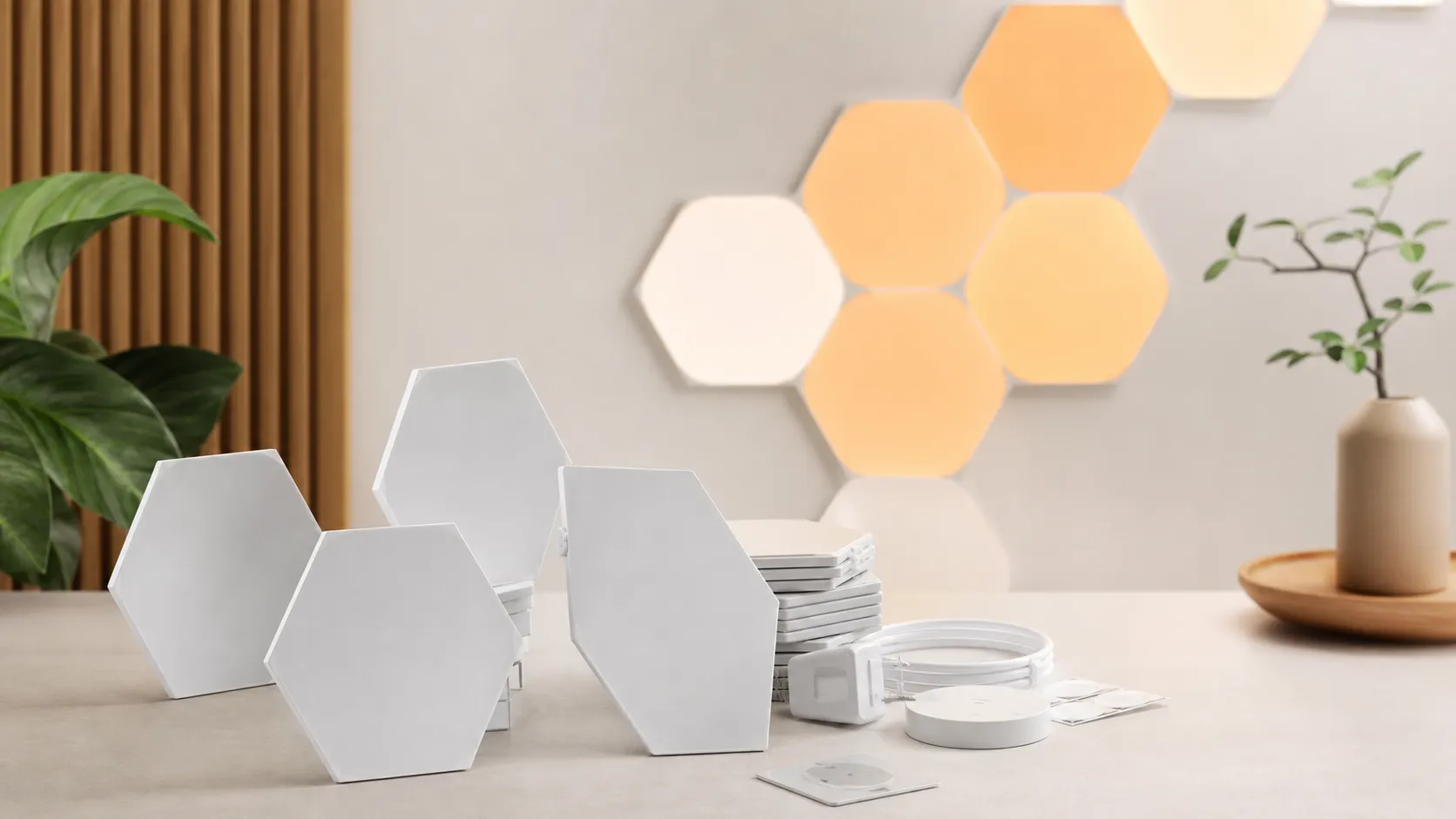
Nanoleaf Shapes Hexagons are modular LED panels shaped as hexagons that snap together to form custom layouts on walls and ceilings. The Smarter Kit includes a starter number of panels, a controller, power supply and adhesive mounts so you can tile a small to medium pattern right out of the box. The system is part of Nanoleaf’s wider Shapes ecosystem, meaning the Hexagons can be expanded with additional panels and integrated into the brand’s app and smart-home platform.
Unlike single-point smart bulbs, Shapes create surface-level illumination with high color saturation, animated scenes and gradients that move across multiple panels. That makes them popular with home decorators, streamers, photographers and anyone who wants a centerpiece lighting effect rather than basic room lighting.
What Reviewers Across the Internet Say
We synthesized thousands of user reviews and expert write-ups to identify the broad consensus:
- Amazon: Strongly positive overall — reviewers consistently praise the "wow" factor, color quality and the way the panels photograph. The most common negatives on Amazon are price and occasional mounting or adhesive failures.
- Reddit: A mixed-but-practical perspective — many users post show-and-tell builds and advanced setup tips, but community threads also catalog troubleshooting for connectivity, firmware updates and adhesives. Redditors tend to accept trade-offs for the aesthetic payoff.
- YouTube: Positive and demo-driven — video reviewers highlight animations, responsiveness and how well the product performs on-camera; they frequently call out the price and app quirks.
- Expert blogs: Generally favorable — experts focus on color accuracy, build quality and ecosystem integration and usually recommend Shapes for design-minded buyers while noting that cost makes this a premium pick.
Across sources the aggregated scores land in the low-4s out of 5, with quality and visual performance scoring highest and perceived value and occasional reliability issues pulling down the average.
Performance & Real-World Use
Nanoleaf Shapes Hexagons Smarter Kit delivers vivid ambient lighting, fluid animations, and broadly reliable control that hold up in everyday use, provided you respect its 2.4 GHz Wi‑Fi and surface‑prep constraints. Its wow‑factor visuals and deep integrations earn consistent praise, while value anxiety and occasional adhesive or connectivity hiccups are the main trade‑offs to weigh.
Smart wall panels succeed or fail on everyday realities: do they look great, respond quickly, and keep working after the novelty wears off? For modular hexagons, performance spans visual quality, control responsiveness, network reliability, physical mounting, and how well the system fits your smart‑home routines. Across ~17,200 public reviews the trend is clear: striking visuals and sturdy hardware, with price anxiety and sporadic connectivity or adhesive issues.
Nanoleaf Shapes Hexagons Smarter Kit delivers vivid, uniform ambient light with fluid animations and broad smart‑home support that holds up in daily use. Its trade‑offs are value (cost scales fast with bigger layouts), 2.4 GHz Wi‑Fi sensitivities, and adhesive prep that must be done right.
What “good performance” really means for hexagon light panels
Five levers determine satisfaction: light output and color, responsiveness, reliability, physical integrity, and ecosystem fit. Specs set the ceiling: each Hexagon panel is rated at 100 lumens with an RGBW engine, CRI 80, and a tunable white range from 1200K to 6500K—plenty for accent lighting with natural‑looking whites. Panels connect on 2.4 GHz Wi‑Fi (not 5 GHz), so crowded 2.4 GHz or guest networks can slow control or block discovery. The thin tiles link via rigid connectors that keep seams tight; diffusion is even, which makes gradients look smooth. On ecosystem fit, the kit works with Apple Home, Google Home, Amazon Alexa, and SmartThings, and can act as a Thread Border Router for compatible accessories—useful if you own Nanoleaf Essentials bulbs or other Thread devices. (us-shop.nanoleaf.me)
Community ratings roundup
Aggregated community ratings by major source (~17,200 combined reviews).
View the underlying data
| Measure | Avg rating |
|---|---|
| Amazon | 4.3/5 |
| 4/5 | |
| YouTube | 4.2/5 |
| Expert blogs | 4.4/5 |
Synthesized from public reviews; sub-scores per prompt consensus.
How the Nanoleaf Shapes Hexagons Smarter Kit behaves on day one
Installation is quick if you respect the constraints. Use the paper templates or the in‑app AR Layout Assistant to mock up a design; wipe the wall with isopropyl alcohol, let it dry, then press each tile for ~30 seconds. Nanoleaf cautions against textured or porous surfaces (brick, wallpaper, heavy orange‑peel) and any ceiling install with the stock tape; for those, plan screw mounts from the start. Power the first tile, then pair in the Nanoleaf App over 2.4 GHz Wi‑Fi; if your router merges 2.4/5 GHz under one SSID, temporarily split bands or move near the access point to avoid timeouts. Expect an immediate firmware prompt—take it. Then sample built‑in scenes, enable Rhythm (music‑reactive) effects, and try Screen Mirror via the Nanoleaf Desktop App for gaming and movies. If your router supports DHCP reservations, bind the controller’s MAC to a fixed IP for faster reconnections; add a drip loop and cable clips so the first tile bears no strain, and remember the controller buttons can power, cycle scenes, and set brightness without the app. (nanoleaf.me)
The first week: dialing in light quality, routines, and responsiveness
At 100 lumens per tile, a 9‑panel layout yields ~900 lumens—akin to a single 60W bulb—but spread across the wall, which reads as immersive ambience rather than glare. Set up touch gestures early: taps or swipes can change scenes, adjust brightness, or run “Touch Actions” in Apple Home to control other accessories (start music, set a Focus scene). Voice control works across Apple, Google, and Alexa once rooms and names are tidy. Animations feel instant because wired linkers propagate changes without wireless hops between tiles. If you own Thread devices (e.g., Essentials bulbs), enabling the kit’s Thread Border Router role can improve their responsiveness by moving them onto a low‑latency mesh. For daytime focus, many owners settle near 5000–5500K at 30–50% to keep contrast without glare, then glide to 2700–3000K after sunset. Add two automations—warm at sunrise, cooler for work blocks—and the panels become everyday lighting rather than an occasional showpiece. (support.nanoleaf.me)
Months of ownership: what changes (and what doesn’t)
Over time, adhesives, Wi‑Fi behavior, and firmware decide satisfaction. On clean, flat painted drywall the stock tape holds, but users who push the rules (textured paint, humid rooms, ceilings) see corners peel more often. If you must move tiles, warm the tape with a hair dryer and twist off gently to protect paint; screw mounts eliminate doubts. Wi‑Fi hiccups usually trace to 2.4 GHz congestion or AP isolation—keep the controller within ~30 feet through walls, avoid guest networks, and consider fixing your 2.4 GHz channel to reduce neighbor interference. Firmware updates matter: Nanoleaf periodically ships builds that stabilize connectivity and enable the system’s Thread Border Router function, which benefits any Thread bulbs or sensors you already own. LED longevity isn’t a worry—rated 25,000 hours at typical evening use—and color consistency stays good because each panel’s mapping and diffusion layer even out hotspots. (nanoleaf.me)
Estimated monthly energy cost by layout size
Assumes 2W per panel (Nanoleaf spec), 3 h/day usage, $0.168/kWh (EIA 2025 forecast).
View the underlying data
| Measure | Monthly cost |
|---|---|
| 5 panels | 0.2 $ |
| 10 panels | 0.3 $ |
| 15 panels | 0.5 $ |
| 21 panels | 0.6 $ |
Calculations based on Nanoleaf power specs and EIA price forecast.
Where it shines—and where owners hit the limits
Use cases where the kit excels: ambient mood behind a desk or TV, creator backdrops, and event lighting where Rhythm scenes react to music. Screen Mirror throws soft, color‑matched washes that expand games and films beyond the display edge. Limits show up with brute‑force illumination and edge‑case networks. Even at 100 lumens per panel, lighting a large living room for tasks would need many tiles—and beyond 21 panels you’ll need a second 42W power supply, since each tile can draw up to 2W at peak. Homes reliant on 5 GHz‑only access points, guest networks, or AP isolation will see pairing and local control fail until a 2.4 GHz SSID with multicast is enabled. One more boundary: Shapes aren’t Matter endpoints; they integrate with Apple, Google, and Alexa over Wi‑Fi while serving as a Thread Border Router for other products, so don’t expect them to appear as a native Matter light today. (us-shop.nanoleaf.me)
How it compares to typical alternatives in practice
Inside Nanoleaf’s lineup, Hexagons land at the vivid, feature‑rich end versus Elements (wood‑look, mood‑first, dimmer per tile) and Canvas (squares with a softer glow). Nanoleaf’s comparison pages list roughly 100 lumens per Shapes Hexagon panel, ~80 lumens for Canvas, and ~20–22 lumens for Elements, reflecting owner reports: Shapes carry the boldest gradients and can do some desk‑adjacent task lighting; Elements are pure ambience; Canvas splits the difference. All support touch and music reactivity, but only Shapes and Elements (and Lines) act as Thread Border Routers—a perk if you’re building a Thread smart‑home. Against third‑party hex panels, Shapes typically win on diffusion, animation polish, touch gestures, and Apple Home support; some cheaper kits match peak brightness but skimp on platform depth or look less uniform. The rub is price: per‑panel costs are higher, so the premium pays off most if you’ll use integrations, gradients, and Screen Mirror rather than basic “RGB on a wall.” (nanoleaf.me)
Nanoleaf lineup: which features you actually get
Feature comparison (published specs and support docs).
| Item | Shapes Hexagons | Shapes Triangles | Elements | Canvas |
|---|---|---|---|---|
| Touch control | Yes | Yes | Yes | No |
| Built-in music reactivity | Yes | Yes | Yes | Yes |
| Acts as Thread Border Router | Yes | Yes | Yes | No |
| Works with Apple Home/Google/Alexa | Yes | Yes | Yes | Yes |
| 5 GHz Wi‑Fi support | No | No | No | No |
Nanoleaf product pages and knowledge base.
Practical steps to get the best performance
- Prep the surface. Wipe with isopropyl alcohol, wait 10+ minutes, avoid textured/porous walls and all ceilings with stock tape; use screw mounts for tricky spots. (nanoleaf.me)
- Stage the layout. Dry‑fit linkers/cables, confirm controller reach, and route power so it doesn’t tug on the first tile.
- Give Wi‑Fi a clean path. Pair within 10–15 feet of your 2.4 GHz router, split SSIDs if needed, and avoid guest networks or AP isolation. The kit doesn’t support 5 GHz. (us-shop.nanoleaf.me)
- Update firmware immediately. New builds stabilize connectivity and enable the Thread Border Router feature; Thread bulbs often respond faster afterward. (us-shop.nanoleaf.me)
- Calibrate scenes to your room. For work hours, try warm whites (2800–3200K) at 20–40%; save saturated gradients for evenings. RGBW plus 1200K–6500K keeps whites natural. (us-shop.nanoleaf.me)
- Use Touch Actions and schedules. Map a panel to launch a Focus scene or trigger a HomeKit routine; schedule gentle warm wake‑ups and cooler daytime accents. (support.nanoleaf.me)
- Plan power early. A 42W PSU supports up to 21 Hexagons at up to 2W each; bigger layouts need another PSU. Distribute power so one failure doesn’t darken everything. (us-shop.nanoleaf.me)
- Mind energy, not just price. At U.S. average rates around 16–17¢/kWh, a 15‑panel setup run 3 hours nightly adds well under 50 cents monthly—useful when budgeting nightly ambience. (eia.gov)
Reliability and ecosystem notes (Thread, Matter, and voice)
Responsiveness stems from short local hops: app to controller over Wi‑Fi, then controller to tiles via wired linkers, so color changes and animations appear almost instantly. Voice reliability hinges on clean naming and room assignment; once set, commands land quickly across major platforms. Matter vs Thread often confuses buyers: Shapes connect over Wi‑Fi and integrate with Apple, Google, and Alexa but are not exposed as native Matter lights. Their bonus is acting as a Thread Border Router, letting Thread‑based gear (like Nanoleaf Essentials) join your home without a separate hub. Thread runs over IEEE 802.15.4 at 2.4 GHz with IPv6 routing and self‑healing paths; border routers like this kit link that mesh to your Wi‑Fi LAN for low‑latency control. For definitions, the Thread Group explains Thread as the low‑power mesh network layer, while the Connectivity Standards Alliance positions Matter as the cross‑brand application layer that can run on Thread or Wi‑Fi. (Thread Group; CSA; us-shop.nanoleaf.me)
Conclusion: does real‑world performance justify the price?
If you value saturated color, smooth gradients, and deep integrations, the everyday experience is rewarding. The community’s 4.2/5 consensus (quality 4.4, reliability 4.0, value 3.6, ease 4.1) reflects that balance: top‑tier visuals and respectable reliability offset by a premium per‑panel cost and the need to respect surface prep and 2.4 GHz realities. Treat installation as a brief project, keep the network basics in mind, and the kit pays you back with ambience that elevates desks, dens, and creator sets. The performance case for buying is strong, especially if you’ll use Screen Mirror, Rhythm, and schedules weekly. (us-shop.nanoleaf.me)
Sources referenced in this section
- Nanoleaf Shapes Hexagons Smarter Kit – official shop/spec page
- Mounting Your Shapes – Nanoleaf support
- Matter over Thread – Nanoleaf support (overview)
- Thread Group – What is Thread (official)
- Connectivity Standards Alliance – Matter FAQ (official)
- U.S. EIA – Today in Energy: 2025 residential price expectation (~16.8¢/kWh)
Pros and Cons
Pros
- Very vivid colors and smooth gradients that photograph and video well.
- Modular hexagon design allows flexible, eye-catching layouts.
- Deep customization: scenes, rhythm/reactive effects and scheduling.
- Strong smart-home integrations (HomeKit, voice assistants and ecosystem compatibility).
- Solid build quality with clean seams when tiles are properly aligned.
Cons
- Premium price — cost scales fast when you expand to cover larger areas.
- Occasional connectivity or firmware hiccups reported across platforms.
- Adhesive mounts can fail on some surfaces; mounting reliability varies.
- App and scene-creation UX feels less polished than the hardware.
Who Should Buy It (and Who Shouldn't)
Should buy if:
- You want a high-impact visual centerpiece. If your priority is design, photography-friendly lighting or content creation, Hexagons deliver a unique look that single bulbs can’t match.
- You enjoy customizing lighting scenes and integrating the panels into a broader smart-home setup. Power users and decorators who like to tinker will appreciate the feature set.
- You’re prepared to invest. The kit is priced as a premium item; if budget allows, the visual payoff is substantial.
Should not buy if:
- You need inexpensive whole-room illumination. Shapes are accent and ambient lights, not economical room-fill lighting.
- You want a guaranteed zero-problem, out-of-the-box experience. While most installs go smoothly, some users do encounter mounting or connectivity issues and may need to troubleshoot.
- You can’t accept the sticker shock of scaling up. A single starter kit looks great, but to cover a large wall you’ll need many more panels and a much larger budget.
Final thoughts
If aesthetics and dynamic color are the top priorities in your lighting choices, the Nanoleaf Shapes Hexagons Smarter Kit is one of the most compelling options available in 2026. It combines excellent color and animation capabilities with a flexible modular format and strong smart-home integration. Just be mindful of the premium price and the possibility of minor setup or mounting headaches — for buyers who value visual impact and customization, those trade-offs are often worth it.
What Reviewers Love
- Very vivid colors, smooth gradients and good overall brightness for ambient/accent lighting.
- Modular hexagon design — flexible layouts and high aesthetic impact.
- Deep customization: scenes, rhythm effects, schedules and strong smart-home integrations (Voice/HomeKit/others).
- Solid build quality and clean seams between panels when tiled.
- Large library of animations and good performance in demos and videos (appeals to content creators).
Common Complaints
- High price — cost scales quickly once you add panels to fill a wall.
- Occasional connectivity or firmware hiccups (app/mesh/voice integrations reported).
- Mounting/adhesive can fail for some users or on certain surfaces.
- App UX and scene-creation tools feel less polished than the hardware quality.
Our Verdict
4.2The Nanoleaf Shapes Hexagons Smarter Kit is a design-first smart lighting solution that delivers outstanding color, animations and expandability. It’s a premium buy — expect strong visual results but plan for a possible learning curve with mounting and connectivity.
Frequently Asked Questions
Common questions shoppers ask before buying the Nanoleaf Shapes Hexagons Smarter Kit.
Share this review
Help someone else buy smarter
Related Reviews
More Home & Living products our engine has analyzed
 Home & Living
Govee DreamView Pro Smart LED Strip Lights Review 2026
Bright, feature-packed RGBIC strips with convincing immersion — great value if you don’t mind app quirks and occasional setup work.
 Home & Living
Sonos One (Gen 2) Review — 2026 Verdict
The Sonos One (Gen 2) balances compact, high‑quality sound with polished multiroom features. Great for Sonos homes; pricier and Wi‑Fi‑only for others.
 Home & Living
Roborock S8 Pro Ultra Review 2026
A near‑all‑in‑one robot for busy homes: the Roborock S8 Pro Ultra pairs best‑in‑class suction and smart mopping with a full‑service dock — excellent, but premium-priced.