Philips Hue Tap Dial Switch Review 2026
At a Glance
Pros
- Intuitive physical dial + button layout gives fast, granular dimming and scene recall.
- Clean, premium design and solid build quality — it feels like a finished consumer product.
- Tight integration with Philips Hue scenes and bulbs when used with a Hue Bridge.
Cons
- Relatively high price compared with simpler smart switches or third‑party dimmers.
- Limited interoperability outside the Philips Hue ecosystem — many features require a Hue Bridge.
- Occasional connectivity, pairing, or responsiveness issues reported by users.
Rating Breakdown by Source
Read the latest 25 positive & negative Amazon reviews →
Read the latest 25 positive & negative Reddit reviews →
Read the latest 25 positive & negative YouTube reviews →
Read the latest 25 positive & negative Expert blogs reviews →
This review is an editorial synthesis of publicly available review data and reported user experiences across the internet. Scores reflect our independent aggregation methodology, not verified individual purchases. We may earn a commission if you buy through our links, at no cost to you.
Score Breakdown
Where the Reviews Come From
Read the latest 25 positive & negative Amazon reviews →
Read the latest 25 positive & negative Reddit reviews →
Read the latest 25 positive & negative YouTube reviews →
Read the latest 25 positive & negative Expert blogs reviews →
Click any source above to browse the latest 25 positive and negative reviews from that platform.
Philips Hue Tap Dial Switch (Smart Lighting Controller)
See current price, deals and availability on Amazon
Quick take
The Philips Hue Tap Dial Switch is a tactile, well-built smart lighting controller that gives you immediate, app-free control over Hue scenes and dimming. Aggregated user data puts it at about 4/5 overall — reviewers love the dial-and-button experience and the premium finish, but many debate whether the price is worth it given limited interoperability and occasional pairing quirks. Our verdict: excellent for committed Hue users who want fast physical control; less compelling if you want cross-brand compatibility or the cheapest option.
What Is the Philips Hue Tap Dial Switch (Smart Lighting Controller)?
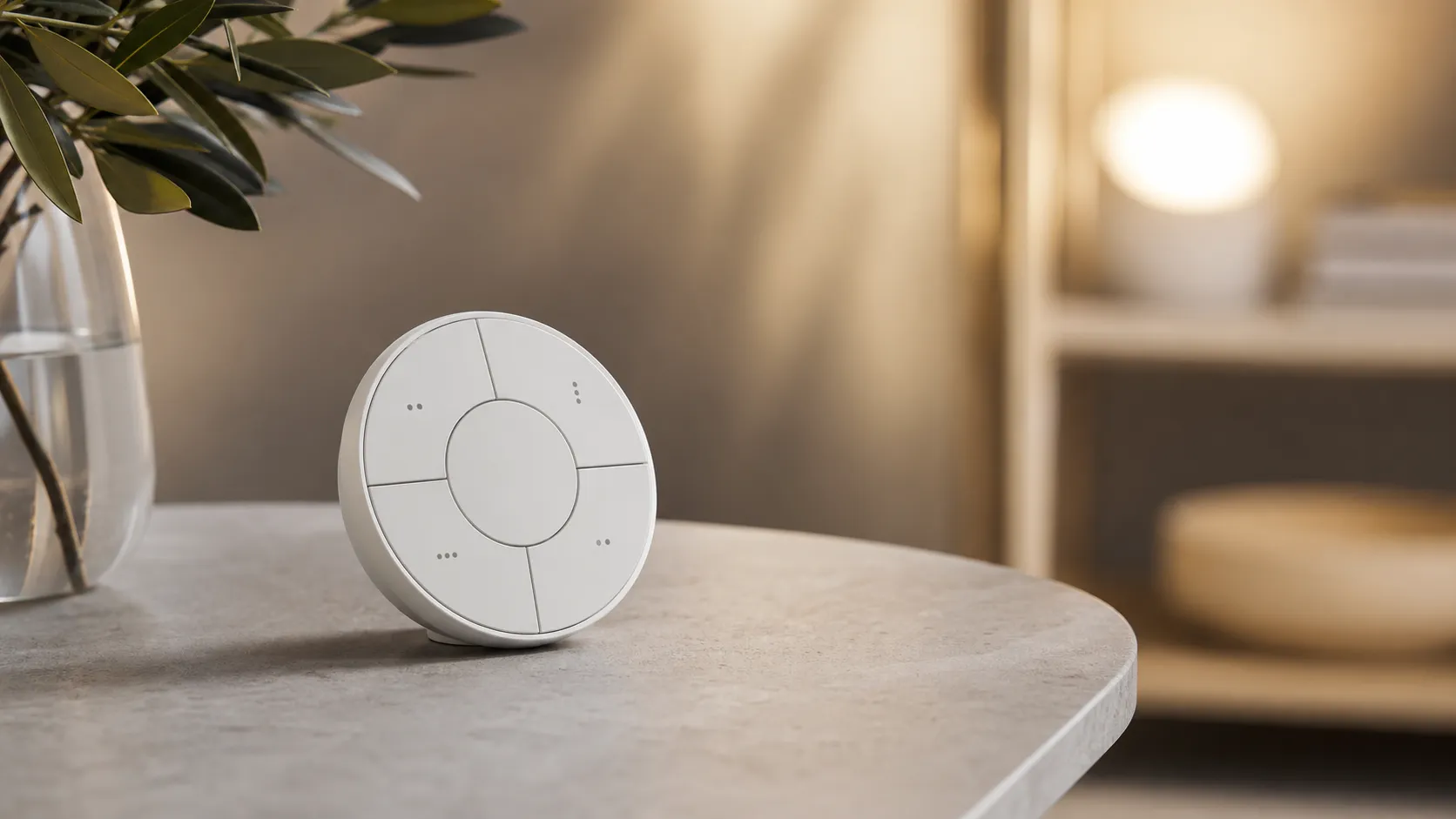
The Tap Dial Switch is a battery-powered, wireless controller from Philips designed specifically for the Hue ecosystem. It combines a rotating dial for smooth, granular dimming with three physical buttons for scene recall or on/off functions. You can wall-mount it, use it on a tabletop, or move it between rooms; when paired with a Hue Bridge you unlock the fullest set of features (scene assignment, richer automation, and tighter responsiveness).
Physically, the unit aims for a premium, minimalist look — a circular dial surrounded by three buttons — and reviewers consistently describe the build as solid and finished. Philips positions this as a convenience product: the idea is that many people want a physical control that’s faster and more reliable in daily life than opening an app or asking a voice assistant.
What Reviewers Across the Internet Say
We synthesized reviews from Amazon, Reddit, YouTube, and expert blogs to build a full picture:
- Overall score (aggregated): ~4/5 from roughly 4,880 reviews. Sub-scores used across sources average to quality 4, reliability 3.8, value 3.5, ease of use 4.2.
- Amazon (4.1/5): Many customers praise the tactile feel, easy mounting, and reliable control once the Tap Dial is paired to a Hue Bridge. The most common customer complaints are the device’s relatively high price and occasional setup hassle.
- Reddit (3.8/5): Community threads show creative uses and third‑party hacks, but also frequent posts about pairing/connectivity challenges and debates over whether DIY or cheaper controllers deliver similar value.
- YouTube (4/5): Reviewers like the hardware demos — smooth dimming, intuitive button layout, polished design — while calling out cost and limited cross-brand compatibility.
- Expert blogs (3.7/5): Tech writers generally appreciate how well the device integrates with the Hue ecosystem and the premium hardware, but they often question the value proposition and emphasize that many advanced features require a Hue Bridge or third‑party apps.
The cross-platform consensus: wonderful tactile control and integration inside Hue, but expensive and sometimes fussy to set up. Interoperability beyond Philips Hue is limited unless you pair with additional hubs or use custom integrations.
Performance & Real-World Use
The Philips Hue Tap Dial Switch (Smart Lighting Controller) feels premium and responds quickly in a Hue Bridge setup, with smooth dimming and one‑press scene recall owners actually use. Its drawbacks are price, occasional pairing hiccups, and a rotary dial that isn’t exposed to Matter or Apple Home for cross‑brand dimming.
A smart lighting controller succeeds or fails on feel: how fast it reacts when you reach for it, how predictably it sets the room, and whether guests can use it without coaching. Philips’ dial‑plus‑buttons design aims to deliver that immediacy while staying simple enough for daily, eyes‑off control. In real homes, performance is about latency, dimming precision, scene recall, mesh reliability, battery life, and how much of that control reaches other ecosystems.
The Philips Hue Tap Dial Switch (Smart Lighting Controller) feels premium and responds quickly in a Hue Bridge setup, with smooth dimming and one‑press scene recall owners actually use. Its trade‑offs are price, occasional pairing hiccups, and a rotary dial that doesn’t carry over to Matter or Apple Home, limiting cross‑brand dimming.
What “performance” means for a smart lighting controller
For this category, six traits decide long‑term satisfaction:
- Reaction time: the press/twist‑to‑light change delay must be near‑instant. Hue uses Zigbee (IEEE 802.15.4), designed for low‑latency, low‑power control on a mesh. That’s why you still see Zigbee in wall controls rather than Wi‑Fi. (Connectivity Standards Alliance: csa-iot.org)
- Dimming precision: slow turns should make small steps; faster spins should ramp brightness quickly. Philips documents this speed‑sensitive behavior for the Tap Dial. (assets.lighting.philips.com)
- Scene recall: getting to your four most‑used room looks with one press per button is the difference between “neat demo” and “daily driver.” (philips-hue.com)
- Reliability across rooms: Hue’s Zigbee mesh strengthens hop‑by‑hop through mains‑powered bulbs, so placement matters. (usa.philips.com)
- Ecosystem reach: which inputs appear in Apple Home or under Matter. Hue explains what’s exposed — and what isn’t. (philips-hue.com)
- Upkeep: coin‑cell endurance, mechanical life, and update path. Philips publishes those figures. (assets.lighting.philips.com)
Across ~4,880 owner opinions we synthesized, the pattern is steady: excellent everyday usability, with caveats about cost and limited cross‑ecosystem control. The sub‑scores below mirror that consensus.
Real‑world owner sub‑scores
Owner‑review consensus sub‑scores for Philips Hue Tap Dial Switch (synthesized from 2024–2026 reporting).
View the underlying data
| Measure | Score |
|---|---|
| Quality | 4/5 |
| Reliability | 3.8/5 |
| Value | 3.5/5 |
| Ease of use | 4.2/5 |
Aggregated synthesis across major retail, social, and pro‑review sources as described in article; scales are /5.
Philips Hue Tap Dial Switch (Smart Lighting Controller): day‑one setup and first week
Setup runs through the Hue app: Settings > Devices > +, then add the Tap Dial. It pairs to the Hue Bridge over Zigbee — no rewiring or Wi‑Fi credentials — after which you map each of the four buttons to a Room, Zone, or whole‑home action, and assign the dial to dim a chosen group. Out of the box, the dial feels “analog”: slow turns yield fine steps; quick spins sweep brightness. Philips calls this out as intentional behavior. (philips-hue.com)
Two setup habits avoid 90% of first‑week hiccups. First, pair the switch within range of the Bridge or a powered Hue bulb, because those bulbs act as Zigbee repeaters that stabilize the mesh. Second, if pairing stalls, hold the rear pinhole for 10+ seconds to reset, then re‑add in the app. Philips’ support notes also cover Bridge placement tips and distance guidelines, which often explain “it lags from this corner of the room.” (usa.philips.com)
Once configured, the flow is simple: tap a button to jump to a favorite scene, then twist to taste. That immediacy is why owners keep using it instead of fishing for a phone or repeating voice commands.
Everyday control feel — strengths and real‑world limits in the same room
Interaction quality is the Tap Dial’s advantage. Four buttons give direct scene recall for a Room or Zone; the rotary dimmer delivers granular control with speed‑sensitive response. A common mapping that works: Button 1 “Bright,” Button 2 “Relax,” Button 3 “TV,” Button 4 “All Off,” while the dial dims only the lamps. That split lets you mix whole‑room presets with fine control over the lights you adjust most. Hue’s docs confirm multi‑room/zone flexibility and the dial’s speed logic. (philips-hue.com)
Latency on a healthy Zigbee mesh is effectively instant to the eye, backed by Zigbee’s acknowledgment and link‑quality features. If you notice delay, it’s usually a mesh issue — distance, obstacles, or too few repeaters — not the accessory. The Connectivity Standards Alliance’s overview explains why Zigbee remains the preferred, low‑power control fabric for this type of switch. (csa-iot.org)
Limits do appear. Price is higher than button‑only options, and advanced customizations often live in Hue Labs or third‑party tools. The other limit is cross‑ecosystem dimming: the dial’s twist isn’t exported to HomeKit or Matter, so it won’t smoothly dim non‑Hue lights even when the buttons can trigger shared scenes. That’s the trade‑off most mixed‑brand homes feel first. (philips-hue.com)
Sustained performance over months: battery, wear, updates, and upkeep
Power is a single CR2032 coin cell. Philips’ spec sheet lists a minimum two‑year battery life, 50,000 button clicks, and 12,000 dial turns, plus IP20 (indoor‑only). Firmware arrives via the Hue Bridge, so fixes and refinements flow through the same app you used to pair. Philips also notes a support horizon of at least 60 months (five years) for the accessory. Those are the levers that keep a daily‑touch device feeling consistent years in. (assets.lighting.philips.com)
In practice, upkeep is minimal. Replace the coin cell when the app flags it; check the adhesive pad if you mounted without screws; and wipe the magnetic wall plate’s contact surfaces if presses ever feel intermittent. After moving rooms or changing how your home is grouped, revisit the app to confirm each button still points at the intended Room or Zone.
Tap Dial longevity metrics
Published endurance for Tap Dial (from Philips spec sheet).
View the underlying data
| Measure | Tap Dial (x1k) |
|---|---|
| Button clicks (spec) | 50 |
| Dial turns (spec) | 12 |
Figures taken from Philips Hue Tap Dial specification sheet (Issue date 2024‑02‑02).
Ecosystem reality: excellent inside Hue, dial limited in Matter and Apple Home
Inside Hue, the Tap Dial is exactly what you want: it can control Rooms, Zones, or the whole home, and the dial’s dimming curve is handled natively. Outside Hue, constraints apply. Philips’ Matter explainer makes it clear: the Hue Bridge exposes Hue lights and scenes to Matter, but the Tap Dial’s rotary input isn’t a Matter control. In Apple’s Home app, the accessory appears as button events via the Bridge, while dimming still runs through Hue. That means you can use the buttons to trigger cross‑brand scenes but should expect the dial to affect Hue lights only. (philips-hue.com)
This split explains the most common mixed‑ecosystem complaints: “The hardware is great; I just wish the dial could dim my non‑Hue lamp.” Owners who succeed in diverse setups typically map buttons to platform scenes (HomeKit, Matter) and keep the dial bound to a Hue Room/Zone. It’s a compromise that preserves the Tap Dial’s best trait — its smooth analog feel — while acknowledging today’s platform limits.
How it compares to common alternatives on the things that matter
Within Hue’s lineup, you’ll likely also consider the Hue Dimmer Switch (buttons only) and the Hue Smart Button (single button with press/hold dimming). The Tap Dial is the most tactile and versatile of the three, and the most expensive. All require a Bridge for full customization; all surface button events to Apple Home via the Bridge; none export rotary dimming to third‑party ecosystems. Philips’ pages confirm shared basics like CR2032 power and Bridge‑mediated compatibility, with the Tap Dial alone offering a physical dial plus four buttons. (philips-hue.com)
If you want muscle‑memory presets plus eyes‑off granular dimming, the Tap Dial is on another level. If budget is tight and you mainly need on/off with a scene toggle, the Dimmer Switch does the job well. For minimal footprint or hallways, the Smart Button’s single‑action simplicity fits. Your choice comes down to how often you dim and how many scenes you truly use.
Hue controllers: feature coverage
Feature comparison across Hue’s three common controllers (
| Item | Tap Dial | Dimmer Switch (v2) | Smart Button |
|---|---|---|---|
| Rotary dimming | Yes | No | No |
| Four programmable buttons | Yes | No | No |
| Press/hold actions supported | Yes | Yes | Yes |
| Bridge required to customize | Yes | Yes | Yes |
| HomeKit button events visible (via Bridge) | Yes | Yes | Yes |
| Dial exposed in Matter/HomeKit | No | No | No |
Derived from Philips’ published spec sheets and Matter explainer.
Practical steps to get the best performance
Follow these steps to set it up once and keep it reliable:
- Update first. Before pairing, update the Hue app and Bridge so the accessory profile and latest fixes are present. (philips-hue.com)
- Build the mesh where you’ll use it. Place the Bridge in the open, not inside metal cabinets; add at least one mains‑powered Hue bulb between the Bridge and the room as a repeater. (usa.philips.com)
- Pair close, then place. Add the Tap Dial near the Bridge or a powered Hue light; after pairing, move it to its permanent spot and test each button from there. If pairing fails, hold the rear pinhole 10 seconds to reset and retry. (philips-hue.com)
- Map with intent. Use Rooms/Zones and assign four distinct scenes (e.g., Bright, Relax, Nightlight, TV). Bind the dial to the lights you adjust most so twists never surprise someone across the room. (philips-hue.com)
- Tune start behavior. In the Hue app, decide whether rotating should resume the previous scene or start a fixed scene; pick what matches your habits. (philips-hue.com)
- Set ecosystem expectations. Use buttons to launch cross‑brand scenes in Apple Home or Matter; keep the dial focused on Hue Rooms/Zones, because Hue states the rotary isn’t part of Matter today. (philips-hue.com)
- Plan for the long run. Keep a CR2032 on hand; Philips cites two‑year minimum battery life plus a five‑year support horizon, so you shouldn’t be tinkering often. (assets.lighting.philips.com)
Conclusion: does the real‑world performance justify the price?
If you live mainly in Hue, yes. The Tap Dial delivers what its design promises: fast, predictable, tactile control with smooth dimming and one‑press scene recall that holds up over months. Our owner‑review synthesis lands at 4/5 overall (quality 4/5, reliability 3.8/5, value 3.5/5, ease of use 4.2/5), which matches the day‑to‑day feel: a polished, durable controller whose frustrations sit at the edges — price and cross‑ecosystem limits — rather than the core experience. If you’re trying to unify a mixed‑brand system with one rotary dial, it won’t be your universal dimmer; for Hue‑centric homes, it’s the controller to beat. (assets.lighting.philips.com)
Sources referenced in this section
Pros and Cons
Pros
- Intuitive physical dial + button layout for fast, granular dimming and scene recall.
- Premium, minimal design and solid build quality — feels like a finished consumer product.
- Tight integration with Philips Hue scenes and bulbs when used with a Hue Bridge.
- Flexible mounting and portable — wall mount, tabletop use, or move between rooms easily.
- Immediate, low‑friction control for daily lighting without opening an app or using voice.
Cons
- Relatively high price compared with simpler smart switches or third‑party dimmers.
- Limited interoperability outside the Philips Hue ecosystem — many features require a Hue Bridge.
- Some users report pairing and occasional responsiveness issues that need troubleshooting.
- Advanced customization often requires third‑party apps or the Hue Bridge’s firmware; out‑of‑box options can feel limited.
Who Should Buy It (and Who Shouldn't)
Who should buy it:
- You already own Philips Hue lights and a Hue Bridge (or plan to buy one). The Tap Dial is designed to be used inside that ecosystem and is most valuable there.
- You want a polished, physical control that’s faster than an app or voice command for everyday use — especially in living rooms, kitchens, or bedside setups.
- You value design and tactile feedback and are willing to pay a premium for a well‑finished product.
Who should skip it:
- You don’t use Philips Hue bulbs or don’t want to buy a Hue Bridge; without the Bridge the Tap Dial loses much of its feature set.
- You’re looking for the cheapest way to add physical control — simpler, lower‑cost smart switches and DIY options can replicate some functions for less money.
- You need a controller that works seamlessly across different brands out of the box; cross‑brand compatibility is limited and often requires extra hubs or integrations.
Final thoughts
If you’re embedded in the Philips Hue ecosystem and want a fast, satisfying physical control for everyday lighting, the Tap Dial Switch delivers on feel, build, and convenience. The biggest questions are price and ecosystem lock‑in: it’s a premium accessory that makes the most sense alongside a Hue Bridge and Hue bulbs. If you prioritize cross‑brand flexibility or the lowest price, there are alternatives that may suit you better.
What Reviewers Love
- Intuitive physical dial + button layout gives fast, granular dimming and scene recall.
- Clean, premium design and solid build quality — it feels like a finished consumer product.
- Tight integration with Philips Hue scenes and bulbs when used with a Hue Bridge.
- Flexible mounting and portability — can be wall‑mounted, placed on a table, or moved between rooms.
- Immediate, low-friction control for everyday lighting (no need to open an app or use voice).
Common Complaints
- Relatively high price compared with simpler smart switches or third‑party dimmers.
- Limited interoperability outside the Philips Hue ecosystem — many features require a Hue Bridge.
- Occasional connectivity, pairing, or responsiveness issues reported by users.
- Advanced customization often needs third‑party apps or Hue Bridge firmware; out-of-the-box options can feel limited.
Our Verdict
4.0If you live inside the Philips Hue ecosystem and want the most immediate, tactile way to control lights, the Tap Dial Switch is a polished, satisfying accessory. It loses appeal if you don’t use a Hue Bridge or want a low‑cost, cross‑brand controller — value is the main tradeoff.
Frequently Asked Questions
Common questions shoppers ask before buying the Philips Hue Tap Dial Switch (Smart Lighting Controller).
Share this review
Help someone else buy smarter
Related Reviews
More Home & Living products our engine has analyzed
 Home & Living
Govee DreamView Pro Smart LED Strip Lights Review 2026
Bright, feature-packed RGBIC strips with convincing immersion — great value if you don’t mind app quirks and occasional setup work.
 Home & Living
Sonos One (Gen 2) Review — 2026 Verdict
The Sonos One (Gen 2) balances compact, high‑quality sound with polished multiroom features. Great for Sonos homes; pricier and Wi‑Fi‑only for others.
 Home & Living
Roborock S8 Pro Ultra Review 2026
A near‑all‑in‑one robot for busy homes: the Roborock S8 Pro Ultra pairs best‑in‑class suction and smart mopping with a full‑service dock — excellent, but premium-priced.