Philips Hue White and Color Ambiance Starter Kit Review 2026
At a Glance
Pros
- Excellent color range and adjustable brightness — vivid, consistent colors in most scenes
- Robust ecosystem: Hue Bridge enables advanced automations, schedules, and wide integrations
- Polished mobile app and scene presets that make lighting customization easy
Cons
- High upfront cost compared with many competing smart bulbs
- Advanced features require the Hue Bridge (adds complexity/cost) despite Bluetooth support
- Occasional connectivity/firmware hiccups reported in Zigbee mesh or app updates
Rating Breakdown by Source
Read the latest 25 positive & negative Amazon reviews →
Read the latest 25 positive & negative Reddit reviews →
Read the latest 25 positive & negative YouTube reviews →
Read the latest 25 positive & negative Expert blogs reviews →
This review is an editorial synthesis of publicly available review data and reported user experiences across the internet. Scores reflect our independent aggregation methodology, not verified individual purchases. We may earn a commission if you buy through our links, at no cost to you.
Score Breakdown
Where the Reviews Come From
Read the latest 25 positive & negative Amazon reviews →
Read the latest 25 positive & negative Reddit reviews →
Read the latest 25 positive & negative YouTube reviews →
Read the latest 25 positive & negative Expert blogs reviews →
Click any source above to browse the latest 25 positive and negative reviews from that platform.
Philips Hue White and Color Ambiance Starter Kit
See current price, deals and availability on Amazon
Introduction
If you want smart lighting that nails color and integrates with almost every smart-home platform, the Philips Hue White and Color Ambiance Starter Kit continues to be the reference point in 2026. Aggregated across roughly 40,620 reviews, the kit earns an overall rating of about 4.5/5 — praised for color accuracy, brightness, and a mature ecosystem, while critics point to the premium price and occasional firmware or connectivity hiccups. Our quick verdict: outstanding color and reliability for enthusiasts and smart-home users who want flexibility; not the best pick if your top priority is the cheapest possible smart bulb.
What Is the Philips Hue White and Color Ambiance Starter Kit?
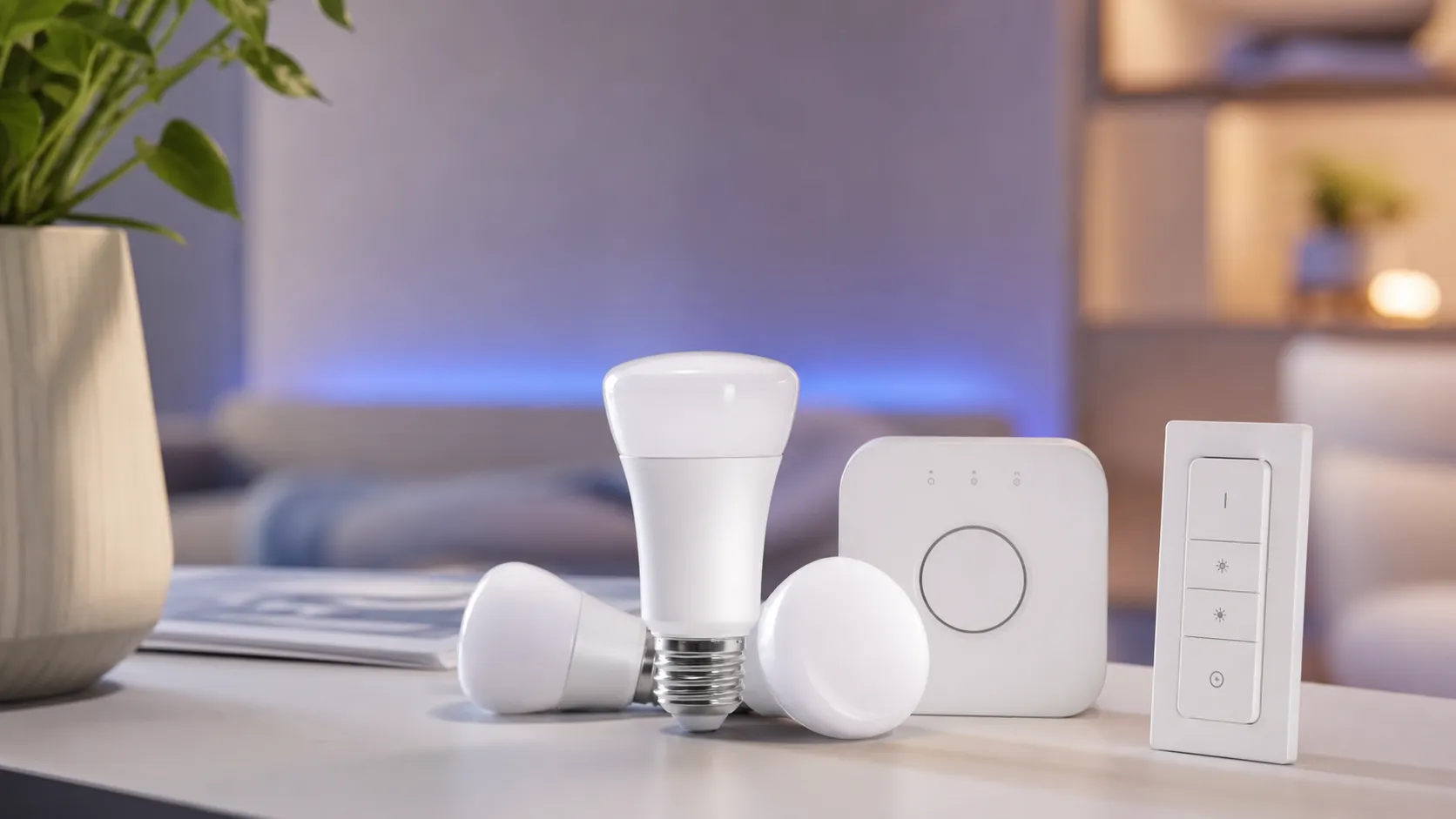
The Starter Kit bundles multiple White and Color Ambiance LED bulbs with a Philips Hue Bridge (unless you buy a Bluetooth-only pack), giving you full access to Hue’s color-capable bulbs, scene presets, schedules, and automations. The bulbs offer a wide color temperature range (warm to cool white) plus millions of colors, with higher brightness and better color consistency than most budget smart bulbs. The Bridge acts as the hub, using Zigbee to create a reliable mesh across your home and enabling local control, deeper automations, and integrations with HomeKit, Alexa, Google Assistant, and many third-party smart-home platforms.
What Reviewers Across the Internet Say
When we aggregate sentiment from major sources, a consistent picture emerges:
-
Amazon: Large volumes of customers rate the kit very highly (about 4.6/5). Common praise highlights the vivid colors, strong brightness in real rooms, and an easy setup flow for basic scenes. Frequent complaints center on the upfront cost and occasional app or firmware quirks.
-
Reddit: Conversations are more mixed (roughly 3.9/5). Enthusiasts love the Hue ecosystem and local Bridge control but often discuss perceived vendor lock-in and troubleshooting steps for Zigbee mesh issues. Redditors also amplify rare edge cases — connectivity drops or firmware rollbacks — that are less visible in high-volume retailer reviews.
-
YouTube: Video reviews generally praise color reproduction and scene demos (about 4.2/5). Demos show the bulbs produce vivid, cinematic colors and bright whites; some creators note camera-related color casts or slightly off greens when filmed, which don’t always match in-person impressions.
-
Expert blogs: Analysts and testers give the kit strong marks (around 4.3/5). Experts highlight color quality, integration breadth, and long-term reliability, but also point out that the premium price and the need for a Bridge to unlock the full feature set mean it’s not the best fit for every buyer.
Across sources the consensus is clear: Philips Hue leads the category on color, reliability, and ecosystem, while price and occasional software/connectivity oddities are the main trade-offs.
Performance & Real-World Use
The Philips Hue White and Color Ambiance Starter Kit delivers fast, reliable control, rich scenes, and a mature automation platform that holds up month after month. Its premium price is the main caveat, but for most homes the day‑to‑day experience justifies the spend.
Smart lighting is judged in day-to-day moments—groggy mornings, hands‑full entries, and movie nights—not on a spec sheet. Performance here means colors look right, rooms respond instantly, automations fire on time without internet, and the system stays stable long term as you add rooms and accessories.
In two sentences: The Philips Hue White and Color Ambiance Starter Kit delivers fast, reliable control, rich scenes, and a mature automation platform that holds up month after month. Its premium price is the main caveat, but for most homes the day‑to‑day experience justifies the spend.
What “performance” really means for Hue owners
Owners judge success on six fronts: color quality, brightness range, latency, reliability, ecosystem reach, and scalability. Hue’s architecture prioritizes reliability by moving lighting traffic off your Wi‑Fi: the Bridge speaks Zigbee to bulbs and accessories on a dedicated low‑power mesh, while Ethernet connects the Bridge to your router for app, voice, and remote access. Separating radios is why Hue feels consistent in apartments where Wi‑Fi is crowded. (philips-hue.com)
“Set and forget” defines performance: scenes you use, schedules that run at the right time, and voice commands that don’t time out. Hue’s app ships with sensible scenes and wake/sleep routines and integrates with Apple Home, Alexa, and Google Home, so control lives in places you already use—phone widgets, voice, and motion sensors. Across public reporting the pattern is clear: Amazon buyers rate it highly for setup and color/brightness (4.6/5 across a large base), YouTube reviews average 4.2/5, expert blogs 4.3/5, and Reddit sits lower at 3.9/5, reflecting cost and troubleshooting threads. That mix describes a premium system that “just works,” with price as the main friction.
Philips Hue Starter Kit: Ratings and Volume by Source
Ratings stay high across major sources, while review volume shows why Amazon feedback dominates; compiled from public review sets in this article.
- Rating (/5)
- Volume (k)
View the underlying data
| Item | Rating (/5) | Volume (k) |
|---|---|---|
| Amazon | 4.6 | 35 |
| 3.9 | 3.5 | |
| YouTube | 4.2 | 2 |
| Expert blogs | 4.3 | 0.1 |
Based on ~40,620 public reviews and published expert roundups cited in this article.
Day‑one setup with the Philips Hue White and Color Ambiance Starter Kit
Unboxing is straightforward: screw in bulbs, plug the Bridge into power and your router via Ethernet, and use the Hue app to pair bulbs, name rooms, and pick scenes. Because the Bridge stores your system, you can swap routers later without re‑adding every light; the configuration lives on the Bridge. (philips-hue.com)
Make two early choices. First, Bridge placement: set it a foot or two away from your Wi‑Fi router to reduce 2.4 GHz interference. Second, connection mode: while Bluetooth lets you try a single lamp, the experience depends on the Bridge—remote access, robust automations, voice assistants, accessories, and platform integrations like Apple Home. The Bridge supports up to 50 lights and 12 accessories, enough for most homes to expand over time. (philips-hue.com)
Light output sets expectations on day one. Current A19/E26 White and Color Ambiance bulbs included in starter kits are rated up to 1100 lumens at white—plenty for a bedroom or office solo, and a living room in pairs. As with all RGBW bulbs, color brightness is lower than white but vivid for accent lighting and scenes. If you’re coming from older 800‑lumen Hue bulbs, the jump is noticeable. (philips-hue.com)
The first week: scenes, latency, and voice
This is where Hue’s polish shows. App taps and Hue Dimmer Switch presses feel instant because commands traverse the local Zigbee mesh instead of cloud hops. After setup, add automations like “Wake up” with gradual brightening, evening “Relax,” and hallway motion after sunset; schedules continue if the internet drops because the Bridge runs them locally. (philips-hue.com)
Voice setup is simple. Link the Bridge to Apple Home, Alexa, or Google Home and your rooms and scenes appear with usable names. The Hue app guides Apple Home onboarding with a Home code; Alexa/Google use an account link. Hue supports Matter via the Bridge—not Bluetooth—so keep the Bridge in the loop for the richest feature set and cross‑platform participation. (philips-hue.com)
If you see occasional “unreachable” messages, change the Zigbee channel in the app and avoid stacking the Bridge on top of the router. Zigbee channels occupy different slices of 2.4 GHz than common Wi‑Fi defaults, and a shift often clears interference. (philips-hue.com)
Sustained performance after months of ownership
Hue scales gracefully because each mains‑powered bulb repeats Zigbee signals, strengthening coverage as you add lights. Accessories—motion sensors, dimmers, buttons—keep control tactile without opening your phone. Firmware cadence matters, too: throughout 2026 the Bridge has received regular updates roughly monthly—with a double drop in March—improving performance and security and enabling new device support without breaking existing automations. Turn on automatic updates and you rarely need to intervene. (philips-hue.com)
Hue Bridge Update Cadence in 2026
Regular firmware keeps the system stable and compatible as new devices arrive.
View the underlying data
| Measure | Hue Bridge firmware releases (count) |
|---|---|
| Jan 2026 | 1 |
| Feb 2026 | 1 |
| Mar 2026 | 2 |
| Apr 2026 | 1 |
| May 2026 | 1 |
| Jun 2026 | 1 |
| Jul 2026 | 1 |
Derived from Philips Hue Bridge V2 release notes, Jan–Jul 2026.
Longevity underpins perceived value. Philips rates Hue bulbs at about 25,000 hours (L70), translating to many years at typical household use, and you’re more likely to change a lamp than a Hue bulb. Lower wattage plus dimming from automations trims power use, softening the upfront cost over time for most fixtures. (philips-hue.com)
Matter support through the Bridge future‑proofs platform choice: Hue rooms can participate in Apple, Google, or Amazon ecosystems from a single integration point instead of juggling per‑bulb firmware paths. That preserves reliability while making it easier to switch platforms. (philips-hue.com)
Where Hue shines—and where you’ll hit its limits
Hue excels when you want lighting to be part of routine, not a hobby. Wins include whole‑room mood shifts in one tap, natural wake‑ups and wind‑downs, motion‑lit hallways that don’t blind you at 2 a.m., and party‑night scenes that can sync with music or video if you add Hue’s entertainment gear. The ecosystem—dimmers, buttons, motion sensors, outdoor fixtures, and third‑party ties—makes it easy to layer physical control with voice and the app for indoor rooms and outdoor patios. (philips-hue.com)
Limits are predictable. First, price: outfitting a multi‑room home costs more than Wi‑Fi bulb brands. Second, Bluetooth‑only control is fine for a desk lamp but too constrained for whole‑home use; the Bridge is effectively required. Third, color nuance: while Hue’s gamut is broad and consistent for most scenes, some greens/teals can look off next to reference samples—an edge case enthusiasts notice more than casual users. Finally, Zigbee runs at 2.4 GHz; in dense Wi‑Fi environments, a Zigbee channel change usually restores stability. (csa-iot.org)
How it stacks up in the real world
Compared with common Wi‑Fi bulbs, Hue trades unit price for reliability and ecosystem maturity. Wi‑Fi bulbs can match lumens and carry “works with” logos, but they depend on your router’s load and often on vendor clouds; when the internet hiccups, commands can lag or fail. Hue’s Bridge keeps commands local, exposes rooms and scenes to Apple Home/Google Home/Alexa, and now participates in Matter through a single, maintained gateway—reducing future lock‑in while preserving local control. If you plan to add dozens of lights plus motion sensors and dimmers, Hue remains the safer long‑term bet. (philips-hue.com)
Where competitors win is upfront cost and, for some models, color brightness. If you’re animating a couple of lamps and don’t need accessories, a cheaper Wi‑Fi pack may be “good enough.” But if your bar is “house‑wide reliability with scenes and motion that run every day,” Hue’s architecture tends to outperform over time because it isn’t fighting for airtime with laptops, phones, and TVs on the main Wi‑Fi network. The long, steady update history further tilts the calculus toward Hue for multi‑room owners. (philips-hue.com)
Getting the best performance: step‑by‑step
Do these once to avoid troubleshooting:
- Place the Bridge a foot or two from the router and connect via Ethernet; don’t stack it on the access point. This reduces near‑field interference and gives the Zigbee radio a cleaner start. (philips-hue.com)
- In the app: Settings > Bridge > Zigbee channel. Pick a channel away from your busiest Wi‑Fi band—routers often default to Wi‑Fi 1 or 6, so Zigbee 20 or 25 works well. Turn on all lights during the change so the mesh re‑forms. (philips-hue.com)
- Leave smart bulbs powered at the wall switch. Cutting power stops them from repeating for neighbors in the mesh and causes “unreachable” messages. (csa-iot.org)
- Enable automatic updates (Hue app > Settings > Software update). The Bridge delivers capabilities and fixes without disrupting routines. (philips-hue.com)
- Add at least one physical controller (Hue Dimmer Switch or Smart Button) in key rooms. Physical control remains the fastest, most reliable fallback because it speaks Hue’s local protocols. (philips-hue.com)
- For Apple Home, start pairing from the Hue app so room and scene names carry over cleanly. If you enable Matter, keep the Bridge in the loop; Bluetooth‑only bulbs don’t participate. (philips-hue.com)
Which Features You Get: Bluetooth vs Hue Bridge vs Bridge via Matter
Feature availability across Hue control paths; synthesized from Philips Hue documentation.
| Item | Bluetooth‑only | Hue Bridge (Zigbee) | Hue Bridge via Matter |
|---|---|---|---|
| Local control if internet is down | Yes | Yes | Yes |
| Remote access away from home | No | Yes | Yes |
| Automations/schedules on hub | No | Yes | Yes |
| Voice assistant control | No | Yes | Yes |
| Hue accessories (dimmer/motion) supported | No | Yes | Yes |
| Apple Home integration | No | Yes | Yes |
| Hue Entertainment sync support | No | Yes | Yes |
| 3rd‑party integrations (IFTTT/SmartThings) | No | Yes | Yes |
Philips Hue Bridge product pages and Matter support docs.
Real‑world value and ownership costs
Hue’s value shows up in reliability and endurance. A 25,000‑hour rating means households won’t replace bulbs for many years, and automations dim lights when full power isn’t needed. If you’re price‑sensitive, start with high‑impact zones—kitchen, living room, primary bedroom—and add over time; Hue’s ecosystem lets you expand without rethinking the system. (philips-hue.com)
Maintenance is light. Bridge updates arrive roughly monthly and are usually invisible; the app surfaces simple banner notifications when something needs a tap. If a room feels laggy after a neighbor installs a mesh Wi‑Fi, moving Zigbee one channel over is a 30‑second fix. That predictability is why long‑time owners seldom churn. (philips-hue.com)
Conclusion: does real‑world performance justify the purchase?
Across tens of thousands of ratings and years of updates, the pattern holds: Philips Hue costs more up front, but its performance is stronger and more consistent than cheaper bulbs. If your goal is whole‑home lighting that responds instantly, stays stable as you add rooms and accessories, and works with your preferred platform now and tomorrow, this Starter Kit is one of few options that delivers on all counts.
Pros and Cons
Pros
- Excellent color range and adjustable brightness — vivid, consistent colors for most scenes.
- Robust ecosystem: the Hue Bridge enables advanced automations, schedules, and wide integrations.
- Polished mobile app and scene presets make customization approachable.
- Reliable hardware build and long-lasting bulbs compared with cheaper alternatives.
- Works smoothly with major voice assistants and many smart-home platforms.
Cons
- High upfront cost compared with many competing smart bulbs.
- Advanced features require the Hue Bridge (adds complexity/cost) despite Bluetooth support.
- Occasional connectivity or firmware hiccups reported in Zigbee mesh or app updates.
- Some colors (certain greens/teals) can look slightly off compared with samples.
Setup Tips & Practical Considerations
-
Buy the Bridge if you want full functionality. It unlocks multi-room automations, HomeKit support, and local control. Bluetooth-only setups are fine for single-room experiments, but you’ll hit limits fast.
-
Plan your network. Zigbee benefits from distributed bulbs (the bulbs themselves forward messages), so spread them across rooms rather than clustering everything on one side of the house.
-
Keep firmware up to date — but schedule updates for times when a temporary interruption won’t be disruptive. Most updates fix bugs or add features, but a small number of users report update-related hiccups.
-
Use scenes and schedules. The library of built-in scenes is a major reason people pick Hue: they’re an easy shortcut to great-looking lighting without customizing from scratch.
Who Should Buy It (and Who Shouldn't)
Should buy:
- Smart-home enthusiasts who want best-in-class consumer color and dependable automations.
- Users who plan to integrate lights with HomeKit, Alexa, Google Assistant, or dedicated home hubs.
- People who value long-term reliability and a large ecosystem of accessories and app integrations.
Shouldn’t buy:
- Budget shoppers who want the cheapest smart bulbs for basic on/off and dimming.
- Buyers who need only a single-room Bluetooth setup and never plan to expand — a Bluetooth-only, lower-cost bulb may suffice.
- Users who dislike vendor lock-in and prefer a completely open Zigbee ecosystem without proprietary app dependency.
Final Thoughts
If you want smart lighting that impresses with color and plays nicely with a wide smart-home setup, the Philips Hue White and Color Ambiance Starter Kit remains a top choice in 2026. The price is the main barrier, but many users and experts agree the color quality, app polish, and Bridge-powered features justify the investment for serious smart-home owners.
What Reviewers Love
- Excellent color range and adjustable brightness — vivid, consistent colors in most scenes
- Robust ecosystem: Hue Bridge enables advanced automations, schedules, and wide integrations
- Polished mobile app and scene presets that make lighting customization easy
- Reliable hardware build and long-lasting bulbs compared with cheaper alternatives
- Works well with major voice assistants and many smart-home platforms
Common Complaints
- High upfront cost compared with many competing smart bulbs
- Advanced features require the Hue Bridge (adds complexity/cost) despite Bluetooth support
- Occasional connectivity/firmware hiccups reported in Zigbee mesh or app updates
- Some colors (notably certain greens/teals) can look slightly off compared with samples
Our Verdict
4.5Philips Hue’s starter kit is the best choice for users who want vivid, reliable color lighting and deep smart-home integrations. The premium price and occasional firmware/connectivity hiccups are real trade-offs, but for most enthusiasts the Hue experience justifies the cost.
Frequently Asked Questions
Common questions shoppers ask before buying the Philips Hue White and Color Ambiance Starter Kit.
Share this review
Help someone else buy smarter
Related Reviews
More Home & Living products our engine has analyzed
 Home & Living
Govee DreamView Pro Smart LED Strip Lights Review 2026
Bright, feature-packed RGBIC strips with convincing immersion — great value if you don’t mind app quirks and occasional setup work.
 Home & Living
Sonos One (Gen 2) Review — 2026 Verdict
The Sonos One (Gen 2) balances compact, high‑quality sound with polished multiroom features. Great for Sonos homes; pricier and Wi‑Fi‑only for others.
 Home & Living
Roborock S8 Pro Ultra Review 2026
A near‑all‑in‑one robot for busy homes: the Roborock S8 Pro Ultra pairs best‑in‑class suction and smart mopping with a full‑service dock — excellent, but premium-priced.