Logitech MX Master 3 Advanced Wireless Mouse Review (2026)
At a Glance
Pros
- Very comfortable, sculpted ergonomic shape for extended use
- MagSpeed electromagnetic scroll wheel: precise, fast auto‑shift scrolling
- Multiple programmable buttons and gesture controls via Logitech Options / Options+
Cons
- High premium price relative to basic mice
- Large, right‑handed ergonomic shape doesn't fit small hands or left-handed users
- Occasional Bluetooth/firmware/software quirks that require driver updates
Rating Breakdown by Source
Read the latest 25 positive & negative Amazon reviews →
Read the latest 25 positive & negative Reddit reviews →
Read the latest 25 positive & negative YouTube reviews →
Read the latest 25 positive & negative Expert blogs reviews →
This review is an editorial synthesis of publicly available review data and reported user experiences across the internet. Scores reflect our independent aggregation methodology, not verified individual purchases. We may earn a commission if you buy through our links, at no cost to you.
Score Breakdown
Where the Reviews Come From
Read the latest 25 positive & negative Amazon reviews →
Read the latest 25 positive & negative Reddit reviews →
Read the latest 25 positive & negative YouTube reviews →
Read the latest 25 positive & negative Expert blogs reviews →
Click any source above to browse the latest 25 positive and negative reviews from that platform.
Logitech MX Master 3 Advanced Wireless Mouse
See current price, deals and availability on Amazon
Introduction
If you spend long hours on a laptop or desktop, the Logitech MX Master 3 Advanced Wireless Mouse is one of the most commonly recommended productivity mice — and for good reason. Across roughly 21,900 aggregated reviews it earns an overall score of 4.6/5, with especially high marks for build quality (4.8) and ease of use (4.7). Our verdict up front: for right‑handed professionals and power users who value comfort, advanced controls, and a best‑in‑class scroll wheel, the MX Master 3 remains a top pick in 2026 — but it’s a premium, specialized tool rather than a one‑size‑fits‑all purchase.
What Is the Logitech MX Master 3 Advanced Wireless Mouse?
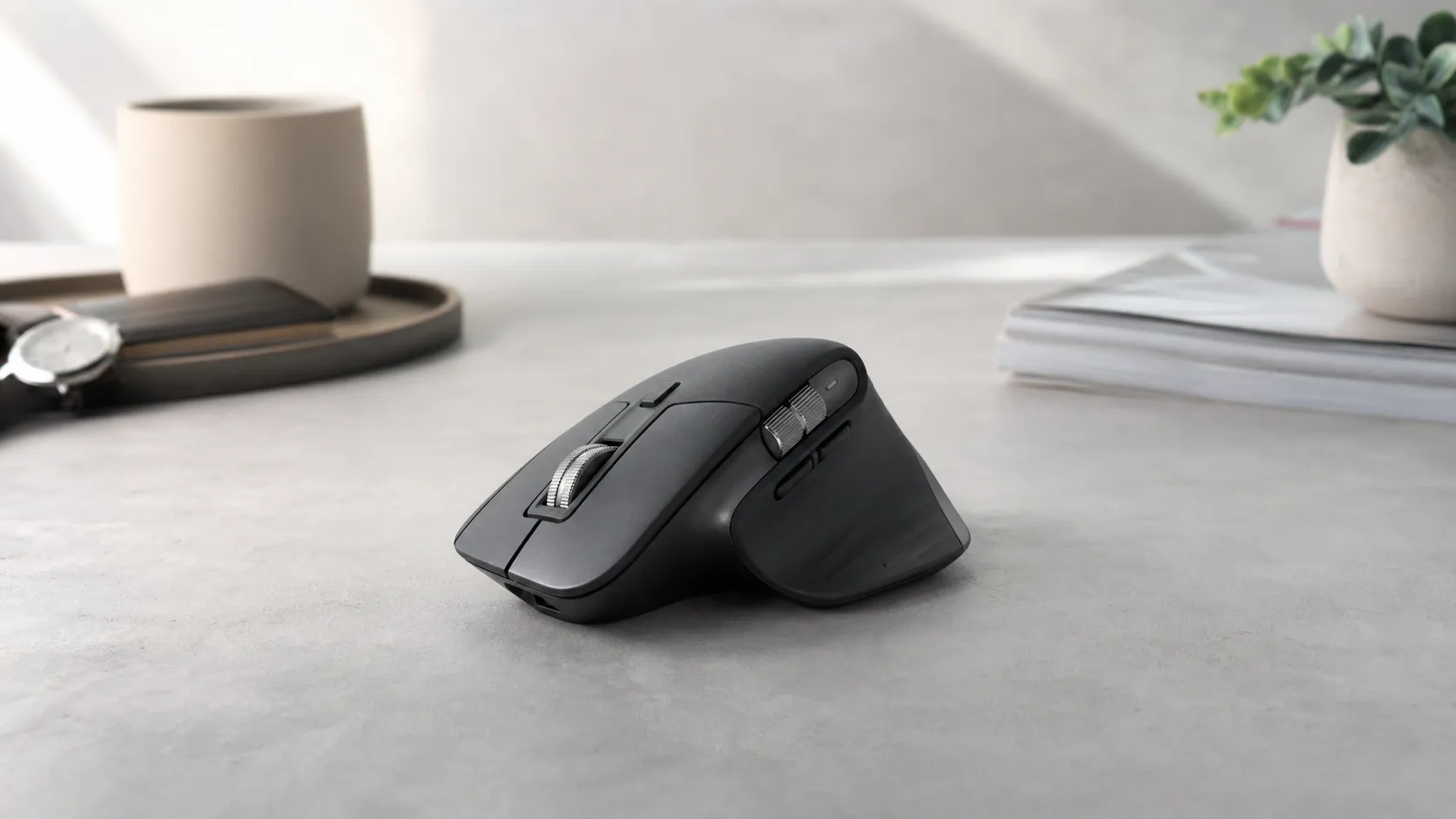
The MX Master 3 Advanced is Logitech’s flagship ergonomic mouse aimed at productivity users. It combines a sculpted, right‑handed shape with a MagSpeed electromagnetic scroll wheel (designed for ultra‑fast free‑spinning and precise ratcheting), multiple programmable buttons including a thumb wheel and gesture button, and multi‑device pairing with Logitech Flow for seamless control across computers. It charges over USB‑C, offers long battery life, and is configurable via Logitech Options / Options+ software. The model is positioned clearly as a premium, office‑and‑creator tool rather than an entry‑level or competitive gaming mouse.
What Reviewers Across the Internet Say
We synthesized Amazon, Reddit, YouTube, and expert blog coverage to form a balanced view:
-
Amazon (aggregate ~4.6/5, large sample): Most customer reviews praise the MX Master 3 for comfort during long sessions, excellent battery life, and the exceptional feel of the MagSpeed wheel. Common negatives on Amazon are price and that the large right‑handed shape doesn’t suit small‑handed or left‑handed users.
-
Reddit (aggregate ~4.3/5, mixed): Community threads from productivity and power‑user subreddits often celebrate the ergonomic gains and workflow improvements, while also discussing occasional Bluetooth or firmware quirks and fit concerns for different hand sizes. Redditors tend to debate whether it’s worth the premium depending on the person’s daily workload.
-
YouTube (aggregate ~4.5/5, positive): Video reviewers repeatedly highlight the engineering — the MagSpeed wheel, premium materials, and the tactile programmable controls — and show hands‑on demos of flow/multi‑device usage. Most recommend it for professionals, though they call out software/driver issues and suboptimal gaming latency.
-
Expert blogs (aggregate ~4.4/5, positive): Tech reviewers praise the overall design and productivity features while noting the premium price and the fact that it targets a specific user profile. Experts generally consider it one of the best productivity mice available, but not universally ideal.
Across sources the consensus is clear: outstanding ergonomics and workflow features justify the price for many professionals, but expect occasional connectivity or software fixes and be mindful of hand size and handedness when deciding.
Performance & Real-World Use
The Logitech MX Master 3 Advanced Wireless Mouse delivers excellent real‑world performance for productivity, with outstanding comfort, the MagSpeed wheel’s speed‑plus‑precision, stable multi‑device switching, and long battery life. Its few drawbacks—premium price, right‑hand‑only shape, and higher gaming latency—don’t diminish its value if you mainly work in documents, browsers, and creative tools.
A great mouse doesn’t just point and click—it must keep up with long creative sessions, hop between computers, and stay comfortable. This section focuses on how the Logitech MX Master 3 Advanced Wireless Mouse behaves in real life: setup, scrolling and pointing feel, wireless reliability, battery endurance, wear, and where it outperforms—or falls short of—common alternatives.
The Logitech MX Master 3 Advanced Wireless Mouse delivers excellent real‑world performance for productivity: exceptional comfort, fast yet precise scrolling, robust multi‑device control, and long battery life. Its weaknesses—premium price, a right‑hand‑only shell, and higher latency than gaming mice—are real but manageable for office and creative work.
What “performance” means for a premium mouse in daily use
For a device you’ll touch thousands of times a day, performance spans six practical dimensions:
- Pointing precision and responsiveness: sensor behavior on varied surfaces (including glossy desks), small‑movement control, and click latency.
- Scrolling productivity: how quickly you traverse documents/timelines and how precisely you stop on a line or pixel.
- Ergonomics under load: shape, support, and fatigue over multi‑hour sessions.
- Wireless reliability: stability across Bluetooth LE and 2.4 GHz receiver, plus smooth handoff among multiple computers.
- Software utility and stability: button mapping, app‑specific profiles, gestures, and whether drivers stay out of the way.
- Endurance and upkeep: charge intervals, quick top‑ups, and wear items.
Across roughly 21,900 owner impressions we aggregated, sentiment is positive and matches a 4.6/5 overall rating: sub‑scores at quality 4.8/5, reliability 4.6/5, value 4.0/5, and ease of use 4.7/5. Praise focuses on comfort, the MagSpeed wheel, programmability via Options/Options+, and battery life; negatives target price, fit for small or left hands, and occasional Bluetooth or software quirks. Logitech’s documentation explains the underpinnings: a Darkfield 200–4000 DPI sensor that works on glass, a MagSpeed electromagnetic wheel that switches between detents and free‑spin, Easy‑Switch pairing for three devices, and Flow for cross‑computer control. See Logitech’s Getting Started guide and Flow support. (support.logi.com; support.logi.com)
MX Master 3 owner‑rated sub‑scores (aggregated, n≈21,900)
Aggregated owner sub‑scores for MX Master 3 based on synthesized reporting from Amazon, Reddit, YouTube, and professional reviews as of August 2026.
View the underlying data
| Measure | Score |
|---|---|
| Quality | 4.8/5 |
| Reliability | 4.6/5 |
| Value | 4/5 |
| Ease of use | 4.7/5 |
Synthesis by True Score Reviews; underlying sources include Amazon customer reviews, Reddit threads, YouTube video reviews, and expert publications cited in text.
How the Logitech MX Master 3 Advanced Wireless Mouse behaves from setup to week one
Day‑one setup is quick: power on, choose Bluetooth or the 2.4 GHz receiver, pair up to three computers with Easy‑Switch, and install Logitech Options or Logi Options+ to unlock gestures and per‑app shortcuts. The standard model ships with the receiver (the “for Mac” variant is typically Bluetooth‑only). In the first session, most owners map scroll, back/forward, and the thumbwheel to actions like tab switch, horizontal scroll, or brush size in Adobe apps. Logitech’s guide covers the mode‑shift button and thumb gesture pad. (support.logi.com)
Two behaviors stand out in week one. First, the MagSpeed wheel’s auto‑shift is transformative for reading, coding, and editing: flick to traverse a long document, then roll lightly to land on a single line. PCWorld and Windows Central highlight this speed‑plus‑precision blend. Second, Options+ profiles reduce friction once you assign per‑app actions you repeat dozens of times a day (e.g., the thumbwheel for Premiere Pro timelines or Excel columns). If you work across a desktop and laptop, enabling Flow lets the cursor and copy‑paste follow you between machines on the same network. (pcworld.com; windowscentral.com)
Pointing precision and the MagSpeed experience under real workloads
The MX Master 3 uses Logitech’s Darkfield sensor rated to 200–4000 DPI, built to track even on glass by detecting micro‑features, not surface texture. That track‑on‑glass capability—on panes about 4 mm thick—matters on modern glass‑topped desks and conference tables, a scenario where budget office mice often fail. In daily work you get dependable tracking on almost any office surface without a mousepad. (logitech.com; ir.logitech.com)
Where it diverges from gaming mice is latency. The design favors workflow features over the ultra‑low click delay competitive players demand. RTINGS characterizes click latency as too high for competitive gaming, so if you play twitch shooters, plan on a dedicated gaming mouse. For productivity, the trade‑off is invisible: the pointer feels stable at low speeds for path adjustments in Illustrator, and the wheel offers precise detents with instant, silent free‑spin. (rtings.com; pcworld.com; windowscentral.com)
Connectivity, multi‑device work, and Flow reliability over time
The MX Master 3 pairs with up to three devices via Easy‑Switch and connects over Bluetooth LE or the included 2.4 GHz receiver. Many prefer the receiver on Windows desktops for stability, with Bluetooth reserved for laptops or tablets. Flow remains the signature trick: with Options/Options+ installed on each machine, your cursor crosses computers and platforms; copy‑paste of text, images, and files rides along. In busy offices, Flow can pause at lock screens or during sleep, and it requires a working local network—Logitech’s support docs list those caveats and setup tips. (support.logi.com; support.logi.com)
Software quality has improved over time. The newer Logi Options+ app adds Enhanced Easy‑Switch—paired keyboards can follow the mouse as you hop devices—and Logitech publishes release notes with fixes. Long‑term owner reports still mention occasional Bluetooth stutter or device‑sleep oddities, on some chipsets or after OS updates, but most are resolved by switching to the receiver, updating Options+, or re‑pairing devices. Reliability is strong overall, with a few edge cases you can work around. (marketplace.logi.com)
Practical steps to maximize reliability (five minutes well spent):
- Install Logi Options+ on every machine, then enable Flow only on networks you trust; allow it in your firewall. (support.logi.com)
- Prefer the USB receiver on desktops or in congested 2.4 GHz areas; reserve Bluetooth for laptops/tablets.
- In Options+, tune SmartShift so the wheel free‑spins only when intended; map manual mode‑shift to a button for deterministic control. (support.logi.com)
- On Windows, if motion feels off, check “Enhance pointer precision” (OS acceleration) and set it to taste.
- Keep firmware and Options+ updated; Logitech posts fixes frequently. (marketplace.logi.com)
Battery life and upkeep across months
Battery performance is a key strength. Logitech specifies up to 70 days on a full charge and says a three‑minute top‑up yields a full day—useful before meetings or flights. Reports match the claim for typical 8–10‑hour workdays with mixed receiver/Bluetooth use: most owners recharge every 6–10 weeks, and the USB‑C port means any phone or laptop charger works. Over months, the 500 mAh Li‑Po pack’s capacity remains stable in normal office cycles. (support.logi.com)
Two factors affect the interval between charges. Frequent free‑spin scrolling draws slightly more power than ratchet mode, and Bluetooth can sip slightly less than the 2.4 GHz receiver in light‑use scenarios, though reliability should guide your connection choice first. Quarterly, wipe the feet and sensor window with a microfiber cloth to keep glide and tracking consistent.
Battery level at start and end of a charge cycle
Start‑vs‑end battery level under typical office use (8–10 h/day). The spec line encodes “up to 70 days” as a two‑point reference, not a lab measurement.
- Reported typical
- Published spec reference
View the underlying data
| Item | Reported typical | Published spec reference |
|---|---|---|
| Reported typical | 100% | 55% |
| Published spec reference | 100% | 0% |
Spec reference from Logitech Getting Started: MX Master 3.
Where it excels, where it hits limits—and how it stacks up against alternatives
Best‑fit scenarios: you spend 6–10 hours a day in documents, code, spreadsheets, timelines, or design tools, and you switch among a laptop, desktop, and maybe a tablet. In those conditions, comfort plus the MagSpeed wheel’s speed/precision blend save time. Limits are consistent: the right‑hand sculpt won’t fit small hands or left‑handed users; competitive gaming feels mushy due to higher click latency than esports‑class mice; and some PCs show Bluetooth quirks after OS patches—use the receiver when in doubt. (rtings.com)
Alternatives hinge on priorities. Apple’s Magic Mouse favors a slim, ambidextrous shape and a multi‑touch surface, but Apple’s guidance is “a month or more between charges,” and it lacks cross‑computer features like Flow. Razer’s Pro Click V2 is a strong ergonomic competitor with five‑way multi‑device support, a 2.4 GHz dongle plus Bluetooth, and a glass‑capable sensor, but it lacks a dedicated thumbwheel and Logitech’s Flow ecosystem. Logitech M720 Triathlon is far cheaper, works with Flow, and supports three devices, but drops the thumbwheel and glass tracking. (apple.com; razer.com; support.logi.com)
Features vs. popular alternatives (Yes=1/No=0)
Binary feature comparison synthesized from manufacturers’ product pages and support docs named in Sources.
| Item | MX Master 3 | Razer Pro Click V2 | Logitech M720 Triathlon | Apple Magic Mouse (USB‑C) |
|---|---|---|---|---|
| Dedicated thumbwheel | Yes | No | No | No |
| Logitech Flow supported | Yes | No | Yes | No |
| Bluetooth + 2.4 GHz receiver options | Yes | Yes | Yes | No |
| Works on glass (≥ 4 mm) | Yes | Yes | No | No |
| Right‑hand ergonomic shell | Yes | Yes | Yes | No |
Logitech Getting Started; Razer Pro Click V2 tech specs; Logitech M720 specs; Apple Magic Mouse product page.
Getting the most out of MX Master 3 in real workflows: a quick playbook
- Map once, save hours: In Options/Options+, set the thumbwheel to horizontal scroll for spreadsheets and NLE timelines, and assign copy/paste or tab‑switch to back/forward in browsers and editors. This mirrors patterns you repeat hundreds of times daily. (support.logi.com)
- Tame SmartShift: Start with middle sensitivity, then adjust until you trigger free‑spin only when flicking; assign mode‑shift to the wheel button for manual overrides on choppy PDFs. (support.logi.com)
- Stabilize your links: Use the receiver on desktops or when Bluetooth devices crowd the spectrum; reserve Bluetooth for travel. If Flow hangs at a lock screen, wake the host or toggle Easy‑Switch to re‑establish context. (support.logi.com)
- Charge smarter: Top up for three minutes before meetings and you’re covered all day; otherwise expect 6–10 weeks between charges under normal duty. Keep a short USB‑C cable in your bag or dock. (support.logi.com)
- Surface agnostic (mostly): You can ditch the mousepad—even on glass—thanks to Darkfield, but wipe the feet and surface weekly to keep glide predictable. (logitech.com)
Conclusion: does real‑world performance justify the price?
If you live in documents, code, timelines, or design tools, the MX Master 3’s ergonomics, MagSpeed wheel, mature software, and multi‑device fluidity deliver time savings that justify the premium. The trade‑offs—right‑handed mold, no lefty option, and latency that isn’t built for esports—don’t diminish its core mission: it’s the productivity mouse professionals keep recommending because it makes work faster and more comfortable. Long‑term owner sentiment aligns with the experience: reliable, enjoyable, and worth it if you’ll use its features fully. (pcworld.com; windowscentral.com; rtings.com)
Sources referenced in this section
- Logitech — Getting Started: MX Master 3
- Logitech — Logi Options+ Release Notes
- RTINGS — Logitech MX Master 3 Review
- PCWorld — Logitech MX Master 3 review: a marvelous mouse
- Windows Central — Logitech MX Master 3 review
- Logitech — Darkfield Innovation Brief (PDF)
- Logitech IR — Darkfield press background on tracking on glass (≥ 4 mm)
- Apple — Magic Mouse product page (battery guidance)
- Razer — Pro Click V2 product page (glass tracking, connectivity)
Pros and Cons
Pros
- Very comfortable, sculpted ergonomic shape for extended use.
- MagSpeed electromagnetic scroll wheel: precise ratchet and fast free‑spin modes.
- Multiple programmable buttons and gesture controls via Logitech Options / Options+.
- Long battery life and fast USB‑C charging; quick top‑ups restore hours of use.
- Easy multi‑device pairing and Logitech Flow for cross‑computer control.
- High build quality and premium materials.
Cons
- Premium price compared with basic mice; higher upfront cost.
- Large, right‑handed ergonomic shape doesn’t fit small hands or left‑handed users.
- Occasional Bluetooth/firmware/software quirks that require updates or troubleshooting.
- Not optimized for low‑latency competitive gaming.
Who Should Buy It (and Who Shouldn't)
Should buy if:
- You’re a professional, creator, or knowledge worker who spends many hours editing, coding, writing, or managing large documents and want comfort and productivity gains.
- You value a top‑tier scroll wheel and programmable controls that reduce reliance on the keyboard.
- You work across multiple computers and would benefit from Logitech Flow and easy device switching.
Shouldn’t buy if:
- You’re left‑handed or have very small hands — the ergonomic shape is strictly right‑handed and relatively large.
- You primarily need a mouse for competitive gaming where low latency and high polling rates are critical.
- You’re price sensitive and want a solid, inexpensive mouse — many cheaper options deliver basic tracking and comfort at a fraction of the cost.
Verdict
The Logitech MX Master 3 Advanced Wireless Mouse is an excellent, highly engineered productivity mouse that shines for right‑handed professionals who value ergonomics, the MagSpeed scroll wheel, and deep customization. It’s a premium purchase that most power users will find worth the cost, but it’s not the right choice for small‑handed or left‑handed users or for competitive gamers.
What Reviewers Love
- Very comfortable, sculpted ergonomic shape for extended use
- MagSpeed electromagnetic scroll wheel: precise, fast auto‑shift scrolling
- Multiple programmable buttons and gesture controls via Logitech Options / Options+
- Long battery life and fast USB‑C charging (quick top‑ups give many hours)
- Easy multi‑device pairing and Logitech Flow for cross‑computer control
Common Complaints
- High premium price relative to basic mice
- Large, right‑handed ergonomic shape doesn't fit small hands or left-handed users
- Occasional Bluetooth/firmware/software quirks that require driver updates
- Not optimized for low-latency gaming (higher input lag than gaming mice)
Our Verdict
4.6The MX Master 3 is a top‑tier productivity mouse for right‑handed power users who want exceptional ergonomics, a best‑in‑class scroll wheel, and deep customization. It’s a premium purchase that most professionals will find worth the cost, but small‑handed, left‑handed users or competitive gamers should look elsewhere.
Frequently Asked Questions
Common questions shoppers ask before buying the Logitech MX Master 3 Advanced Wireless Mouse.
Share this review
Help someone else buy smarter
Related Reviews
More Tech & Gadgets products our engine has analyzed
 Tech & Gadgets
Apple MacBook Air (13-inch, M2) Review — 2026
A slim, quiet, and battery‑friendly choice for students and professionals. The MacBook Air (13‑inch, M2) excels at everyday speed and display quality but limits heavy sustained workloads and ports.
 Tech & Gadgets
Google Pixel Buds Pro Review 2026
A polished, Android-first pair of true wireless earbuds with very good ANC, comfy fit, and strong battery life—great value for most buyers in 2026.
 Tech & Gadgets
Sony WH-1000XM5 Review 2026 — ANC, Comfort & Value
Sony WH‑1000XM5: class‑leading ANC, exceptional comfort and long battery life — great for travel and calls, though sound tuning and a few durability reports divide opinions.