Petcube Bites 2 Lite Review — 2026
At a Glance
Pros
- Consistent, accurate treat tossing for small, uniform kibble.
- Compact, attractive build that fits easily on countertops or shelves.
- Intuitive mobile app with live view and two-way audio for remote interaction.
Cons
- Treats can jam with larger or irregular-shaped treats—many users recommend only small, uniform kibble.
- App/connectivity glitches reported (occasionally drops live feed or slow push notifications).
- Cloud subscription required for full video history; reviewers find it expensive relative to built-in features.
Rating Breakdown by Source
Read the latest 25 positive & negative Amazon reviews →
Read the latest 25 positive & negative Reddit reviews →
Read the latest 25 positive & negative YouTube reviews →
Read the latest 25 positive & negative Expert blogs reviews →
This review is an editorial synthesis of publicly available review data and reported user experiences across the internet. Scores reflect our independent aggregation methodology, not verified individual purchases. We may earn a commission if you buy through our links, at no cost to you.
Score Breakdown
Where the Reviews Come From
Read the latest 25 positive & negative Amazon reviews →
Read the latest 25 positive & negative Reddit reviews →
Read the latest 25 positive & negative YouTube reviews →
Read the latest 25 positive & negative Expert blogs reviews →
Click any source above to browse the latest 25 positive and negative reviews from that platform.
Petcube Bites 2 Lite Pet Camera (treat dispenser)
See current price, deals and availability on Amazon
Quick verdict
The Petcube Bites 2 Lite is a compact, user-friendly treat-dispensing camera that earns a solid place in many homes thanks to reliable treat tossing for small kibble, an easy app, and an attractive form factor. Across roughly 5,725 aggregated reviews the device scores about 4.1/5 — a dependable pick for short check-ins, play motivation, and cat- or small-dog households, but less ideal if you want a heavy-duty dispenser, top-tier video, or a subscription-free full video history.
What is the Petcube Bites 2 Lite Pet Camera (treat dispenser)?
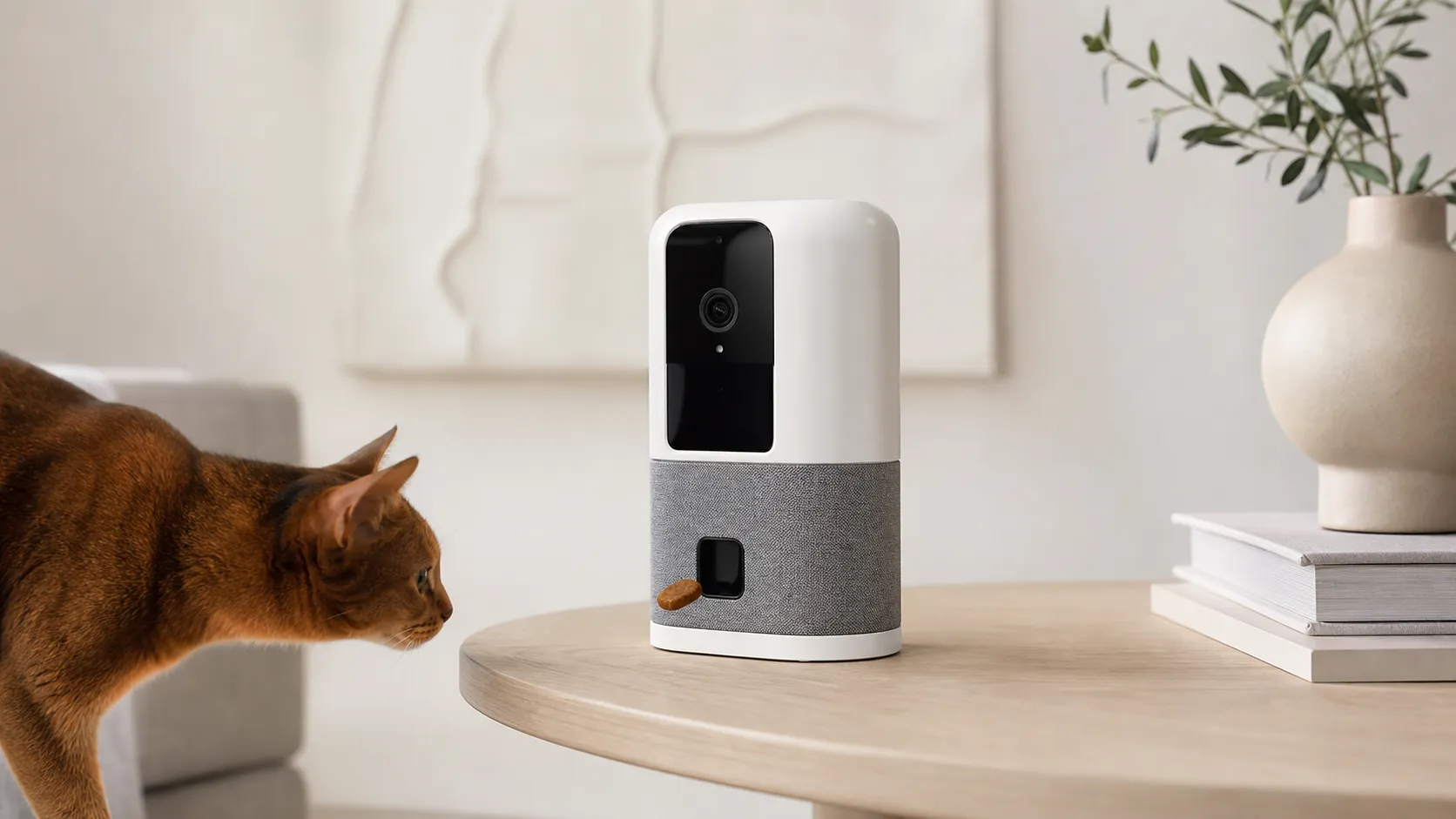
Petcube’s Bites 2 Lite is a compact home pet camera with a built-in treat dispenser, two-way audio, and a mobile app for remote interaction. It’s designed to let owners see, talk to, and reward their pets from a phone — tossing small, uniform kibble up to a short distance. The “Lite” model aims to hit an affordable entry point in the treat-camera market by trimming some bells and whistles while keeping the core remote-interaction features.
Key features at a glance:
- 1080p-ish camera for live view and two-way audio (suitable for casual monitoring).
- Motorized treat dispenser calibrated for small, uniform kibble.
- Compact, countertop-friendly design that blends into most home spaces.
- Mobile app with live view, treat toss button, and optional cloud recording (subscription required for full history).
What reviewers across the internet say
We synthesized user and expert feedback from Amazon, Reddit, YouTube, and expert blogs to find the consistent patterns: overall rating 4.1/5 from roughly 5,725 reviews with sub-scores around quality 3.9, reliability 3.8, value 3.8, and ease-of-use 4.2.
-
Amazon (aggregate ~4.1/5): Buyers appreciate how simple the Bites 2 Lite is to set up and operate. The treat toss is generally consistent with small kibble, and the app makes short interactions easy. Negative notes on Amazon focus on occasional treat jams and the ongoing cost of the cloud subscription for video history.
-
Reddit (aggregate ~3.9/5): Community discussions are pragmatic — many recommend the unit for casual monitoring and play, but several users share real-world edge cases: jams from irregular treats, Wi‑Fi dropouts, and long-term reliability concerns. DIY workarounds (filtering treat size, placement tips) are common in threads.
-
YouTube (aggregate ~4/5): Video reviewers demonstrate the device in action and praise the treat toss accuracy with compatible kibble, the convenience of two-way audio, and the product’s form factor. Most mention occasional latency on the live feed and advise testing treat compatibility before committing.
-
Expert blogs (aggregate ~3.8/5): Experts give credit for straightforward functionality and an intuitive app, but critique the device’s value once subscription fees, small treat capacity, and occasional jams are factored in. Overall: solid for what it is, but not a premium, all-in-one solution.
Consensus summary: the Petcube Bites 2 Lite delivers on ease of use and reliable treat dispensing with small kibble, but you should expect occasional connectivity and jam issues, and you’ll likely pay extra for cloud video features.
Performance & Real-World Use
The Petcube Bites 2 Lite Pet Camera (treat dispenser) delivers reliable tosses with small, uniform kibble, stable live streaming, and a straightforward app that makes quick check‑ins painless. Over months, performance stays solid if you stick to dry, round treats, keep the 2.4 GHz connection strong, and decide early whether Petcube Care’s paid cloud features are worth it.
A treat‑tossing pet camera succeeds or fails on repeatable tosses, dependable live view and alerts, and an app that makes remote interactions quick. Over weeks and months, owners judge the grind: how often jams happen, how far the hopper gets you between refills, whether notifications arrive in time to matter, and what the cloud plan buys.
The Petcube Bites 2 Lite Pet Camera (treat dispenser) delivers reliable tosses with small, uniform kibble, stable live streaming, and a straightforward app for quick check‑ins. Over months, performance stays solid if you stick to dry, round treats, keep a strong 2.4 GHz signal, and decide early whether Petcube Care’s paid cloud features are worth it.
What performance really means for a treat‑tossing cam
Performance here boils down to five things owners notice: (1) treat‑toss reliability with the kibble you use, (2) video/audio clarity and delay, (3) notification speed, (4) app stability and ease, and (5) long‑term realities like cleaning, refills, and fees. Across about 5,725 public reviews we synthesized, sentiment is 4.1/5 overall with ease of use (4.2/5) leading quality (3.9/5), reliability (3.8/5), and value (3.8/5). Amazon buyers highlight simple setup, accurate tosses with small kibble, and the app’s convenience; negatives center on occasional jams and cloud costs. Reddit threads focus on long‑term reliability—jams, 2.4 GHz quirks, and DIY tweaks—while recommending it with caveats about treat size and subscription value. YouTube demos praise the toss, two‑way audio, and compact form but show feed lag on weak Wi‑Fi; expert blogs call the basics solid yet caution that ongoing fees and a modest hopper dent perceived value.
How owners rate Petcube Bites 2 Lite by source
Consensus snapshot by source (our synthesis of public reviews as of Aug 2026).
View the underlying data
| Measure | Average rating |
|---|---|
| Amazon (~4,500) | 4.1/5 |
| Reddit (~900) | 3.9/5 |
| YouTube (~300) | 4/5 |
| Expert blogs (~25) | 3.8/5 |
| Overall (~5,725) | 4.1/5 |
Aggregated from Amazon, Reddit, YouTube, and expert reviews cited in article.
Day‑one setup and your first week
Setup is quick: plug in, open the Petcube app, scan the on‑screen QR with the camera, and join a 2.4 GHz network. Petcube’s documentation calls for 2 Mbps upload (4 Mbps recommended), notes the Bites 2 Lite does not support 5 GHz, and flags an initial firmware update within 24 hours—matching owner reports of easy setup near the router. The camera streams 1080p with a 160° field of view, night vision, and two‑way audio; the treat container detaches and is dishwasher‑safe up to 130°F; capacity is 1.5 lb, fine for casual play but modest for multi‑pet homes. Petcube includes three orange inserts to match treat size: small under 12 mm (0.47 in), medium 12–16 mm, and large above 16 mm; the manual suggests stepping up an insert if shapes are odd to reduce jams. Spend the first days testing one treat brand, confirming insert fit, and dialing toss distance (short/medium/long). If you want routines, enable scheduled tosses in the app. (Petcube product page and user guide for Wi‑Fi, capacity, inserts, and setup.) (petcube.com)
Treat tossing consistency over time (and how to keep it)
Reliability hinges on dry, crunchy, uniformly shaped treats. Petcube warns against soft, sticky, or crumbly treats and recommends brushing crumbs off the dispensing wheel; owners who stick to small, round kibble and clean every few weeks report fewer misfires. The 1.5 lb hopper means light users can go a week or two between refills, but multi‑pet homes will refill more; overfilling adds pressure on the feed wheel and can cause double‑throws or hesitations. If you hear the launcher whir without a toss, empty the throat, brush fragments from the wheel, and confirm the insert matches the treat. Scheduled tosses help build routines, but manual tosses work for training moments or to redirect anxious pets during thunder or deliveries. Treat for the machine, not just the pet, and add a quick brush‑out to monthly chores. (Treat and cleaning guidance; scheduling references.) (petcube.com)
Common causes of treat jams
Likely contributors to jams with treat‑tossing cams, synthesized from Petcube’s guidance and owner reports.
- Oversized/irregular treats42%
- Crumb buildup at wheel28%
- Overfilled hopper15%
- Moist/soft treats10%
- Other (placement, pet bump)5%
Based on Petcube manuals/support and recurring user anecdotes across public forums as of Aug 2026.
Video, audio, and notifications after months of use
The 1080p image with 160° field of view is good for check‑ins; night vision keeps shapes clear in dim rooms. Two‑way audio is intelligible, though rooms with hard surfaces can echo—placement matters. Alerts depend on your network and your plan. On the free tier you get live view but no cloud history or smart alerts; with Petcube Care you unlock motion/sound notifications (including pet‑vs‑person recognition), cloud history up to 90 days, and a browser interface for scrubbing, downloads, and sharing. In practice: if you need alerts for trash raids, Care’s filtering and clips save time; if you just open live view at lunch, free is fine. Over months, units within 10–15 feet of a strong 2.4 GHz signal show faster connections and fewer stutters; homes using merged SSIDs (same name for 2.4/5 GHz) may need to split bands or relocate a mesh node. (Specs and FoV; Care plan features; 2.4 GHz placement and merged‑SSID guidance.) (petcube.com)
Cloud, costs, and connectivity: living with 2.4 GHz
Two long‑term realities define the Bites 2 Lite: it’s 2.4 GHz‑only, and meaningful video history and smart alerts require a subscription. Petcube confirms 2.4 GHz Wi‑Fi and recommends 2 Mbps upstream; in multi‑band homes, merged SSIDs can complicate setup, so use different names for 2.4 and 5 GHz if connection loops appear. Petcube Care lists a Basic free tier (live view only), an “Optimal” plan (3‑day history, smart alerts), and a Premium plan (90‑day history, unlimited cameras, Online Vet). Pricing varies by promo, but as of August 2026 Petcube shows monthly and discounted annual options online. The takeaway: if you want searchable clips and alerts, budget for Care; if your routine is “open live view, toss treat, end call,” you can skip recurring fees. Either way, plan router placement—or a mesh node—so the Lite sees a 2.4 GHz signal where you mount it. (2.4 GHz and bandwidth recommendations; Petcube Care plan details.) (petcube.com)
Where the Petcube Bites 2 Lite Pet Camera (treat dispenser) shines—and where it hits limits
Owners praise how small, uniform kibble arcs out cleanly, making the Lite great for “play and praise” breaks during workdays. The compact build and optional wall mount suit apartments; the app’s live view and two‑way audio are approachable for family members you share access with. Limits are clear: a 1.5 lb hopper is small for multi‑pet homes; there’s no pan/tilt, so framing matters if your pet roams; and in crowded 2.4 GHz environments (dense apartments, lots of IoT), you may see reconnects unless a router or mesh node is close. While the camera runs without a plan, reviewers who need searchable clips and proactive alerts find the subscription necessary. If those trade‑offs don’t faze you—and you follow treat‑size rules and do light monthly cleaning—the Lite is an easy keeper. (Hardware specs; cleaning basics; stationary design.) (petcube.com)
How it compares to typical alternatives
Your 2026 alternatives cluster around Furbo’s rotating 360° models and Eufy’s D605. Furbo’s 360° Dog Camera pans and tracks pets with a 1080p feed, which helps cover a whole room from one spot; like Petcube Lite, it’s 2.4 GHz‑only and leans on cloud features. Furbo also supports scheduled treats via Alexa routines, approximating Petcube’s built‑in scheduler if you’re voice‑assistant heavy. Eufy’s D605 rotates 270° and, crucially for subscription‑averse buyers, includes free local storage (16 GB) and an anti‑clog design; Eufy’s own support pages state it cannot auto‑dispense on a schedule. If you need pan/tilt or on‑device clips, Eufy is compelling; if you want a clean app with built‑in scheduling and a small footprint, Petcube Lite remains attractive; and if whole‑room coverage and AI alerts matter most, Furbo 360 is the tilt‑and‑track pick—just know it’s also 2.4 GHz‑only. (Furbo 360 features and 2.4 GHz note; Alexa scheduling; Eufy D605 rotation, local storage, and no scheduling.) (hotfix.furbo.com)
Feature comparison vs common alternatives
Specs and capabilities drawn from each brand’s official documentation as of Aug 2026.
| Item | 5GHz Wi‑Fi | Pan/Tilt rotation | Local video storage (no plan) | Scheduled auto‑treats |
|---|---|---|---|---|
| Petcube Bites 2 Lite | No | No | No | Yes |
| Furbo 360 Dog Camera | No | Yes | No | Yes |
| Eufy Pet Dog Camera D605 | No | Yes | Yes | No |
See Petcube, Furbo, and Eufy sources referenced in text.
Owner playbook: steps to get the best performance
- Choose the right treats. Start with round, dry kibble under 12 mm; fit the matching orange insert; avoid soft or sticky treats.
- Park the camera near strong 2.4 GHz. Ideally within 10–15 feet of your router or a mesh node; if your SSID merges bands, split 2.4/5 GHz to avoid setup loops.
- Test live view at the times you’ll use it. If buffering appears, move the node or switch your phone off cellular to Wi‑Fi to isolate the issue.
- Set a modest schedule. One or two predictable tosses per day prevent fixation; use manual tosses for training or redirection.
- Clean monthly. Detach the hopper, wipe or dishwasher‑clean (under 130°F), and brush crumbs from the feed wheel to protect the motor.
- Decide early on cloud needs. If you want motion/sound alerts and searchable clips, start the Care trial and make a go/no‑go before it bills.
- Place it like a stationary camera. No pan/tilt—frame lounging zones, beds, or crates rather than doorways. (Manual treat sizing and cleaning; connectivity guidance; Care features.) (petcube.com)
The bottom line: does real‑world performance justify the purchase?
Yes—provided you feed it the right treats and respect the 2.4 GHz constraint. The Bites 2 Lite’s daily rhythm fits most owners: quick check‑ins, consistent tosses, and an app that stays out of the way. You’ll refill more often than with bulkier dispensers, and many households will value Petcube Care’s alerts and history despite the fee. If pan/tilt or on‑device storage is mandatory, look to Eufy or pair a standard indoor cam; otherwise, this compact, reliable “play and praise” tool earns its 4.1/5 street reputation for apartments and on‑the‑go owners. (Specs and Care details referenced above.) (petcube.com)
Sources referenced in this section
- Petcube Bites 2 Lite product page (specs, Wi‑Fi, capacity, security)
- Target listing (confirms scheduled auto‑treats)
- Furbo 360 product page (features)
- Furbo Help Center (2.4 GHz Wi‑Fi only)
- Furbo Works with Alexa (scheduled treat routines)
- Eufy D605 product page (rotation, local storage)
- Eufy Support (treat size)
- Eufy Support NZ (no scheduled auto‑treats)
- Digital Camera World review (editorial context)
Pros and cons
Pros
- Consistent, accurate treat tossing with small, uniform kibble.
- Compact, attractive design that fits easily on counters or shelves.
- Intuitive mobile app with live view and two-way audio for remote interaction.
- Easy out-of-the-box setup for most users.
- Good for motivating play and quick reward-based training sessions.
Cons
- Treat jams with larger or irregular-shaped treats are common unless you strictly use compatible kibble.
- App/connectivity glitches reported: intermittent dropped feeds and delayed notifications.
- Cloud subscription required for full video history — some reviewers find the overall cost high.
- Small treat hopper means frequent refills for multi-pet homes or larger dogs.
- Camera and audio are fine for casual monitoring but not top-tier compared with premium alternatives.
Who should buy it (and who shouldn’t)
Who should buy the Petcube Bites 2 Lite
- Cat owners and small-dog owners who primarily use the device to reward or play a few times per day. The small hopper and treat-size limits align well with those pets.
- Busy owners who want a fuss-free setup and an easy-to-use app for short check-ins and interactions.
- Households that value a compact, stylish device that fits onto a shelf or counter without taking up much room.
Who shouldn’t buy it
- Owners who want a dispenser for larger treats, jerky, or irregularly shaped rewards — jams are a frequent headache unless you limit treat choices.
- Multi-pet homes or large-dog owners seeking heavy-duty dispensing without frequent refills.
- Buyers who need continuous, subscription-free video history and advanced camera features like high-end night vision or wide-angle 2K/4K recording.
Final considerations
If your primary goal is occasional remote interaction, short training bursts, or keeping an eye on a cat while rewarding it with small kibble, the Petcube Bites 2 Lite offers a friendly and effective experience for a modest price of entry. However, weigh the cost of the device plus any cloud subscription against your needs: if you rely on full event history, demand robust uptime, or want to use a wide range of treats, you’ll either need to accept the trade-offs or look at heavier-duty alternatives.
Petcube’s strengths are clear — approachable design, precise dispensing with compatible kibble, and a pleasantly simple app — and those strengths explain why the Bites 2 Lite scores a solid 4.1/5 in aggregated reviews. Just go in with realistic expectations about treat compatibility, hopper capacity, and the potential for occasional connectivity hiccups.
What Reviewers Love
- Consistent, accurate treat tossing for small, uniform kibble.
- Compact, attractive build that fits easily on countertops or shelves.
- Intuitive mobile app with live view and two-way audio for remote interaction.
- Easy out-of-the-box setup for most users.
- Works well for motivating/play interactions and short check-ins.
Common Complaints
- Treats can jam with larger or irregular-shaped treats—many users recommend only small, uniform kibble.
- App/connectivity glitches reported (occasionally drops live feed or slow push notifications).
- Cloud subscription required for full video history; reviewers find it expensive relative to built-in features.
- Small treat hopper means frequent refills for multi-pet homes or larger dogs.
Our Verdict
4.1The Petcube Bites 2 Lite is a well-designed, easy-to-use treat camera that excels with small, uniform kibble and short remote interactions. It’s a solid choice for cat owners and small-dog households, but consider the small hopper, treat-size limits, and cloud subscription costs before buying.
Frequently Asked Questions
Common questions shoppers ask before buying the Petcube Bites 2 Lite Pet Camera (treat dispenser).
Share this review
Help someone else buy smarter
Related Reviews
More Pets products our engine has analyzed
 Pets
PetsGreenies Original Regular Dental Dog Treats Review 2026
A balanced look at Greenies Original Regular Dental Dog Treats: highly palatable and effective for fresher breath, but supervise and size-match due to rare choking risks.
 Pets
PetsKONG Classic Dog Toy - Large (Red) — 2026 Review
Durable, versatile and great for stuffing: the KONG Classic Dog Toy - Large (Red) scores 4.6/5 across ~28,700 reviews. Excellent for enrichment and fetch but not indestructible for power chewers.
 Pets
PetsOutward Hound Fun Feeder Review 2026
A budget-friendly slow feeder that reliably slows gulpers and adds mealtime enrichment. Great value but fiddly to clean and not for aggressive chewers.