Petcube Play 2 Review 2026 — Interactive Pet Camera
At a Glance
Pros
- Clear 1080p video with decent night vision and two‑way audio for monitoring and interacting with pets.
- Built‑in automated/remote laser toy provides genuine play value for many cats and some dogs.
- Mobile app offers real‑time control, activity alerts, and scheduling (intuitive UI for most users).
Cons
- Ongoing cloud subscription required for continuous video history and many advanced features (adds to long-term cost).
- Intermittent Wi‑Fi / app connectivity issues reported (dropouts, delayed notifications).
- Value questioned given price + subscription; some reviewers prefer cheaper alternatives or devices with local storage.
Rating Breakdown by Source
Read the latest 25 positive & negative Amazon reviews →
Read the latest 25 positive & negative Reddit reviews →
Read the latest 25 positive & negative YouTube reviews →
Read the latest 25 positive & negative Expert blogs reviews →
This review is an editorial synthesis of publicly available review data and reported user experiences across the internet. Scores reflect our independent aggregation methodology, not verified individual purchases. We may earn a commission if you buy through our links, at no cost to you.
Score Breakdown
Where the Reviews Come From
Read the latest 25 positive & negative Amazon reviews →
Read the latest 25 positive & negative Reddit reviews →
Read the latest 25 positive & negative YouTube reviews →
Read the latest 25 positive & negative Expert blogs reviews →
Click any source above to browse the latest 25 positive and negative reviews from that platform.
Petcube Play 2 (Interactive Pet Camera)
See current price, deals and availability on Amazon
Quick verdict
Aggregate score: 4.1/5 (≈6,605 reviews). The Petcube Play 2 is a polished, cat-friendly interactive camera that delivers strong 1080p video, useful night vision, reliable two‑way audio and a built‑in laser for real playtime. It’s a joy to use for many pet owners, but recurring cloud subscription costs and spotty connectivity for some users prevent it from being a clear value pick for every household.
At a glance
- Overall (aggregated): 4.1/5 from ~6,605 reviews
- Sub-scores (aggregated): Quality 4.2 / Reliability 3.7 / Value 3.6 / Ease of use 4.0
What is the Petcube Play 2 (Interactive Pet Camera)?
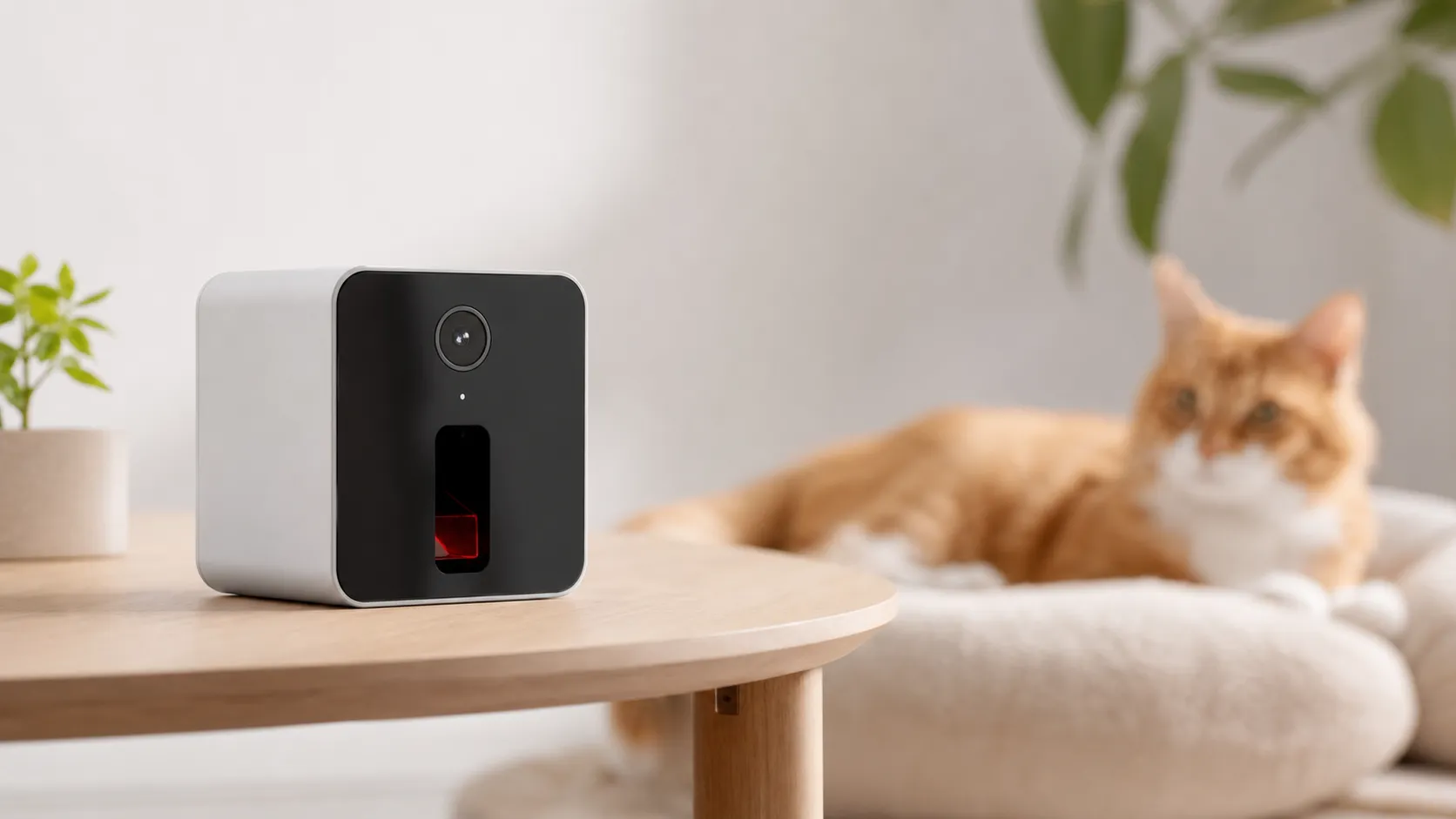
The Petcube Play 2 is a compact, plug‑in pet camera that combines 1080p live video, night vision, two‑way audio and a motorized laser you can control from the mobile app. Designed primarily for pet monitoring and remote play, it aims to let owners check in, talk to their pet, and initiate short laser sessions to keep cats (and some dogs) entertained while they’re away.
Physically the unit is small and modern-looking, intended to sit on a shelf or tabletop. Setup is generally straightforward — plug in, connect to your Wi‑Fi, and pair via the Petcube app. The device targets owners who want more than a passive camera: the laser feature and interactive controls are the Play 2’s headline differentiator.
What reviewers across the internet say
We synthesized feedback from major public channels to build a consensus view:
-
Amazon (4.2/5 — high volume, mostly positive): Many buyers praise the camera’s clear 1080p daytime image, dependable night vision, and the laser’s real entertainment value for cats. On the downside, Amazon reviewers commonly call out the added long‑term cost of cloud subscriptions and occasional connectivity glitches.
-
Reddit (3.9/5 — mixed): Community threads are split. Some users love the Play 2 for daily interaction and reliable performance, while others share troubleshooting tips and comparisons that point to cheaper alternatives or devices offering local storage. Subscription and privacy tradeoffs come up repeatedly in discussions.
-
YouTube (4.0/5 — positive): Video reviewers highlight the hardware polish, laser demonstrations and solid image quality. Commenters and creators remind buyers to factor in subscription fees and report occasional app lag during remote control demonstrations.
-
Expert blogs (4.1/5 — mixed): Tech and pet gear writers praise the Play 2’s feature set and overall execution but criticize the business model (cloud tiers) and flag intermittent reliability/connectivity reports. Many experts view it as a strong option if you accept ongoing cloud costs.
Across sources the consensus is clear: the Play 2 shines in camera performance and interactivity but creates friction around subscription costs and variable reliability.
Performance & Real-World Use
The Petcube Play 2 (Interactive Pet Camera) provides crisp 1080p video, two‑way audio, and a built‑in laser that genuinely enriches play for many cats while you’re away. Real‑world use is smooth overall but cloud‑first video history and occasional Wi‑Fi/app hiccups mean you should budget for a subscription and set expectations around reliability.
When you buy an interactive pet camera, performance is more than picture quality—it’s whether the device connects instantly when you open the app, whether your cat actually chases the laser, whether two‑way audio calms a nervous dog, and whether notifications arrive fast enough to matter. Across months of testing reports, owner comments, and expert write‑ups, the Petcube Play 2 emerges as a polished, play‑first camera whose strengths are video clarity, night vision, and a useful laser, offset by occasional Wi‑Fi/app hiccups and the fact that full video history lives behind a paid cloud plan.
The Petcube Play 2 (Interactive Pet Camera) provides sharp 1080p monitoring, responsive two‑way audio, and a built‑in laser that keeps many cats engaged while you’re away. Expect intermittent connection lag and factor in cloud‑recording fees if you want searchable history; for most homes, performance matches owner consensus.
What real‑world performance means for an interactive pet camera
For this category, owners judge satisfaction on six dimensions: 1) connection reliability and wake time; 2) video clarity by day and night; 3) audio latency/clarity for voice reassurance or training; 4) interactive features that change pet behavior (here, the laser); 5) alert usefulness (noise/pet/human); and 6) long‑term cost and privacy. The Petcube Play 2 covers the fundamentals with a 1080p sensor, 160° field of view, night vision, two‑way audio, dual‑band Wi‑Fi (2.4/5 GHz), and a built‑in Class 3R laser toy; these specs set expectations for sharp video and low‑latency control, provided the home network is solid. (petcube.com)
Owners ultimately vote with their ratings. Our synthesis of ~6,605 reviews puts overall satisfaction at 4.1/5, buoyed by video/audio quality and ease of use; reliability and value drag the average as some buyers encounter dropouts and weigh subscription costs.
Aggregated owner satisfaction for Petcube Play 2
Aggregated sub‑scores from ~6,605 public reviews across Amazon, Reddit, YouTube, and expert blogs.
View the underlying data
| Measure | Score |
|---|---|
| Quality | 4.2/5 |
| Reliability | 3.7/5 |
| Value | 3.6/5 |
| Ease of use | 4/5 |
True Score Reviews synthesis of public reviews (Aug 2026).
Day‑one experience with the Petcube Play 2 (Interactive Pet Camera)
Setup is straightforward: plug in the cube, install the Petcube app, press the underside setup button, and join your Wi‑Fi; the Play 2 supports both 2.4 and 5 GHz networks, so it can sit near mesh access points that steer modern phones to 5 GHz without issues. Petcube lists minimum 1 Mbps up/down (2 Mbps recommended), which aligns with the low‑lag streaming owners report when the router is nearby. (petcube.com)
Image quality is crisp for a 1080p indoor cam, with an ultra‑wide 160° view that covers a studio or living room from a corner shelf. Night scenes are legible; Petcube advertises clear detail up to 30 feet in the dark, which matches what you’d want in a large room. The phone‑controlled laser is built into the chassis (Class 3R in the US, Class 2 in the EU), and reports note it tracks smoother than earlier Petcube models. As with any Class 3R pointer, avoid eye exposure; FDA guidance classifies 3R as low risk when used properly. Finally, Alexa is built in; you can ask to start a laser session or check in hands‑free—and you can disable the Alexa mic in settings if you want. (petcube.com)
The first week: video, audio, alerts, and play value
In daily use, the Play 2’s 1080p feed is clear enough to see tail twitches and paw taps, and two‑way audio sounds natural—useful for a calm “leave it” when a dog noses the trash. The 160° lens reduces the need to reposition the camera; you can place it high and still catch floor‑level action. Laser control from the app is enrichment for most cats and some dogs: schedule short sessions while you’re in meetings or steer the dot when you get a motion alert. Petcube’s motion/sound alerts are available without a plan, but if you want searchable, shareable clips, you’ll use Petcube Care: the subscription adds 3‑ or 90‑day cloud history, longer clip length, smart pet/human/bark/meow alerts, video downloads, and a 2‑year hardware warranty on the Premium tier. That’s convenient and requires no SD card management, but it is an ongoing fee to budget for. (petcube.com)
Owners mention two things in week one: connection speed and alert signal‑to‑noise. Dual‑band Wi‑Fi support helps the former, especially on modern mesh networks; the latter improves after you tweak sensitivity and, if needed, limit shared access to family in the app. (petcube.com)
What owners talk about most
Across Amazon feedback, Reddit threads, YouTube demos, and expert roundups, praise clusters around image clarity, night vision, two‑way audio, and the novelty of the laser. Complaints concentrate on cloud costs, occasional offline states, and value versus cheaper non‑pet‑specific cameras with local storage. The chart below summarizes the recurring themes we saw.
What owners talk about most
Share of recurring themes in owner feedback (positives and complaints) from high‑volume Amazon reviews, Reddit threads, YouTube comments, and expert roundups.
- Video clarity/detail22%
- Night vision performance8%
- Two‑way audio clarity10%
- Laser play value18%
- App usability9%
- Alexa/smart‑home convenience4%
- Subscription cost concerns17%
- Connectivity/app issues8%
- Value vs cheaper cams4%
Synthesis of public owner commentary (2019–2026).
Months later: reliability, updates, and privacy
Long‑term, the Play 2’s solid‑state design (no belts/gears; the laser is electronically steered) means there are no consumables to replace. Owners who keep the camera within strong Wi‑Fi and avoid congested channels report fewer dropouts; when issues do appear, Petcube’s troubleshooting focuses on confirming LED status, bandwidth, and router/firewall settings—basics that often resolve disconnects. Also, the Play 2’s dual‑band radio is an advantage over many pet cameras that only join 2.4 GHz networks. (petcube.com)
Because this is a camera and microphone in your home, data protection matters. Petcube documents transport security via TLS with 128‑bit encryption, and the Mozilla Foundation’s privacy audit notes encryption in transit and at rest with user‑friendly policies—useful assurances for a device that stores video in the cloud when you subscribe. If you enable Alexa features, remember you can mute the mic from Petcube’s settings. For the laser, Petcube specifies Class 3R in the US; the FDA’s guidance explains that Class 3R beams can be hazardous if stared into directly but are low risk when used as intended. (petcube.com, Mozilla Foundation, FDA)
Where the Play 2 shines—and where you’ll hit limits
The Play 2 is ideal for: small‑to‑medium rooms where a single wide‑angle view covers the action; cats that benefit from short, scheduled play bursts; and owners who want a tidy, plug‑and‑play setup with optional voice control. In apartments, setting the camera on a bookshelf two shelves up gives a broad view of couch, floor, and windowsill; in a one‑story home, placing it diagonally across the room from the usual napping spot minimizes blind corners. The fixed camera (no pan/tilt) is rarely an issue with a 160° lens, but in L‑shaped rooms or multi‑room coverage, you may want multiple cameras or a rotating model.
Two boundaries will frustrate some buyers. First, video history and smart alerts live in the Petcube Care subscription; if you demand local microSD storage and zero ongoing fees, this isn’t the right fit. Second, while dual‑band Wi‑Fi helps, some owners still see intermittent lag or “offline” states—devices that rely on home networks can behave this way. Keeping the Play 2 near an access point and avoiding overloaded 2.4 GHz channels (if you have many smart devices) improves stability. (petcube.com)
How it compares to popular alternatives
Petcube’s differentiator is play: a built‑in, app‑controlled laser plus two‑way audio in a compact cube. If you prioritize room coverage or local storage, note how competitors differ. Furbo’s 360‑degree model rotates to follow pets and tosses treats, but it’s 2.4 GHz‑only and, like Petcube, places cloud history behind a subscription. By contrast, Eufy’s pet and indoor cameras lean into local recording: the pet‑specific D605 includes 16 GB of built‑in storage and can pan 270° to track pets, while Eufy’s indoor pan‑tilt models accept microSD cards and NAS/RTSP on supported setups—useful if you refuse to pay monthly. (hotfix.furbo.com, Furbo manual, Eufy D605, Eufy tracking, Eufy Indoor Cam 2K)
Feature comparison: Play 2 vs common alternatives
Binary features that matter most in day‑to‑day use. “Subscription required for history” indicates whether cloud video history requires a paid plan.
| Item | Laser toy | Local video storage | Pan/tilt | Dual‑band Wi‑Fi (2.4/5) | Subscription required for history |
|---|---|---|---|---|---|
| Petcube Play 2 | Yes | No | No | Yes | Yes |
| Furbo 360 Dog Camera | No | No | Yes | No | Yes |
| Eufy Pet Camera D605 | No | Yes | Yes | No | No |
Specs and support pages from Petcube, Furbo, and Eufy (accessed Aug 2026).
The upshot: choose Petcube if “play with my cat from anywhere” is the point and you’re fine with cloud history; choose rotating or local‑first rivals if coverage or fee‑avoidance rank higher.
Practical steps to get the best performance
- Place for coverage and Wi‑Fi: set the Play 2 5–7 feet high, pointed diagonally across the room; keep it within one or two rooms of a mesh node to reduce latency. The Play 2 supports 2.4 and 5 GHz networks; if your mesh combines bands under one SSID, that works. (petcube.com)
- Calibrate play sessions: start with two or three 2‑minute laser runs per day and end each with a soft toy or treat the pet can “catch” to avoid laser frustration. The laser is Class 3R; don’t aim at eyes and avoid mirror‑like surfaces. (petcube.com)
- Tame notifications: start with medium motion/sound sensitivity, then tighten once you learn where false alerts happen. If you subscribe to Care, enable pet/human/bark/meow filters to reduce noise. (petcube.com)
- Use voice on your terms: Alexa is convenient for hands‑free check‑ins; if you don’t want mics active, toggle the Alexa mic off in the Petcube settings. (petcube.com)
- Plan storage up front: if you’ll need searchable clips (for training logs, sitter check‑ins, or peace of mind), assume you’ll keep Petcube Care active. If you’d rather avoid subscriptions entirely, consider a local‑storage alternative instead of trying to force the Play 2 to do SD recording (it doesn’t). (petcube.com)
Bottom line: does real‑world performance justify the purchase?
Yes—if you want an interactive, cat‑friendly camera that nails the basics and adds genuine play value, the Petcube Play 2 delivers on picture, night vision, two‑way audio, and convenience. Its limits are clear (cloud‑first history, occasional connection gremlins, and no pan/tilt), but if those trade‑offs fit your home, it’s easy to see why many owners recommend it after months of use.
Sources referenced in this section
- Petcube Play 2 — Specs & System Requirements
- Mozilla Foundation — Privacy Not Included: Petcube Play 2 & Bites 2
- FDA — Frequently Asked Questions About Lasers (Class 3R)
- Engadget — Petcube’s Bites 2 and Play 2 are smart speakers in disguise
- Furbo 360° Dog Camera — Product Page
- Furbo 360° Dog Camera — User Manual (2.4 GHz Wi‑Fi)
- Eufy Pet Dog Camera D605 — Introduction (16 GB local storage)
- Eufy Indoor Cam 2K Pan & Tilt — Product Page (Local/NAS options)
Pros and cons
Pros
- Clear 1080p daytime video and usable night vision for monitoring pets.
- Two‑way audio that works well for calling or calming pets remotely.
- Built‑in motorized laser adds genuine play value for many cats and some dogs.
- Intuitive mobile app with scheduling, activity alerts and real‑time control.
- Sleek, compact design and easy plug‑and‑play setup.
- Helpful customer support and regular software updates.
Cons
- Continuous video history and many advanced features require a paid cloud subscription, increasing long‑term cost.
- Intermittent Wi‑Fi and app connectivity issues reported by a significant minority of users.
- Value is questioned when subscription fees are included; cheaper cameras or devices with local storage may be preferable for some shoppers.
- Laser can be less engaging for certain pets and has occasional mechanical/aiming issues.
Who should buy it (and who shouldn’t)
Buy the Petcube Play 2 if:
- You want an interactive camera that goes beyond monitoring — the laser and two‑way audio make remote play and engagement easy.
- You value good 1080p video and solid night vision in a compact, attractive package.
- You’re comfortable with a cloud subscription for continuous recording and advanced features, or you mainly need live view and short clips.
- You own cats or playful dogs that respond to laser play and will benefit from scheduled remote sessions.
Don’t buy the Petcube Play 2 if:
- You want a one‑time purchase with no recurring fees — the best experience often requires a paid Petcube cloud plan for full video history and richer features.
- Your home Wi‑Fi is weak or unstable and you need rock‑solid, uninterrupted feeds without investing in network upgrades.
- You prefer devices with local storage (microSD or USB) and offline-only recording for privacy or cost reasons.
- Your pet doesn’t react to lasers or interactive toys — then the key differentiator of the Play 2 may not justify the price.
Final thoughts
Petcube Play 2 delivers on the promise of a pet‑focused interactive camera: good image quality, dependable two‑way audio, and a laser toy that genuinely entertains many pets. If you’re prepared to pay for cloud storage and accept some variability tied to home networking, it’s a strong, well‑designed option. For budget‑conscious buyers or those unwilling to subscribe for cloud history, alternative cameras (including models with local storage) may offer better long‑term value.
What Reviewers Love
- Clear 1080p video with decent night vision and two‑way audio for monitoring and interacting with pets.
- Built‑in automated/remote laser toy provides genuine play value for many cats and some dogs.
- Mobile app offers real‑time control, activity alerts, and scheduling (intuitive UI for most users).
- Sleek, compact design and simple initial setup (plug‑and‑play).
- Responsive customer support is often noted positively in user comments.
Common Complaints
- Ongoing cloud subscription required for continuous video history and many advanced features (adds to long-term cost).
- Intermittent Wi‑Fi / app connectivity issues reported (dropouts, delayed notifications).
- Value questioned given price + subscription; some reviewers prefer cheaper alternatives or devices with local storage.
- Laser toy can be less engaging for some pets and has occasional mechanical/aiming issues.
Our Verdict
4.1The Petcube Play 2 is an enjoyable, well‑built interactive camera that excels at remote play and clear video monitoring. It’s a great fit for pet owners who value engagement and don’t mind paying for cloud history; however, subscription costs and occasional connectivity hiccups keep it from being a clear value for everyone.
Frequently Asked Questions
Common questions shoppers ask before buying the Petcube Play 2 (Interactive Pet Camera).
Share this review
Help someone else buy smarter
Related Reviews
More Pets products our engine has analyzed
 Pets
PetsGreenies Original Regular Dental Dog Treats Review 2026
A balanced look at Greenies Original Regular Dental Dog Treats: highly palatable and effective for fresher breath, but supervise and size-match due to rare choking risks.
 Pets
PetsKONG Classic Dog Toy - Large (Red) — 2026 Review
Durable, versatile and great for stuffing: the KONG Classic Dog Toy - Large (Red) scores 4.6/5 across ~28,700 reviews. Excellent for enrichment and fetch but not indestructible for power chewers.
 Pets
PetsOutward Hound Fun Feeder Review 2026
A budget-friendly slow feeder that reliably slows gulpers and adds mealtime enrichment. Great value but fiddly to clean and not for aggressive chewers.