Raspberry Pi 4 Model B (8GB) Review 2026
At a Glance
Pros
- Significant performance uplift and 8GB of RAM enables true multitasking, light desktop use, and container workloads.
- Good I/O: Gigabit Ethernet, USB 3.0 ports, and dual micro‑HDMI (up to 4K) increase real-world utility.
- Large community, extensive documentation, and wide accessory/software ecosystem.
Cons
- Runs hot under sustained CPU/GPU load; many reviewers recommend active cooling to avoid throttling.
- No onboard eMMC — storage performance depends on microSD card quality and can be a bottleneck.
- Requires a good USB‑C power supply and quality cables; some users report issues with inadequate chargers.
Rating Breakdown by Source
Read the latest 25 positive & negative Amazon reviews →
Read the latest 25 positive & negative Reddit reviews →
Read the latest 25 positive & negative YouTube reviews →
Read the latest 25 positive & negative Expert blogs reviews →
This review is an editorial synthesis of publicly available review data and reported user experiences across the internet. Scores reflect our independent aggregation methodology, not verified individual purchases. We may earn a commission if you buy through our links, at no cost to you.
Score Breakdown
Where the Reviews Come From
Read the latest 25 positive & negative Amazon reviews →
Read the latest 25 positive & negative Reddit reviews →
Read the latest 25 positive & negative YouTube reviews →
Read the latest 25 positive & negative Expert blogs reviews →
Click any source above to browse the latest 25 positive and negative reviews from that platform.
Raspberry Pi 4 Model B (8GB)
See current price, deals and availability on Amazon
Quick verdict
The Raspberry Pi 4 Model B (8GB) is the most capable Pi to date for general-purpose desktop use, light server duties, and multi-container projects — and it earns a strong aggregate score (4.7/5 from ~60,700 reviews). If you want a compact, low-power single-board computer with robust I/O and a massive community, the 8GB Pi 4 delivers — but you should plan for cooling, a reliable USB‑C power supply, and decent storage to get the best experience.
What is the Raspberry Pi 4 Model B (8GB)?
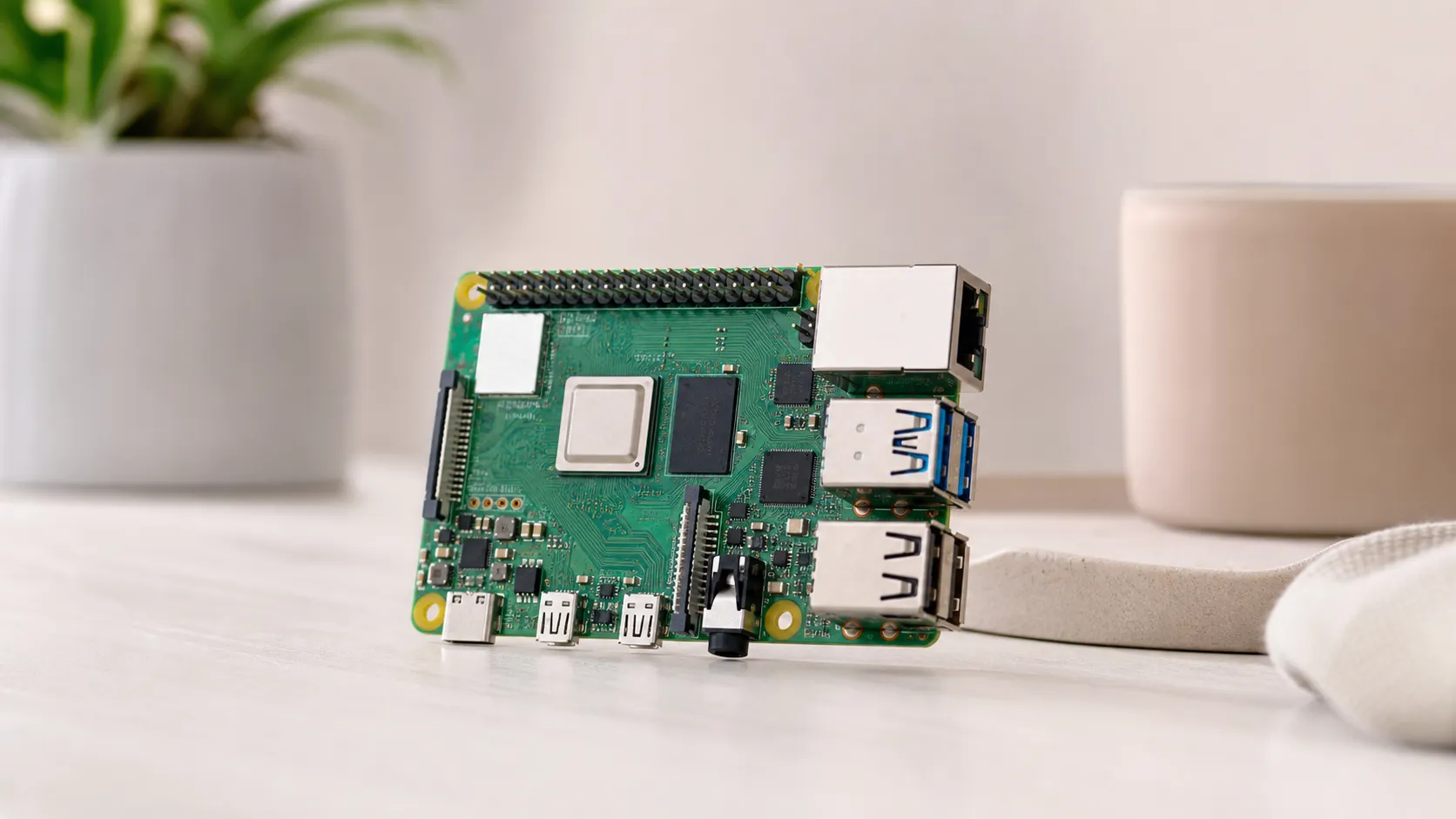
The Raspberry Pi 4 Model B (8GB) is a single-board computer from the Raspberry Pi Foundation that pairs a quad-core Broadcom ARM CPU with 8GB of LPDDR4 RAM. Compared with earlier Pi models, the Pi 4 brings faster CPU clocks, significantly more memory (the 8GB option being the top-tier SKU), USB 3.0 ports, true Gigabit Ethernet (via USB 2.0 bridge improvements), and dual micro‑HDMI outputs capable of driving 4K displays.
Physically small but functionally flexible, the Pi 4 is designed for hobbyists, educators, and makers — and with the 8GB RAM option it increasingly appeals to power users who want a budget-friendly desktop, low-cost server, or an always-on edge device that can run multiple containers or VMs (lightweight ones).
What reviewers across the internet say
Across major platforms the overall consensus is positive but pragmatic. Aggregated data shows an overall rating of about 4.7/5 from roughly 60,700 reviews.
- Amazon reviewers are overwhelmingly positive (approx. 4.8/5), praising the value-for-performance and calling out the 8GB model as a practical low-cost desktop or server. Common shopper notes emphasize the need to buy a quality power supply and a good microSD card or external SSD for best results.
- Reddit discussions paint a more nuanced picture (approx. 4.3/5). Enthusiasts love the hacking potential and the Pi’s versatility but frequently debate thermal management, power quirks, and trade-offs compared to x86 single-board computers or ARM boards with onboard eMMC storage.
- YouTube reviewers (approx. 4.5/5) emphasize benchmarks and real-world tests — desktop responsiveness, media playback, and networking. Video reviewers routinely recommend active cooling and point out that storage and power remain practical bottlenecks unless addressed.
- Expert blogs and technical write-ups (approx. 4.6/5) highlight the Pi 4’s step-change in CPU/RAM and I/O, calling it a practical SBC for many applications while noting thermal throttling during sustained workloads and the earlier USB‑C cable/power detection quirks (the hardware issue around certain cables was widely discussed and is now resolved in official guidance).
Together these sources form a clear pattern: strong performance uplift and utility tempered by thermal and power considerations.
Performance & real-world use
Real-world performance depends heavily on what you ask of the board and how you configure it.
-
Desktop use: With 8GB of RAM the Pi 4 can run Raspberry Pi OS and other lightweight Linux desktops fluidly for web browsing, document editing, and light multitasking. Expect good responsiveness for single-user productivity; heavy browser tabs, large-sized web apps, or many background containers will expose the Pi’s CPU and storage limits sooner than on a midrange laptop.
-
Media and displays: Dual micro‑HDMI outputs (up to 4K) and improved GPU performance make the Pi 4 viable for media playback, digital signage, and dual-monitor setups. 4K at 30Hz or 60Hz (depending on configuration and video codec) works in many scenarios but proper cooling helps maintain sustained playback performance.
-
Servers and containers: The 8GB RAM opens realistic small-server roles: home NAS front-ends, media servers (Plex/Emby for modest transcodes), Docker containers, or edge compute nodes. For storage-heavy or I/O-sensitive workloads, attach a USB 3.0 SSD — microSD is adequate for OS and light use but is the usual bottleneck for throughput and longevity.
-
Thermal behavior and throttling: Numerous reviewers report that under sustained CPU- or GPU-heavy loads the Pi 4 can run hot and throttle to protect the SoC. The practical takeaway: plan for a heatsink + active fan or a case designed for airflow if you expect heavy or continuous workloads.
-
Power and peripherals: Use a reliable 5V USB‑C power supply capable of 3A (official Raspberry Pi recommended supply or equivalent). Cheap chargers and low-quality cables can cause brownouts, instability, or peripheral power problems — reviewers frequently call this out as an avoidable pain point.
Pros and cons
Pros
- Major performance uplift versus earlier Pi models; 8GB RAM enables real multitasking and container workloads.
- Strong I/O: Gigabit Ethernet, two USB 3.0 ports, and dual micro‑HDMI expand practical uses (desktop, media, edge applications).
- Low power draw for its class — good for always-on use like servers or kiosks.
- Large, active community and extensive documentation; accessories and HATs are abundant and generally pin-compatible.
- Pin-compatible GPIO preserves broad maker ecosystem investments.
Cons
- Runs hot under sustained loads; many reviewers recommend active cooling to avoid throttling.
- No onboard eMMC — storage performance and longevity depend on microSD card quality or external SSD choice.
- Requires a proper USB‑C power supply and quality cable; inadequate chargers cause issues.
- Higher price than 2GB/4GB Pi variants and some ARM competitor boards — not always the best value for strictly single-purpose projects.
Tips to get the best experience
- Use the official 5V 3A USB‑C power supply or an equivalent high-quality supply and cable.
- Replace the microSD boot medium with a high-quality A1/A2-rated UHS‑I card (V30 or better) for faster random I/O, or boot from a USB 3.0 SSD for the best storage performance.
- Invest in a case with active cooling or pair a low-profile heatsink with a fan if you plan sustained workloads.
- Keep software up to date and use lightweight desktop environments or container orchestration tuned for limited CPU headroom.
Who should buy it (and who shouldn’t)
Who should buy it
- Makers and educators who want a powerful, flexible SBC with broad community support and accessory compatibility.
- Home-server and edge-compute users who need more RAM for containers, caching, or lightweight VMs and can accept the Pi’s thermal/power trade-offs.
- Anyone wanting an inexpensive, low-power secondary desktop for web browsing, editing, and media playback with some tuning.
Who shouldn’t buy it
- Users who need sustained high CPU/GPU throughput without throttling and can’t add active cooling; a small x86 NUC or a dedicated mini-PC will be a better choice for long-running heavy workloads.
- People who require high-performance, low-latency storage out of the box — boards with onboard eMMC or a small SSD-equipped mini-PC will offer better raw storage performance.
- Buyers looking for the absolute cheapest Pi project board where 2GB/4GB variants cover the intended use; the 8GB SKU is an extra cost that’s only necessary if you need the additional memory.
Final thoughts
The Raspberry Pi 4 Model B (8GB) is the most versatile Pi for 2026-minded hobbyists and makers who want to run more demanding workloads without stepping up to a full desktop PC. Its combination of increased RAM, modern I/O, and a huge ecosystem makes it a practical choice for light desktop use, compact servers, and many edge applications — as long as you plan for cooling, a quality power supply, and appropriate storage.
What Reviewers Love
- Significant performance uplift and 8GB of RAM enables true multitasking, light desktop use, and container workloads.
- Good I/O: Gigabit Ethernet, USB 3.0 ports, and dual micro‑HDMI (up to 4K) increase real-world utility.
- Large community, extensive documentation, and wide accessory/software ecosystem.
- Low power draw for the performance class — good for always-on projects (servers, kiosks, edge nodes).
- Pin-compatible GPIO and HAT ecosystem make it easy to reuse existing Raspberry Pi projects/hardware.
Common Complaints
- Runs hot under sustained CPU/GPU load; many reviewers recommend active cooling to avoid throttling.
- No onboard eMMC — storage performance depends on microSD card quality and can be a bottleneck.
- Requires a good USB‑C power supply and quality cables; some users report issues with inadequate chargers.
- Higher price compared with 2GB/4GB Pi variants and some ARM SBC competitors for certain use-cases.
Our Verdict
4.7The Raspberry Pi 4 Model B (8GB) is an excellent, versatile single-board computer that meaningfully expands what a Pi can do — lighter desktop workloads, small servers, and multi-container projects all benefit from 8GB of RAM. It’s not perfect for sustained high-load tasks without active cooling or for workloads that demand top-tier built-in storage, but for most maker, education, and light production uses it’s a compelling, community-backed value.
Frequently Asked Questions
Common questions shoppers ask before buying the Raspberry Pi 4 Model B (8GB).
Share this review
Help someone else buy smarter
Related Reviews
More Tech & Gadgets products our engine has analyzed
 Tech & Gadgets
Apple MacBook Air (13-inch, M2) Review — 2026
A slim, quiet, and battery‑friendly choice for students and professionals. The MacBook Air (13‑inch, M2) excels at everyday speed and display quality but limits heavy sustained workloads and ports.
 Tech & Gadgets
Google Pixel Buds Pro Review 2026
A polished, Android-first pair of true wireless earbuds with very good ANC, comfy fit, and strong battery life—great value for most buyers in 2026.
 Tech & Gadgets
Sony WH-1000XM5 Review 2026 — ANC, Comfort & Value
Sony WH‑1000XM5: class‑leading ANC, exceptional comfort and long battery life — great for travel and calls, though sound tuning and a few durability reports divide opinions.