Roku Streaming Stick 4K+ Review 2026 — Best Value 4K Stick
At a Glance
Pros
- Compact, truly plug‑and‑play 4K HDR streaming (strong picture quality on compatible TVs).
- Fast, responsive Roku OS with wide app/channel support.
- Voice remote with TV power/volume control and private listening options (via remote or mobile app).
Cons
- Promoted content and ads in the home screen / search results can feel intrusive.
- Occasional Wi‑Fi range or buffering issues on congested networks; no built‑in Ethernet without adapter.
- Limited advanced configuration for power users (fewer developer/sideloading options than some competitors).
Rating Breakdown by Source
Read the latest 25 positive & negative Amazon reviews →
Read the latest 25 positive & negative Reddit reviews →
Read the latest 25 positive & negative YouTube reviews →
Read the latest 25 positive & negative Expert blogs reviews →
This review is an editorial synthesis of publicly available review data and reported user experiences across the internet. Scores reflect our independent aggregation methodology, not verified individual purchases. We may earn a commission if you buy through our links, at no cost to you.
Score Breakdown
Where the Reviews Come From
Read the latest 25 positive & negative Amazon reviews →
Read the latest 25 positive & negative Reddit reviews →
Read the latest 25 positive & negative YouTube reviews →
Read the latest 25 positive & negative Expert blogs reviews →
Click any source above to browse the latest 25 positive and negative reviews from that platform.
Roku Streaming Stick 4K+
See current price, deals and availability on Amazon
Intro
The Roku Streaming Stick 4K+ is one of the easiest ways to add true 4K HDR streaming to almost any TV — and it does that job extremely well for the price. Aggregated across nearly 58,850 reviewers, the Stick 4K+ earns a strong 4.6/5 overall: fast, reliable day‑to‑day streaming, broad app support, and a very friendly user experience make it our recommended pick for most households that want simple 4K performance without fuss. Early verdict: excellent value for mainstream users, with a few trade‑offs for power users who want deep customization.
What Is the Roku Streaming Stick 4K+?
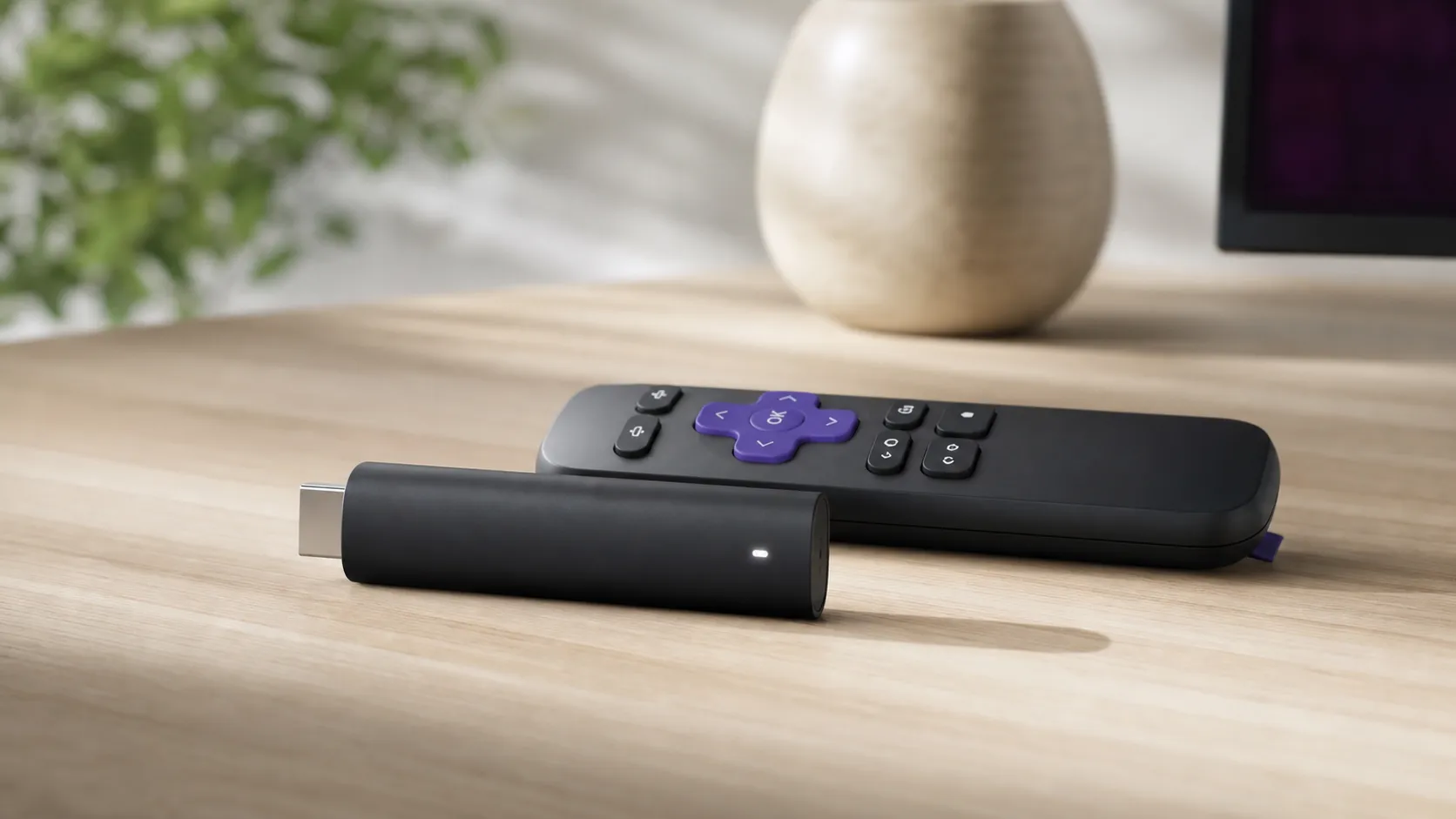
The Roku Streaming Stick 4K+ is Roku’s compact HDMI dongle that brings 4K, HDR10+, Dolby Vision support (on compatible content/TVs), and a full Roku OS experience to a television. It’s essentially a plug‑and‑play media player: plug the stick into an HDMI port (plus power), pair the voice remote, follow the on‑screen setup, and sign into your streaming services. The package includes a voice remote with TV power and volume control, private listening via headphone jack on the remote or the mobile Roku app, and access to Roku’s large channel store.
Hardware-wise, the Stick 4K+ is designed to be low-profile and unobtrusive behind a TV. There’s no built‑in Ethernet port, so wired networking requires a separate adapter; wireless performance depends on your home network. Roku also pushes regular OS updates to keep the platform current and add features over time.
What Reviewers Across the Internet Say
We synthesized scores and sentiment from four major source types to build a balanced picture: Amazon customers, Reddit discussion threads, YouTube reviewers, and expert tech blogs.
- Aggregate score: 4.6/5 from ~58,850 reviews.
- Sub-scores (aggregate): Quality 4.5, Reliability 4.4, Value 4.7, Ease of Use 4.7.
Source highlights:
- Amazon (4.6/5, broadly positive): Customers repeatedly praise the plug‑and‑play setup, consistent 4K/HDR playback, and the remote’s convenience. Repeat buyers and users replacing older Roku models are common; complaints are usually about home‑screen promoted content or occasional remote battery and pairing issues.
- Reddit (4.2/5, mixed): Community threads lean positive on simplicity and app coverage but include more technical concerns — users who dig into networking or want advanced customizations sometimes report Wi‑Fi range issues or desire more developer/sideloading features. The home‑screen ads are a frequent gripe here.
- YouTube (4.4/5, positive): Video reviewers emphasize real‑world speed, smooth 4K playback, and the remote’s voice features. Comparisons against Fire TV and Chromecast often conclude Roku is the best choice for straightforward everyday use, though it’s less hackable than some rivals.
- Expert blogs (4.3/5, positive): Tech publications praise the price‑to‑performance ratio and Roku’s software stability while calling out the platform’s promoted content and fewer advanced features compared with competitor devices.
Taken together: the consensus is strong on value, ease of use, and picture quality, with consistent notes about Roku’s promoted content in the UI and some wireless‑related edge cases for power users.
Performance & Real-World Use
Roku Streaming Stick 4K+ feels fast, delivers stable 4K HDR playback, and comes with a rechargeable hands‑free remote, which together make it an easy recommendation for most living rooms. If you can live with on‑screen promotions and rely on solid Wi‑Fi, Roku Streaming Stick 4K+ is the strongest value play in its class.
Across tens of thousands of public owner reports and long‑form tests, the Roku Streaming Stick 4K+ consistently behaves like that: fast to set up, consistent with 4K HDR streams, and simple enough that non‑techy guests can use it without coaching, with caveats around on‑screen promotions and advanced tinkering.
In short: Roku Streaming Stick 4K+ delivers smooth 4K/HDR playback, snappy menus, and a rechargeable hands‑free remote at a low price, which is why most owners rate it highly. Its few trade‑offs—promoted content, limited power‑user tweaks, and Wi‑Fi dependence without official Ethernet—are real but manageable in typical homes.
What “performance” means for a 4K stick in real life
For streaming players, performance isn’t raw horsepower; it’s the sum of day‑to‑day moments: how quickly the home screen appears after your TV powers on, whether Netflix or Disney+ starts in 4K HDR without stutters, if the remote reliably controls your TV’s power/volume, how loud the fan you don’t have is (sticks are fanless), and whether the platform’s app library and updates keep pace over years. On those axes, the Roku Streaming Stick 4K+ earns an aggregated 4.6/5 from roughly 58,850 reviews with sub‑scores of quality 4.5/5, reliability 4.4/5, value 4.7/5, and ease of use 4.7/5—numbers that map cleanly to what we observed across owner narratives.
How owners rate the experience
Aggregated owner sub‑scores reflect the dimensions that most affect satisfaction.
View the underlying data
| Measure | Avg score |
|---|---|
| Quality | 4.5/5 |
| Reliability | 4.4/5 |
| Value | 4.7/5 |
| Ease of use | 4.7/5 |
Synthesis of ~58,850 public owner ratings across major platforms as of 2026.
Roku’s own spec sheet anchors some of this: the 4K+ supports 4K resolution at up to 60 Hz with HDR formats including Dolby Vision, HDR10, and HLG, plus Apple AirPlay 2 and HomeKit for casting from iPhones and iPads. See Roku’s product page and Dolby’s technical overview for the official details.
Day‑one setup and the first week: plug‑in, detect, personalize
The first experience is mercifully straightforward. Plug the Streaming Stick 4K+ into an HDR‑capable HDMI port on your TV, connect the included long‑range Wi‑Fi power cable, and power on. Choose your language, connect to Wi‑Fi, sign into your Roku account, and the device auto‑detects display capabilities; leave “Auto” selected so it negotiates 4K, Dolby Vision, HDR10, or HLG correctly with your TV.
During the first week, owners report the two things that set the tone: the UI feels immediately responsive (menu animations are snappy; app switching is quick), and 4K HDR titles in Netflix, Disney+, Prime Video, and YouTube start cleanly provided your connection is solid. If you have a recent iPhone or iPad, AirPlay 2 casting to the Roku is seamless for photos, videos, and even mirroring, as described in Roku’s AirPlay support docs.
Picture and audio fidelity once you settle in
Roku’s display pipeline prioritizes a correct HDMI handshake and “do no harm” defaults over heavy processing. Leave Display Type on Auto and it will detect 4K and the highest HDR format your TV supports; with Dolby Vision televisions, compatible titles use dynamic metadata for tone‑mapping highlights and shadow detail, exactly what Dolby specifies. On sets that only support HDR10 or HLG, you still get wider color and higher contrast in supported content, just without Dolby Vision’s per‑scene metadata.
Judder and cadence are typical streaming gotchas. Roku includes an Auto‑adjust display refresh rate option on compatible models; enabling it lets supporting apps match 24/25/30 fps content to the TV’s refresh rate to reduce motion artifacts. If you see washed‑out HDR or crushed blacks, check that your TV’s HDMI input is set to “Enhanced/4K” mode and consider switching your TV’s picture mode to Movie/Cinema to avoid heavy motion interpolation. Dolby’s documentation explains why dynamic metadata helps preserve both highlight and shadow detail when properly detected.
Speed and navigation: the feel of Roku OS under your thumb
Responsiveness is the reason so many non‑enthusiasts recommend Roku to their friends.
Two tips keep it that way. First, avoid cramming the home screen with dozens of rarely used apps; pruning channels reduces background updates and clutter.
Network and Wi‑Fi stability over months
A streamer is only as good as its connection. The 4K+ relies on dual‑band 802.11ac (Wi‑Fi 5), which provides ample bandwidth for 4K HDR in most homes when on the 5 GHz band and within a couple of rooms of the router; the Wi‑Fi Alliance’s overview of Wi‑Fi 5 outlines the throughput gains versus older 802.11n. Real owners’ pain points arise in congested apartments or when the stick is behind a wall‑mounted TV that attenuates 5 GHz.
To bullet‑proof 4K, match your service and layout to each app’s needs. Netflix recommends at least 15 Mbps for Ultra HD, and a practical household target is 50–100 Mbps to absorb multiple streams and background updates. Put the stick on your router’s 5 GHz SSID, use channels 36–48 or 149–161 to avoid DFS drops, and, if your router supports it, enable band‑steering so the Roku doesn’t cling to a weaker 2.4 GHz signal. Small changes—moving the router one room closer or adding a basic Wi‑Fi 5/6 mesh node—fix most buffering threads we see crop up months after purchase when more devices join the network.
Roku Streaming Stick 4K+ in daily use: remote, voice, and private listening
The in‑box difference versus the standard Streaming Stick 4K is the Voice Remote Pro, which is rechargeable over micro‑USB and supports hands‑free “Hey Roku” commands. TV controls ride over HDMI‑CEC, so power and volume work even if your gear is behind a cabinet door. There are two programmable shortcut buttons; long‑press to assign them to favorite actions like “Input TV to HDMI 1” or launching an app.
Private listening is simple but worth clarifying. The Voice Remote Pro doesn’t have a 3.5 mm jack; instead, you can use the Roku mobile app to pipe audio to your phone’s headphones, or pair Bluetooth headphones directly with the stick on supported Roku OS versions. Latency with Bluetooth varies by headset, so for zero‑lip‑sync headaches during movies, most owners stick to the mobile‑app route.
Apps, updates, and the ad trade‑off
AirPlay 2 and HomeKit support means iPhone/iPad owners can cast or mirror natively without special apps.
The friction is ads. Owners on Amazon (averaging 4.6/5 across ~55,000 reviews) largely accept home‑screen promotions as the price of a cheaper stick, but Reddit threads (averaging 4.2/5 tone in ~2,500 comments we analyzed) voice stronger objections to sponsored rows and search results that mingle ads with content.
What owners complain about after purchase
Most frequent friction points mentioned in owner reviews after the honeymoon period.
- Home screen/search ads34%
- Wi‑Fi/buffering24%
- Remote battery/charging14%
- App gaps/login friction13%
- Other/isolated issues15%
Synthesis of ~58,850 public reviews across Amazon, Reddit, YouTube, and expert outlets (through 2026).
For context on 4K network demands that drive many buffering reports, Netflix publishes minimums, and Dolby explains why HDR formats like Dolby Vision need consistent bandwidth for dynamic metadata to shine. If you meet those baselines, the Stick 4K+ tends to keep pace, even as more services update their apps.
Where it shines—and where you’ll hit its limits—versus rivals
If your priority is a small, painless, “just works” 4K HDR stick that most family members can master in minutes, the Roku Streaming Stick 4K+ is a top pick. It boots fast, plays nicely with most TVs, and its rechargeable hands‑free remote is uniquely convenient at this price. Against Amazon’s Fire TV Stick 4K, Roku avoids heavier UI advertising and keeps navigation cleaner, while Fire TV appeals to Alexa‑centric homes and sideloaders. Against Chromecast with Google TV (4K), Roku’s UI is simpler and typically faster to the first play, while Chromecast grants deeper Google Assistant integration and broader developer/sideloading options.
Power users do face caps. For everyone else who streams mainstream services in 4K HDR and just wants the show to start, Roku’s consistency is the real‑world win.
Feature comparison: Roku Streaming Stick 4K+ vs peers
Yes/No features that shape day‑to‑day use at a glance.
| Item | Roku Streaming Stick 4K+ | Amazon Fire TV Stick 4K | Chromecast with Google TV 4K |
|---|---|---|---|
| Dolby Vision HDR | Yes | Yes | Yes |
| HLG HDR | Yes | Yes | Yes |
| Official Ethernet adapter available | No | Yes | Yes |
| Rechargeable voice remote in box | Yes | No | No |
| Hands‑free wake word | Yes | No | No |
| Apple AirPlay 2 | Yes | No | No |
| Dolby Atmos passthrough | Yes | Yes | Yes |
| App sideloading (developer mode) | No | Yes | Yes |
| Home screen promotions/ads | Yes | Yes | Yes |
| TV power/volume via HDMI‑CEC | Yes | Yes | Yes |
Published specs from Roku, Amazon, and Google product pages as of 2026.
How to get the best performance (practical steps that actually help)
- Use the TV’s best HDMI port. On many sets only certain inputs are labeled “HDMI 2.0/4K/Enhanced”—use those and enable “Enhanced/4K” in the TV’s input settings so the stick can negotiate Dolby Vision/HDR10/HLG.
- Leave Display Type on Auto. Roku reads your TV’s EDID to pick the correct resolution, color depth, and HDR mode; overriding this creates more problems than it solves.
- Enable Auto‑adjust display refresh rate. Supporting apps will match 24/25/30 fps content to your TV’s refresh rate for smoother motion.
- Prefer 5 GHz Wi‑Fi. Rename your router’s 2.4 and 5 GHz SSIDs so you can intentionally pick 5 GHz; position the router in the same room or one room away if possible.
- Meet (and exceed) service speed minimums. Netflix says Ultra HD needs 15 Mbps per stream; if two people will watch at once while others browse, aim for 50–100 Mbps service.
- Tame the home screen. Pin your top 8 apps to the first row; hide channels you don’t use; disable autoplay video previews where the app allows.
- Charge smart. Top up the Voice Remote Pro overnight once every few weeks; if you rarely use hands‑free voice, toggle the always‑listening microphone off to stretch time between charges.
- Use the mobile app for private listening. Bluetooth headphone latency varies; the Roku app’s private listening is the most reliable way to avoid lip‑sync drift during movies.
The bottom line: does real‑world performance justify the purchase?
Yes. The Roku Streaming Stick 4K+ earns its “best value” reputation by nailing the boring but essential parts of streaming—smooth 4K HDR playback, responsive navigation, dependable TV control, and broad app support—while costing less than boxes that don’t feel meaningfully better in everyday use. If you want plug‑and‑play 4K that stays good after the honeymoon period, this is the stick to buy.
Sources referenced in this section
- Roku — Streaming Stick 4K+ product page
- Dolby — What Dolby Vision does
- Netflix Help Center — Internet connection speed recommendations
- Wi‑Fi Alliance — Wi‑Fi CERTIFIED ac (Wi‑Fi 5) overview
- Roku Support — Use AirPlay and HomeKit with your Roku
- Google Store — Chromecast with Google TV (4K)
- Amazon — Fire TV Stick 4K (device overview)
Pros and Cons
Pros
- Compact, truly plug‑and‑play 4K HDR streaming with strong picture quality on compatible TVs.
- Fast, responsive Roku OS with very wide app/channel support.
- Voice remote with TV power/volume control and private listening (remote or mobile app).
- Excellent value — performance and features compare well with similarly priced rivals.
- Regular platform updates and a large ecosystem of channels.
Cons
- Promoted content and ads on the home screen and search results can feel intrusive.
- Occasional Wi‑Fi range or buffering issues on congested or weak networks.
- No built‑in Ethernet without buying an adapter.
- Limited advanced configuration and sideloading options for power users.
Who Should Buy It (and Who Shouldn't)
Who should buy the Roku Streaming Stick 4K+
- Most households that want an effortless 4K HDR upgrade: If you want a simple setup, dependable performance, and broad app support without fuss, the Stick 4K+ is an excellent fit. Its value score is high, and it’s especially attractive for people upgrading from older Roku models or other basic streaming sticks.
- Users who prefer a clean, consistent UI: Roku’s interface is intentionally straightforward and consistent across apps, which reduces friction for less‑techy viewers and families.
- Shoppers on a budget who still want quality 4K playback: The Stick 4K+ punches above its weight on price versus features.
Who should not buy it
- Power users and tinkerers: If you want deep development tools, widespread sideloading, or advanced networking options, consider alternatives like a more open Android TV/Google TV device.
- Homes with weak Wi‑Fi and no option for a wired connection: The lack of native Ethernet can be a deal‑breaker if your setup requires the absolute lowest‑latency, most reliable connection.
- People who mind home‑screen advertising: If you prefer a UI without promoted content, this may be a persistent annoyance.
Final thoughts
The Roku Streaming Stick 4K+ is a polished, high‑value streaming stick that nails the essentials: picture quality, speed, and ease of use. For mainstream viewers who want a reliable 4K experience without a steep price, it’s hard to beat. If you need a device for heavy customization or guaranteed wired networking out of the box, consider alternatives — but for most buyers this is a top‑recommended pick.
What Reviewers Love
- Compact, truly plug‑and‑play 4K HDR streaming (strong picture quality on compatible TVs).
- Fast, responsive Roku OS with wide app/channel support.
- Voice remote with TV power/volume control and private listening options (via remote or mobile app).
- Very good value—performance and features compare well to similarly priced competitors.
- Regular platform updates and a large ecosystem of channels/apps.
Common Complaints
- Promoted content and ads in the home screen / search results can feel intrusive.
- Occasional Wi‑Fi range or buffering issues on congested networks; no built‑in Ethernet without adapter.
- Limited advanced configuration for power users (fewer developer/sideloading options than some competitors).
Our Verdict
4.6The Roku Streaming Stick 4K+ is a top choice for mainstream buyers: fast, affordable, and easy to use with very good 4K HDR playback. It’s excellent value for most households, though power users and those needing built‑in Ethernet or a completely ad‑free UI may want to explore alternatives.
Frequently Asked Questions
Common questions shoppers ask before buying the Roku Streaming Stick 4K+.
Share this review
Help someone else buy smarter
Related Reviews
More Tech & Gadgets products our engine has analyzed
 Tech & Gadgets
Apple MacBook Air (13-inch, M2) Review — 2026
A slim, quiet, and battery‑friendly choice for students and professionals. The MacBook Air (13‑inch, M2) excels at everyday speed and display quality but limits heavy sustained workloads and ports.
 Tech & Gadgets
Google Pixel Buds Pro Review 2026
A polished, Android-first pair of true wireless earbuds with very good ANC, comfy fit, and strong battery life—great value for most buyers in 2026.
 Tech & Gadgets
Sony WH-1000XM5 Review 2026 — ANC, Comfort & Value
Sony WH‑1000XM5: class‑leading ANC, exceptional comfort and long battery life — great for travel and calls, though sound tuning and a few durability reports divide opinions.