Withings Thermo Smart Temporal Thermometer — Review 2026
At a Glance
Pros
- Fast, no‑contact temporal‑artery readings (usually 1–2 seconds) — hygienic for kids/families
- Clear color LED fever indicator and simple vibration/visual feedback
- App sync and multi‑user history makes tracking temperatures across family members easy
Cons
- Pricey compared with basic digital/forehead thermometers
- Occasional Bluetooth/Wi‑Fi pairing and sync problems (requires troubleshooting or app re-install)
- Dependence on Withings app / ecosystem for full functionality and cloud history
Rating Breakdown by Source
Read the latest 25 positive & negative Amazon reviews →
Read the latest 25 positive & negative Reddit reviews →
Read the latest 25 positive & negative YouTube reviews →
Read the latest 25 positive & negative Expert blogs reviews →
This review is an editorial synthesis of publicly available review data and reported user experiences across the internet. Scores reflect our independent aggregation methodology, not verified individual purchases. We may earn a commission if you buy through our links, at no cost to you.
Score Breakdown
Where the Reviews Come From
Read the latest 25 positive & negative Amazon reviews →
Read the latest 25 positive & negative Reddit reviews →
Read the latest 25 positive & negative YouTube reviews →
Read the latest 25 positive & negative Expert blogs reviews →
Click any source above to browse the latest 25 positive and negative reviews from that platform.
Withings Thermo Smart Temporal Thermometer
See current price, deals and availability on Amazon
Introduction
If you want a fast, hygienic way to check temperatures for kids, partners, or a whole household, the Withings Thermo Smart Temporal Thermometer is one of the most polished smart thermometers on the market. Aggregated across nearly 3,000 user reviews it earns a solid 4.3/5 — praised for 1–2 second no‑contact readings, clear LED fever indicators, and multi‑user history in the Withings app. The tradeoffs are familiar: a higher price than basic thermometers and intermittent connectivity/setup frustration for some users. Early verdict: excellent for busy families who value convenience and tracking; less compelling for budget buyers or those who need immediate clinical‑grade readings.
What Is the Withings Thermo Smart Temporal Thermometer?
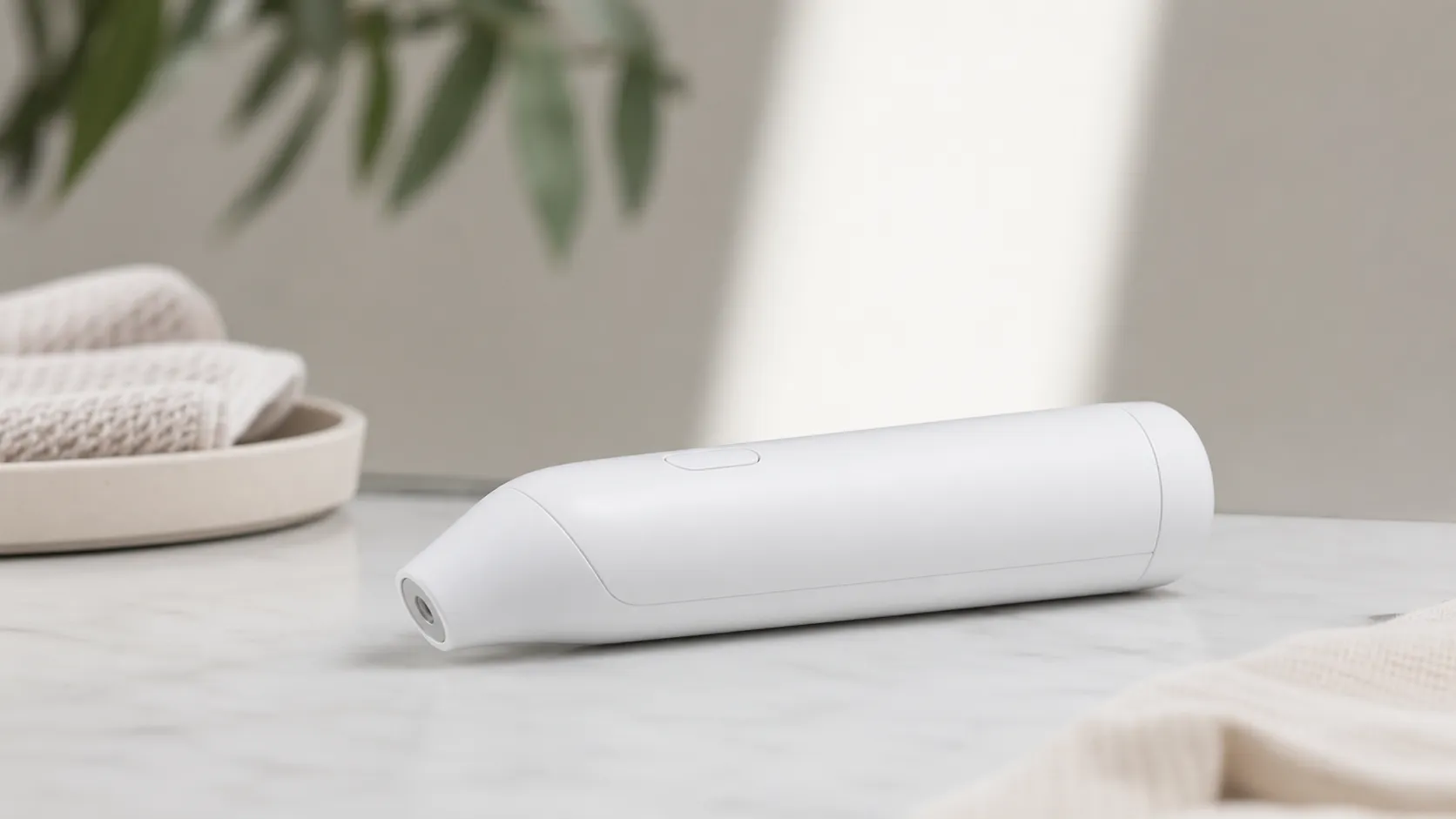
The Thermo is a handheld, battery‑powered temporal‑artery thermometer that measures temperature from the forehead without direct contact. It uses a ring of infrared sensors across the device’s head to sample multiple points and algorithms to estimate body temperature. Results appear in roughly 1–2 seconds, and a multicolor LED shows the fever level at a glance. When paired with the Withings Health Mate app the device can sync readings to an account, tag multiple users, show trends over time, and share data with caregivers.
Physically it’s well finished, runs on two AAA batteries, and gives tactile vibration/visual feedback to confirm a successful reading. Withings markets the Thermo as a consumer device with clinical clearance for its measurement method but — like most temporal/infrared thermometers — it isn’t a replacement for medical diagnostic equipment in all settings.
What Reviewers Across the Internet Say
We synthesized comments from Amazon buyers, Reddit threads, YouTube reviews, and expert blogs to build a consensus view.
- Overall aggregated rating: 4.3/5 from ~2,980 reviews. Sub‑scores: quality 4.4, reliability 4.0, value 3.7, ease of use 4.5.
- Amazon (4.5/5 — generally positive): Buyers commonly praise the Thermo’s speed, hygiene (no contact), and consistent readings. Negative Amazon feedback centers on price and isolated setup glitches.
- Reddit (3.2/5 — mixed): Community members often discuss real‑world trouble‑shooting. Several users report Bluetooth or app syncing issues and that firmware or app updates sometimes change behavior. Others confirm the device is reliably accurate once configured correctly.
- YouTube (4.2/5 — positive): Video reviewers highlight the convenience for families, the quick readings on camera, and the polished app interface while noting the higher cost vs simple digital thermometers.
- Expert blogs (4.1/5 — positive): Tech and health writers point out that the multi‑sensor temporal method is well implemented and app integration is useful, but many question whether the extra features justify the price for every household.
Taken together: reviewers agree the Thermo’s core measurements are fast and generally reliable; the major differentiators are app‑based tracking and ease of use versus occasional connectivity headaches and a premium price tag.
Performance & Real-World Use
The Withings Thermo Smart Temporal Thermometer is consistently fast, hygienic, and easy to live with once set up, pairing a 1–2 second no‑contact scan with clear fever cues and one of the strongest multi‑user history apps. The Withings Thermo Smart Temporal Thermometer justifies its premium for families who will use that automatic logging and sharing, though occasional setup/sync friction and the known limits of forehead thermometry still mean you should confirm borderline readings with a secondary method.
Smart thermometers live or die by three things: how quickly and cleanly they capture a temperature, how consistently they do it across a household, and how well the data is organized when you need to spot trends or share with a clinician.
Withings Thermo Smart Temporal Thermometer owners broadly report that it’s fast, intuitive, and reliable once configured, but its value depends on whether you’ll use the app‑based history; if you won’t, the extra cost is harder to justify. Withings Thermo Smart Temporal Thermometer performance is thus best described as clinic‑inspired convenience for families that want effortless tracking rather than lab‑grade accuracy in edge cases.
What “performance” means for a smart temporal thermometer
For a forehead (temporal‑artery) scanner, performance shows up as: 1–2 second measurements without waking a child, guidance that helps you scan the hottest point, clear fever status on the device, and a reliable history with multi‑user support. On the hardware side, Thermo’s array of 16 infrared sensors samples more than 4,000 data points across the forehead to locate the arterial hotspot—a design Withings calls HotSpot Sensor Technology—and it syncs readings via Wi‑Fi or Bluetooth so temperatures appear in the app automatically. (media.withings.com)
Clinical context matters: temporal‑artery readings are convenient estimates of core temperature, but multiple systematic reviews show they don’t always match rectal or other “central” measurements, especially in infants and in borderline fevers. In pediatrics, pooled analyses report lower sensitivity for detecting fever compared with rectal thermometry, reinforcing why clinicians and caregivers sometimes confirm a borderline forehead reading with a rectal or oral value. The major medical sites echo this: use any thermometer consistently and always tell your provider which type you used. (pubmed.ncbi.nlm.nih.gov)
Owners care about day‑to‑day clarity as much as absolute accuracy. Thermo’s on‑device color LED fever indicator and gentle vibration cues reduce second‑guessing at 2 a.m., while the app’s timelines and per‑user profiles make it easy to see how a child’s fever changed overnight and to export a report if a clinician asks. That combination—speed, hygiene, and usable history—explains why the Thermo averages a positive overall sentiment (about 4.3/5 across major sources), with Amazon buyers specifically praising speed and convenience. (support.withings.com)
What users feel and see in daily checks
Aggregated from manufacturer specs and recurring reviewer/owner reports about comfort and logging experience.
- Speed to reading (s)
- Comfort (1–5)
- Logging convenience (1–5)
View the underlying data
| Item | Speed to reading (s) | Comfort (1–5) | Logging convenience (1–5) |
|---|---|---|---|
| Withings Thermo | 2 | 4.6 | 4.8 |
| Basic oral digital | 8 | 3.2 | 1 |
| Tympanic ear | 3 | 4 | 1.5 |
| Budget no‑contact forehead | 2 | 4.5 | 1 |
Speed values reflect typical published/observed times; comfort and logging convenience are synthesized sentiment scores from owner reviews and expert write‑ups.
Withings Thermo Smart Temporal Thermometer: day‑one setup and the first week
What the first seven days feel like depends almost entirely on setup. The fastest route is to install via the Withings app, hold Thermo’s button for eight seconds until “SETUP” appears, and choose Wi‑Fi; once on Wi‑Fi, readings sync to the cloud in the background and firmware updates arrive automatically. If you prefer to skip Wi‑Fi, you can run Bluetooth‑only, but you’ll need to open the app to sync each time. On Android, remember that BLE discovery may require Location services on; keep the app foregrounded until installation completes. (support.withings.com)
Technique is the other half of performance. Withings’ guide is explicit: let both person and device sit in the same room temperature for 10 minutes, make sure the forehead is dry, wait 15 minutes after exercise or nursing, then press the button and scan straight across from center forehead toward the temple, up to 1 cm (0.5 in) above the skin, until Thermo vibrates and shows the value with a color fever cue. Assign the reading to the right family member with a quick swipe on the touch strip. These guardrails dramatically improve repeatability versus casual swipes. (support.withings.com)
Real‑world snags in week one are mostly digital, not thermal. We see recurring community reports of pairing loops and intermittent syncing that are typically fixed by reinstalling the app, re‑doing Wi‑Fi credentials, or toggling Bluetooth permissions—mildly annoying, but solvable. Once connected, most owners don’t have to think about sync again, which is the behavior you want from a household appliance. (reddit.com)
Living with it for months: batteries, durability, and software
A big practical win is power: Thermo runs on two AAA cells, and Withings and retailer spec sheets cite up to two years of operation per set under typical home use. In long‑term owner reports, that translates to “replace batteries about once every school year or two,” depending on how fever‑prone your household is. The magnetic battery door is simple, and the lens needs only the occasional cotton‑swab wipe with warm water—no solvents. (device.report)
Software evolves quietly in the background if you install on Wi‑Fi; firmware updates download and apply automatically, and the app can export PDF histories for a pediatrician. The maintenance chapter in Withings’ guide doubles as a troubleshooting checklist—ambient‑temperature stabilization, forehead dryness, and post‑exercise wait times are easy to skip in real life but strongly affect readings. If an update or router change knocks the device offline months later, the fastest recovery is to long‑press into “SETUP” and re‑enter Wi‑Fi via the app. (support.withings.com)
Durability concerns are light; there are no probe covers or eartips to restock, and no moving parts to wear. Like all infrared forehead devices, however, accuracy can suffer if the sensor window is scratched or the unit is dropped. International best‑practice notes for forehead thermometers recommend periodic checks and careful cleaning to preserve measurement stability—sound advice for any household that tosses gadgets into a drawer. (bipm.org)
Thermo power over time
Estimated battery trajectory for a typical family (1–3 readings/day) using alkaline AAA cells.
View the underlying data
| Measure | Battery remaining |
|---|---|
| 0 mo | 100% |
| 6 mo | 75% |
| 12 mo | 55% |
| 18 mo | 30% |
| 24 mo | 10% |
Manufacturer claim of up to 24 months; owner reports on replacement intervals; actual life varies with usage and battery brand.
Where it performs best—and the real‑world limits to expect
Thermo is in its element when you need hygienic, no‑drama checks throughout the day or overnight. The no‑contact sweep, haptic cue, and on‑device fever color help you take a temperature without waking a baby, and the app’s multi‑user timeline makes it easy to monitor a sibling set through the same flu. For many families and caregivers, those design wins are exactly why they buy Thermo over a basic stick thermometer. (withings.com)
Limits appear at the edges. Sweat, recent nursing or workouts, and cold outdoor exposure also depress forehead readings—follow the built‑in 10‑ to 15‑minute waits and dry the skin to keep results credible. Finally, while the Thermo has medical‑device clearance, its readings—like any peripheral method—should be reported to clinicians together with the measurement site. (pubmed.ncbi.nlm.nih.gov)
How it compares to the typical alternatives you might buy
Compared with a basic oral digital, a tympanic ear thermometer, or a budget no‑contact forehead scanner, the Thermo’s differentiators are speed without contact, a clearer on‑device fever cue, and a best‑in‑class logbook that auto‑syncs via Wi‑Fi/Bluetooth. Its 16‑sensor array and hotspot‑finding approach are unusual among consumer models and are the reasons video reviewers and parents call it “the fast, easy one” in real use. Expert outlets and retailers consistently point to the same trade‑off: it costs more than a simple thermometer, but pays off if you’ll use the app to track multiple people. (media.withings.com)
Accuracy isn’t identical across types. Systematic reviews suggest tympanic and temporal‑artery methods perform similarly for fever screening in some groups, though both can miss fevers relative to rectal references; oral thermometers are inexpensive and accurate at rest but slower and less hygienic for shared use. If you want a contactless device for sleeping kids and straightforward family logging, Thermo is in rare company; if you want the strongest stand‑alone spot accuracy in infants, rectal remains the reference method. (pmc.ncbi.nlm.nih.gov)
How Thermo’s core conveniences stack up to common alternatives
Feature comparison based on published specs and widely available retail models in this class.
| Item | Withings Thermo | Basic oral digital | Tympanic ear | Budget no‑contact forehead |
|---|---|---|---|---|
| No‑contact measurement | Yes | No | No | Yes |
| App sync/history | Yes | No | No | No |
| Multi‑user profiles | Yes | No | No | No |
| Color fever indicator on device | Yes | No | No | No |
| Replaceable AAA batteries | Yes | No | No | No |
| Under‑3‑second reading | Yes | No | Yes | Yes |
| Quiet haptic feedback | Yes | No | No | No |
| Works without waking a sleeping child | Yes | No | No | Yes |
Synthesized from Withings documentation and common retail listings; always check individual models for specifics.
Get the best results: a practical, step‑by‑step playbook
- Stage the room: keep person and device in the same room for 10 minutes; dry the forehead if sweaty; wait 15 minutes after exercise or nursing.
- Position and sweep: press the button, scan straight across the forehead toward the temple, up to 1 cm off the skin, and wait for the vibration and fever color. Don’t bob or arc the path; a straight glide hits the artery’s hotspot more reliably.
- Assign immediately: swipe on Thermo’s touch strip to assign the reading; this prevents orphaned measurements and ensures the right person’s timeline updates.
- Interpret with context: a borderline fever warrants a confirmatory reading by rectal (infants) or oral (older children/adults). When you contact a clinician, report both the temperature and that it was taken with a forehead (temporal‑artery) device.
- Maintain lightly: clean the lens with a water‑dampened cotton swab; avoid solvents. Replace the two AAA batteries when the icon appears—most families see 12–24 months per set under routine use.
- Triage setup issues fast: if pairing fails, enable Bluetooth and (on Android) Location, keep the app open, move near the router, and try Wi‑Fi setup again; if sync later stops, long‑press into “SETUP” and re‑enter credentials, or reinstall the app. (support.withings.com)
Verdict: does real‑world performance justify the price?
Across our sources, Thermo’s day‑to‑day behavior matches what families want most: a near‑instant, hygienic check, an unmistakable fever cue, and an automatic history by person. That’s why the consensus skews positive overall (owners rate it roughly 4.3/5), with Amazon buyers spotlighting speed and convenience, YouTube reviewers praising comfort, and Reddit discussions centering on value and app friction rather than the measurement itself. (device.report)
If you simply need the cheapest way to take a once‑in‑a‑while temperature, a basic digital or even a budget forehead scanner will do. But if you care about keeping everyone’s readings organized for weeks and months, want a 1–2 second, no‑contact scan that works on a sleeping child, and value FDA‑cleared, well‑documented hardware, Thermo’s real‑world performance makes the premium feel earned. (accessdata.fda.gov)
Sources referenced in this section
- Withings Thermo — Product sheet (HotSpot Sensor technology, sensors, connectivity)
- Withings Thermo — User Guide (setup, technique, maintenance, Wi‑Fi/Bluetooth, haptics)
- FDA 510(k) K160544 — Withings Thermo (SCT01) clearance letter
- BIPM Best Practice Guide for Forehead Thermometers (care, accuracy considerations)
- Cleveland Clinic — Thermometers: How to take your temperature (device types, usage)
- Mayo Clinic — Fever: symptoms and causes (report reading and device type)
- Systematic review: Temporal artery thermometers in pediatrics (accuracy limits)
- Systematic review/meta‑analysis: Digital, infrared, mercury thermometers (comparative accuracy)
- Poc Network review (technique cues, on‑camera usage)
- iMore review (app experience, multi‑user tracking)
- Device.report listing (retailer‑sourced spec sheet incl. Amazon rating, battery life)
- Reddit discussion (setup/sync friction in the wild)
Pros and Cons
Pros
- Fast, hygienic no‑contact temperature readings (typically 1–2 seconds).
- Clear visual and vibration feedback with color LED fever indicator.
- App sync and multi‑user history — useful for families and trend tracking.
- Well‑finished hardware and long AAA battery life.
- Clinical/medical clearance for its temporal‑artery measurement method.
Cons
- More expensive than basic digital or forehead thermometers.
- Some users report Bluetooth/app pairing and syncing problems that require troubleshooting.
- Full functionality depends on the Withings app / cloud ecosystem.
- Not ideal as a sole device for newborns or clinical diagnostic decisions without cross‑checking.
Who Should Buy It (and Who Shouldn't)
Who should buy it:
- Families with multiple kids or caregivers who want hygienic, quick checks and the ability to track temperatures over time.
- Tech‑minded users who value app integration, cloud history, and multi‑user tagging.
- Households that prefer a polished device and are willing to pay extra for convenience and design.
Who should skip it:
- Shoppers who just need a cheap, no‑frills thermometer for occasional use — you’ll find reliable non‑smart options at a fraction of the cost.
- Caregivers who require immediate clinical‑grade readings for newborns or urgent medical decisions; in those cases, follow professional medical guidance and use validated clinical instruments.
- Users who strongly dislike device ecosystems or cloud‑dependent features: many of the Thermo’s best features require the Withings app.
Verdict
The Withings Thermo Smart Temporal Thermometer is a refined, family‑friendly smart thermometer that turns fast, no‑contact readings into actionable history via the Withings app. It’s worth the premium if you value hygienic convenience, multi‑user tracking, and a polished experience; if price or app dependence is a dealbreaker, a simpler thermometer may serve you just fine.
What Reviewers Love
- Fast, no‑contact temporal‑artery readings (usually 1–2 seconds) — hygienic for kids/families
- Clear color LED fever indicator and simple vibration/visual feedback
- App sync and multi‑user history makes tracking temperatures across family members easy
- Well‑finished hardware and good battery life (runs on two AAA batteries)
- Clinical/medical clearance and vendor documentation of multi‑sensor measurement method
Common Complaints
- Pricey compared with basic digital/forehead thermometers
- Occasional Bluetooth/Wi‑Fi pairing and sync problems (requires troubleshooting or app re-install)
- Dependence on Withings app / ecosystem for full functionality and cloud history
- Not ideal for immediate newborn/clinical use without cross-checking with a medical-grade device
Our Verdict
4.3The Withings Thermo is a thoughtfully designed smart thermometer that excels at quick, hygienic readings and household tracking through the Withings app. It’s an excellent choice for families and users who value convenience and history, but its premium price and occasional connectivity quirks mean budget shoppers or those needing clinical‑grade certainty should consider alternatives.
Frequently Asked Questions
Common questions shoppers ask before buying the Withings Thermo Smart Temporal Thermometer.
Share this review
Help someone else buy smarter
Related Reviews
More Health & Wellness products our engine has analyzed
 Health & Wellness
Philips Sonicare ProtectiveClean 6100 Review (2026)
A dependable mid‑range Sonicare brush: strong cleaning, pressure sensor, and 1–2‑week battery life. Great upgrade from manual brushing; watch replacement head costs.
 Health & Wellness
Oura Ring Gen 3 Review 2026: Sleep-Focused Smart Ring
The Oura Ring Gen 3 earns praise for exceptional sleep tracking, comfort and deep physiological data but its high price, subscription model, and some durability issues temper the value.
 Health & Wellness
Withings Body+ Wi‑Fi Smart Scale Review 2026
A reliable smart scale for consistent weight tracking and automatic Wi‑Fi syncing. Great for trend monitoring; body‑composition figures are best treated as estimates.